I fell in love with my first set of Microsoft ergonomic keyboard and mice three years ago. It wasn’t love at first sight but it was lasting love. In fact it was only last month when we had to part ways because I had worn down the rubber surface on the mouse so much it was entirely eroded and no longer usable.
Ever since I’ve been searching for a fitting replacement. I was almost tempted to purchase the same set again but was put off by the now out-of-date aesthetics. Apparently I wasn’t the only one with that thought since the Microsoft Hardware designers appears to have tailored the product refresh cycle exactly for the product lifecycle.
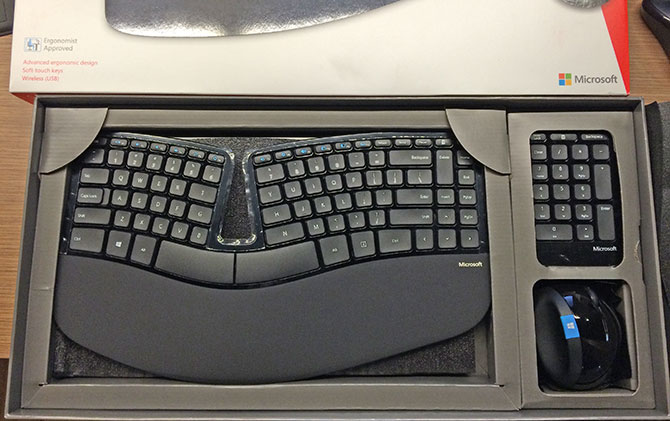
I’ve had a chance to use the Microsoft Sculpt Ergonomic Desktop for a good week now – doing serious coding, typing and Photoshopping, and the keyboard and mice have a lot more to offer than just good look. Even above and beyond their predecessors, it’s better in almost every manner.
Keyboard
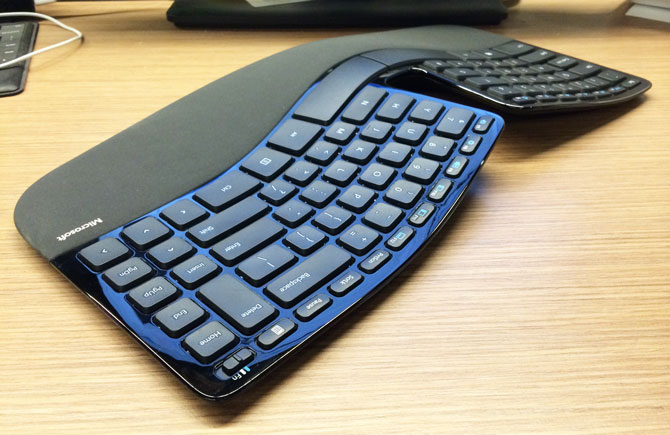
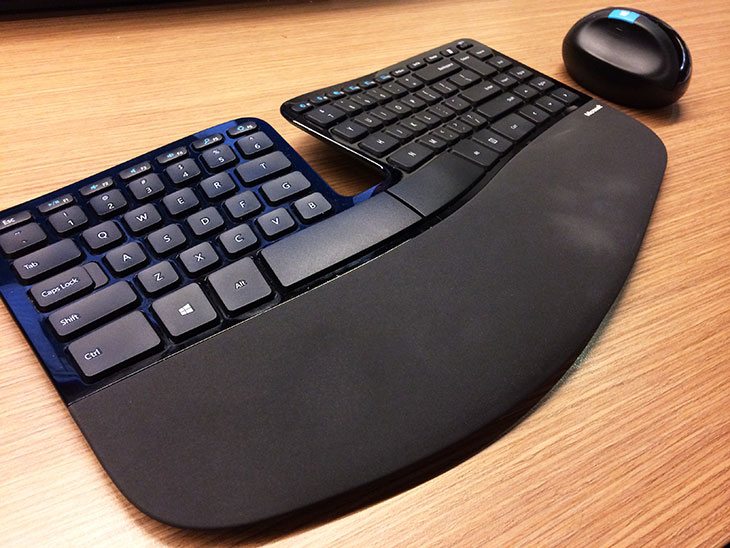
The keyboard is no doubt the first thing to grab your attention. If the curve of the previous Microsoft ergonomic keyboard wasn’t enough just as a functional feature of the product, it has now been accentuated to become an uncanny design feature as well. Although it screams a little bit “look at we can do with plastic”, it doesn’t have any impact on the usability of the keyboard.
The more practical changes to the keyboard are the split spacebar, shorter key travel, media buttons and “inline” caret navigation keys (page up, page down, arrows).
For better or worse, the split spacebar of this keyboard is not the combined backspace and spacebar of other Microsoft keyboards recently introduced. This particular split just means you can press the spacebar with less pressure which my thumb welcomes.
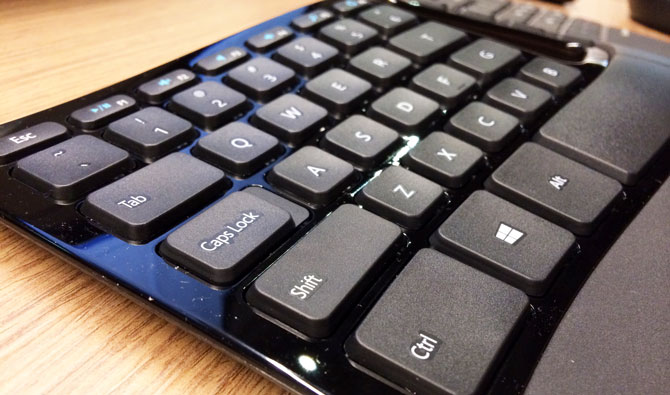
Personally, I’m a big fan of short travel keys as found on most modern laptops and this keyboard strikes a good balance between travel and ergonomics. Even though the keys are nowhere as short as the ones on Apple laptops, it has the responsive and “tappy” feel of the MacBook Air’s keyboard which I thoroughly enjoy. It makes typing feel “light”, which it should be.
Even though this ergonomic keyboard has the same variable-width keys as Microsoft’s previous ergonomics, this is still a keyboard with a high learning curve. But of course, it pays off, big time. It took about 2 days to switch from a standard keyboard to reclaim the same typing speed and error rate.
The designers of this keyboard clearly tried very hard to make this a “compact” keyboard by reducing both the width and height of the keyboard. Both of these are actually most of my frustrations to-date.
The first has to do with the caret navigation buttons (insert, delete, home, end, page up/down, arrows) which is now merged with the rest of the standard character and control keys on the right side of the keyboard. Without any physical spacing or gaps, this makes muscle memory extremely difficult.
To make matters worse, the right “CTRL” key is actually narrower than the “SHIFT” key which breaks the vertical alignment. (See one of the top photos for example)
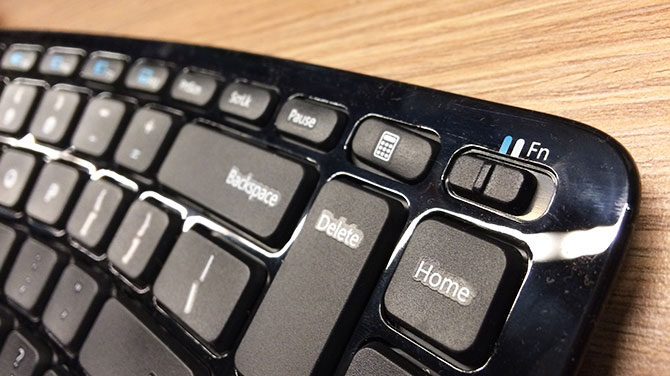
The other, the media keys, is a hybrid of the function keys (F1-F12). Although this practice is quite common and not too much of an issue, however this keyboard doesn’t actually have an FN button. Instead, it’s a physical toggle switch, on the far top right corner.
Whilst I appreciate the simplicity of not having to press a button combination for changing or muting the volume, for professional users who frequently uses both volume and function keys, the toggle is a nightmare. It’s impossible to remember what the toggle is set to and it forces the hand to leave the normal resting position to switch.
The only redeeming factor of the compact factor is the separate but included wireless numpad. It’s always convinient to type lots of numbers on the numpad and I keep mine relatively close. And since it reduces considerable space from the right of the keyboard, the mouse is that much closer.
Mouse
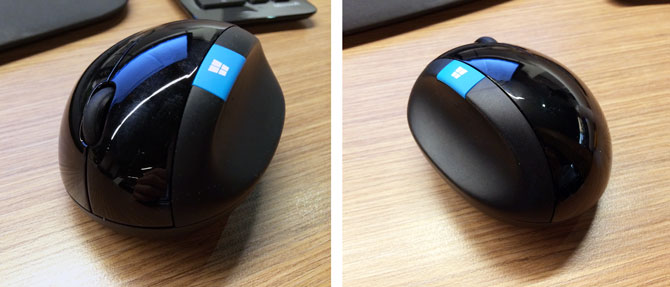
Speaking of the mouse, I firmly believe the mouse is the real star of this package. This may be the best computer mouse I’ve ever used.
The shape might be daunting to anyone to who has never used an ergonomic mouse before but as soon as you put your hand on it, it instantly feels like your hand is resting. While I don’t think shape, angle and weight of this mouse has changed much from the very comfortable Natural Ergonomic Mouse 7000, the tracking, materials and scroll wheel are much improved.
Like a big pebble you just want to hold, this mouse captures most people’s attention and it looks remarkably elegant on a clean desk. Because it’s a BlueTrack sensor, it works better on more surfaces than your traditional sensor or laser.
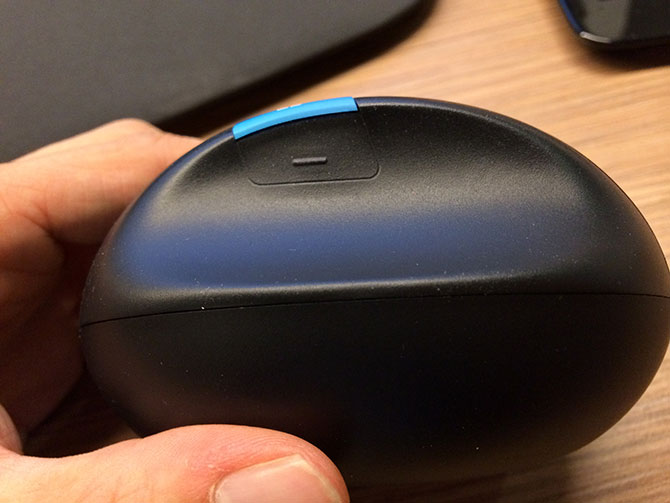
The rubber material on the thumb grip is a vastly improved over the previous generation’s “gel-like” fitting. Not only does it feel textured, it has an ingenious semi-tactile back button built right into the grip. Admittedly at first I was a little worried it would be difficult to press, but it turns out to be an effortless click of the thumb.
Thankfully this new mouse also features a clicky scroll wheel – unlike the free scroll wheel of the past. Although Microsoft seems to have jumped between the two types for various products along the timeline, I’m a firm believer that scroll wheels should be tactile, especially on Windows where scrolling is line-based (instead of pixel-based in Mac OS X).
Last but not least, the blue Windows 8 Start button. I haven’t used it once. I don’t think I ever will.
Conclusion
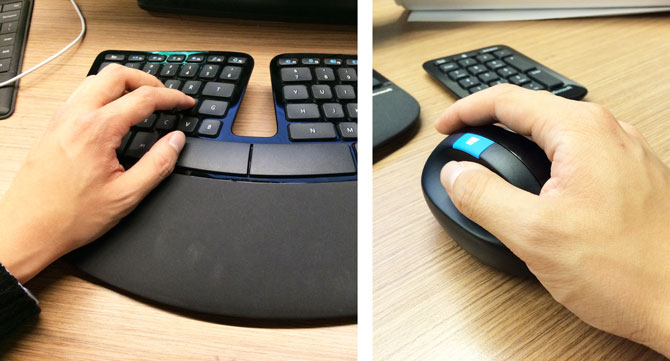
The Microsoft Sculpt Ergonomic Desktop is an impressive package. Both the keyboard and mice are extremely comfortable to use. Although I wish the keyboard didn’t have some of its quirks, this will be my keyboard and mouse of choice for the office.
For any owners of an aging Microsoft Natural Ergonomic Desktop 7000 and have been looking for the upgrade, well this is clearly it. And for anyone else has been tempted by ergonomic keyboards if for nothing but the comfort alone, then this is a product you can’t look past.
The Microsoft Sculpt Ergonomic Desktop retails in Australia at AUD$129.95 and is listed to be avilable in retailers from this month (October 2013). The mouse is available on its own for AUD$59.95.