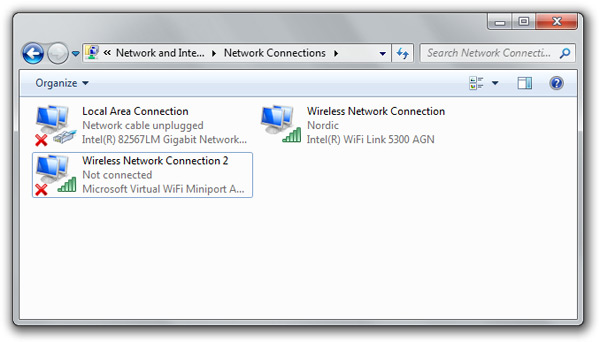
If you have a reasonably new laptop with an Intel WiFi chipset then I have some good news. A set of new Intel WiFi drivers made available just a couple weeks ago, version 13.0.0.107 if you’re playing along, finally adds the necessary driver-level support for the new native Virtual WiFi technology in Windows 7.
After downloading and installing the drivers (32-bit here, 64-bit here), assuming your WiFi chipset supports the functionality (which I can verify the 5300 can but 3945 cannot), a new “Wireless Network Connection” with the adapter name “Microsoft Virtual WiFi Miniport” will automatically appear in your network connections.
Recently, the internet has been abuzz with a new software called Connectify which interacts with this Windows 7 Virtual WiFi technology, but it appears their intention is to sell this application once its finalized. Personally I find it ludicrous that someone would charge for what is essential a wrapper to some functionality already baked into Windows.
To set up and use Virtual WiFi in Windows 7, without paying a buck, just follow these three simple steps:
- Open an elevated command line with administrative privileges and type
netsh wlan set hostednetwork mode=allow ssid=Test key=password
replacing the name and password with your own preference. - Start the adapter by
netsh wlan start hostednetwork - Share an existing connection to it by going to the “Properties” of a connection, selecting the “Sharing” tab and enabling ICS and choosing the corresponding Virtual WiFi adapter.
Of course this functionality isn’t that useful day-to-day, but a powerful usage scenario for this internet sharing functionality via Virtual WiFi will be when you’re at an airport or hotel which limits your connection to a single wireless adapter. Not only would this save you playing switcheroo with the hotspot, but it might also save you paying for multiple connections if you’re traveling with somebody else.
I think Connectify used the lake of easy UI for this feature as a weak point in Window. We can’t blame them for doing what Microsoft should have done to make this great feature more “Visual” other than showing a VWiFi Adapter in Connection Manager. CMD is not user friendly at all, Only IT Admins & Geeks can use it in a right way.
FYI, I posted on this on Nov 3rd on my blog:
http://lituuslimacon.blogspot.com/2009/11/connectify-you-windows-7-pc-for-free.html
But I had been using it to sync and make purchases from my Zune by connecting to my PC (HP tx2 w Realtek card) via the “hostednetwork” since a month or so.
Not asking for credit, since this is publicly accessible info from MSDN. Just an FYI.
“It might also save you paying for multiple connections if you’re traveling with somebody else.”
This is -exactly- why public hotspots will start blocking this behaviour somehow within the next six months or so, and render the feature next to useless.
@Fred: I don’t think its possible to block this behavior since everything is client-side.
Thanks for this! I’ve just got it working on my Atheros (not Intel) wireless card.
i doubt they will bother since its not setup by default
5100 supports this too.
I am just wondering How can I use virtual wifi adapter to connect another new wireless network? not just only share your internet to others
4965 doesn’t appear to work. I presume that us with 3965 and 4965 chipsets are out of luck, even though these are fairly recent chipsets. It’s a shame that cheaper third party chipsets can support this functionality yet these apparently can’t. I wonder if it really is a lack of a hardware feature or if it’s simply a choice by Intel not to allow it to happen.
seeing as hp just bought 3com i could see them making use of this.
dell i’m sure got this working seeing as they work closly with hardware manufactures
Is it possible to set this up without a wifi key?
if you mean encription key yes its probably the same as windows vista adhoc ics
I do mean encryption, I was wondering if it was possible to set it up without encryption. If I set the password to nothing (or “”) the network still shows WPA encryption… Is it possible to have an open network, and create a WiFi hotspot?
well with adhoc usually it can be no encryption or wep
also it looks like its the same issue that connectify did
I’ve been trying to use this function for a few days to connect my Nintendo DS Lite to
the internet without having to drop my home router connection to unsecured or, god forbid, WEP…
Unfortunately, even when i don’t enter a passkey, the darn device won’t pick up the new network…
I haven’t attempted to connect to the network via another laptop yet, just wondering if I might have done anything wrong, i shared the connection from my main card, but not ALL ICS services are enabled…should they be?
Also, do i need to enable an ad-hoc network for any of this to work, or should this work as soon as i finish the command entry?
If it should work as is, should the network show if i simply browse for it from another device?
And is the network always WPA encrypted?
I’ve managed every step of this so far except for connecting to the network via another device.
i a magine that all required services should be enabled but with some pc manufactures they somehow destroy these types of things
you shouldnt have to setup ad hoc but id try to just use ad hoc with ics connectivity 1st & see if it works
if it works & you did it to the letter then the ssid is test key & the wpa code is password
& do you know for sure all devices have client wpa? dsi for example has wpa in its dsi ware apps but not in the ds cards. for them wep encoded into almost the entire ds library
that has wfc options
I cant enable my Microsoft Virtual WiFi Mainport Adapter. It says Disablet whatever I do. I tried ConnectiFy once and worked fine. Then day or two after It says it cant find the WiFi adapter. What might be the problem?
In your scenario after “netsh wlan start hostednetwork” I get:
The hosted network couldn’t be started.
The group or resource is not in the correct state to perform the requested opera
tion.
If you are receiving that kind of message. you can update the driver/s of the wireless card of your computer. Follow the instructions below to try resolve the problem.
1. Access ‘Network and Sharing Center’ and click on ‘Change Adapter Settings’ on the left hand side of the window.
It will typically show all the available network connection on your computer.
You should see ‘Wireless Network Connection’ and ‘Wireless Network Connection 2’
2. Right-Click on ‘Wireless Network Connection’ and click on Properties. If you see any message, just click on ‘YES
3. On the properties windows, click on ‘Configure’ button. And it will show you the ‘network adapter properties’.
4. Click on the ‘Driver’ and click on ‘Update Driver’. A pop-up windows will appear which is the Update Driver screen.
5. Select ‘ Search Automatically for Updated Driver Software’ . Note: you need to be connected to the internet
6. Wait for the update to finish.
7. After it completed the SoftwarUpdate just close all the window by clicking on the ‘OK’ button on each window.
8. Right-Click on ‘Wireless Connection 2’ which has a Microsoft Virtual WIFI Miniport indicated below it. And click on Properties.
9. Follow the same steps again(step 3-7).
10.Open the Command Prompt again and type – in ‘netsh wlan start hostednetwork’ and that you successfully activate your virtual WIFI.
To share your computer internet connection to the virtual WIFI.
1. Go to ‘Network and Sharing Center’ again
2. Access again ‘Network and Sharing Center’ and click on ‘Change Adapter Settings’ on the left hand side of the window.
Now, Note that the internet connection depends on how your computer is connected to the internet or how your computer is getting internet…example: LAN (thru cable), USB Modem, WIFI.
So for example, my computer is connected thru cable or Local Area Connection.
3. Right-Click on ‘Local Area Connection’ and then select ‘properties’. If you see any message, just click ‘YES’
4. On the properties screen, click on ‘Sharing’ tab.
5.Select ‘ Allow other network users to connect through this ccmputer’s internet connection.
(Just in case that you have a drop-down option, select ‘special hosted
6. And click ‘OK’
7. Wait for about 3-4 mins for all changes to take effect.
After finishing all the steps, you should be able now to share the internet connection of your computer to any wireless enabled devices.
Hope this instruction will work for you.
Still I am receiving the error.Is there a virtual wifi compatable adatper available for Intel(R) PRO/Wireless 3945ABG Network Connection.
i dond have “microsoft virtual wifi minipor adapter”… how to create it
I tried it and It shows that the driver software for my wlan device is up to date and there is no Microsoft Virtual WiFi Mainport Adapter
Same happened with me. When I contacted my HP Care they told me that Realtek Network Adapters don’t support hosting.
Thanks for writing about Connectify. We thought you may want to know that Connectify 1.0 is now available for free as the first production ready release. Some older wireless cards do not yet have full Windows 7 support, and for those devices Connectify will act as an Ad Hoc connection manager, instead of a full blown Wi-Fi Access Point.
Changes since Beta 4 include:
• Improved Notification tray icons (including a warning icon if the selected Internet connection is not currently working)
• Support for even more wireless cards and configurations
• Improved memory and CPU management
• Recover from sleep/hibernate
• Support for machines where multiple users install Connectify and log on at same time
• Ability to remove clients from the Client History list (right click to get menu)
• Auto-hiding of the Mode box. By default we hide the “Mode” box to choose between AP or Ad Hoc mode. If your wireless card supports both, then we default to Access Point mode. To keep the mode box visible, there is an option on the Option menu (right click on the Connectify logo to show the menu).
Thank you again for your support.
Forget Connectify I just setup this on my win7 lap top.
Intel® My WiFi Technology
http://www.intel.com/network/connectivity/products/wireless/mywifi.htm
i would try connectify on my laptop but my wifi mini card isnt being seen guess its the motherboard acting up again time to take it back to the retailer’s repair shop before extended warrenty runs out
Hello,
as it seems even the lastest driver 13.0.0.107 do not support 4965AGN and Virtual Wifi. Does anybody know, if that is hardware related or if there is a chance that there will support in a future driver release.
Best regards
–toshidude
could someone please tell me why my win7 64bit gets the BSOD every time i try this? i would really lilke to try it out i have a qcore 6g ram win 7 64bit Atheros AR5006GS wifi adapter.
At the moment i have my network hardwired so i am not using the wifi adapter
cheers phil
i doubt this feature will be blocked considering mac/linux have it. my now deceased laptop had support for this & it came out during the vista launch. xp had this thru a ms research project.
Update pc back from the shop working good but not worth activating 7 on it. guess it will just have to settle with vista/xp
I managed to get this to work so far as to even connecting my iPod touch and surfing the web with it. However, my Nintendo DS still gives me an error code 52000 meaning it cannot assign an IP address. I tried messing around with the manual IP config on the DS, but then I just get an error code 52100. I’m pretty frustrated right now because it took me a long time to get the Intel My Wifi to work, and the main reason why I did it (for my DS) still does not work. If anyone can help, please do so.
it could be that its using wpa instead of wep? so that could be why its not working with ds. i had problems with datel wifi max when vista came out. mainly becasue they dont have a proper ui.
it could be a bad windows 7 install?
there is a adhoc ics style option in connectify but its hidden. you have to right click the icon in the tray
i had a look @ the documentation for virtual wifi(now named wireless hosted network or WHN) & it says WPA2-PSK/AES is a requirement for wireless pan/soft ap mode & for dns resaloution to work you have to set it to home/work not public. but you can use the gui frendly ics to do a wep connection.
http://msdn.microsoft.com/en-us/library/dd815243(VS.85).aspx
Nice
thanks for giving this link ……..
Im gutted to have found out Virtual WiFi is not support by the Intel Pro wireless 4965AGN card. Really hoping this will be implemented in the next driver update from Intel, or is this a hardware problem and not software related?
using wifi..i can blog all the way…
Will this work to connect my Wifi enabled mobile phone?
I tried it, everything looks fine… even my phone connect with the connection, but it still unable to browse the internet. I have shared the internet and the the connection has a text – “Internet access”.
is it a possiblity that you dont have a compatible wifi adapter?
tried this with vail woulnt install
after “netsh wlan start hostednetwork” ! everything was okay but when i connected it showed ” invalid server name ” is there any solution for this?
i’m not able to use connectify or virtual wifi with my intel wireless 3945ABG in laptop. can any1 help me out how can i make it possible to use windows 7 as virtual router? any supported software for this?
regards
shabs!!
same problem here.. need help !
thanks
help! just set this up on a friends compaq presario cq62 to connect my android phone to his internet and all good – got connected but the new virtual wifi connection shows no internet acess under network connections – what to do?
Help! I’m using the Intel 3945ABG Wireless adapter with the latest driver (13.0.0.107). When i type the phrase “netsh wlan set hostednetwork mode=allow ssid=Test key=password ” everything seems to be cool, but no Virtual Wifi adapter appears in the device-manager. And no second wireless network adapter appears in the networksettings. When ih try to start the virtual wifi by typing “netsh wlan start hostednetwork” the dos-prompt says that the network could not be started.
Any ideas to solve that problem?
I have the same problem Winnie!
Pl help !!! i try to download but when is opening new page she sad this programm cannot run in DOS mode…what is mean…
I downloaded the 32-bit driver and entered the commands, but it’s telling me that “The hosted network couldn’t be started. A device attached to the system is not functioning.” I have Dell Inspiron 1545 laptop with Windows 7 Ultimate and tried to set up wireless hotspot and it told me that I do not have sufficient priveleges to start this wireless network.
I have wireless device called NOOK Color that requires a wifi hotspot and downloaded Connectify and got this message that the signal was too weak and “not in range”…
I am stymied for now.
Does Intel PRO/Wireless 3945BG support this functionality ?
Does Intel PRO/Wireless 3945BG support this functionality ?
I have the same problem Winnie!
haha.. me too
when i give this command “netsh wlan start hostednetwork” they say “The hosted network couldn’t be started. A device attached to the system is not functioning”. i am using win 7 ultimate 32 bit on a dell vostro laptop. i have updated the drivers… but no luck…
Mushfiq, what WiFi device does your Dell Vostro laptop have? You will need to ensure your WiFi device (and its driver) supports this?
My Nintendo DSi is able to connect to WPA networks but for some reason it can’t get an IP to connect, what can I do?
Sir,
I use dialup modem to connect to internet on my laptop and i want too use it as a wi-fi hotspot for my netbook and mobile phones. i proceeded as above and my cell phone detected the hotspot too, but was unable to use internet as on my PC, on mouse hover, it said no internet access.
please help me out
i am using win 7 ultimate .32 bit and network card is Atheros AR9285 Wireless network adapter
I’ve the same problem with Rishabh… could anyone help??
The “hosted network couldn’t be started” problem was fixed when I uninstalled ZoneAlarm.
Just saying.
nice……………………
here is my problem i m sending you snapshot of it… plz solve it. i did every thing but still there is problem.
https://fbcdn-sphotos-a.akamaihd.net/hphotos-ak-ash3/581285_384200484949209_100000777818713_908482_1107198905_n.jpg
Can somebody tell me how to use this virtual wifi to connect to multiple wireless connections simultaneously, not just sharing the internet please. If it does not work that way, is there another software which does that?????
I think i have an exact problem with Winnie. Somebody please help out here.
intel now has their own app to do this in w7 its called My WiFi Dashboard & the wifi antennas supported are:
Intel® Centrino® Advanced-N + WiMAX 6250
Intel® Centrino® Advanced-N 6200
Intel® Centrino® Advanced-N 6205
Intel® Centrino® Advanced-N 6205 For Desktop
Intel® Centrino® Advanced-N 6230
Intel® Centrino® Advanced-N 6235
Intel® Centrino® Ultimate-N 6300
Intel® Centrino® Wireless-N + WiMAX 6150
Intel® Centrino® Wireless-N 100
Intel® Centrino® Wireless-N 1000
Intel® Centrino® Wireless-N 1030
Intel® Centrino® Wireless-N 105
Intel® Centrino® Wireless-N 130
Intel® Centrino® Wireless-N 135
Intel® Centrino® Wireless-N 2200
Intel® Centrino® Wireless-N 2200 For Desktop
Intel® Centrino® Wireless-N 2230
Intel® My WiFi Technology (Intel® MWT)
Intel® PRO/Wireless 3945ABG Network Connection
Intel® WiFi Link 1000
Intel® WiFi Link 5300 and Intel® WiFi Link 5100 products
Intel® WiMAX/WiFi Link 5350 and Intel® WiMAX/WiFi Link 5150 products
Intel® Wireless WiFi Link 4965AGN
plce make sure this device doesn’t work (Intel® PRO/Wireless 3945ABG Network Connection), Intel also said it is non-supported addapter
Thanks! It’s work fine.
32-bit here link is not aviable please give me a new link
Intel® Wireless WiFi Link 4965AGN doesn’t support from “My WiFi Dashboard” http://www.intel.com/support/notebook/sb/CS-033660.htm
for sure this device does not work, (Intel® PRO/Wireless 3945ABG Network Connection) the company itself verified it
same problem is occurring after following these steps.plz give any other solution
i am using a usb dongle as a internet i have a wifi receiver too for my desktop i just wanna to use on my android phone configuration driver also fine & get connected on my phone but i can’t browse any page on my phone what the solution?
i dont have wireless connection 2 showing ??
where can i find win 7 drivers for usb wifi 150mb dongle model nb02103
I have intel (R) wifi link 5100 AGN. When i type the scenario netsh wlan start hostednetwork it say The hotspot network couldn’t be started. The group or resource is not in the correct state to perform the requested operation.
I used connectify me before, and it was work (I use LAN before). I did delet it few days ago coz it did not work when i use it usb stick and i download connectify me 2015 just now but it does not work.
I have connected Singtel dongle to my desktop and installed the Virtual Router & also the steps as mentioned above but still I could not run this virtual router.