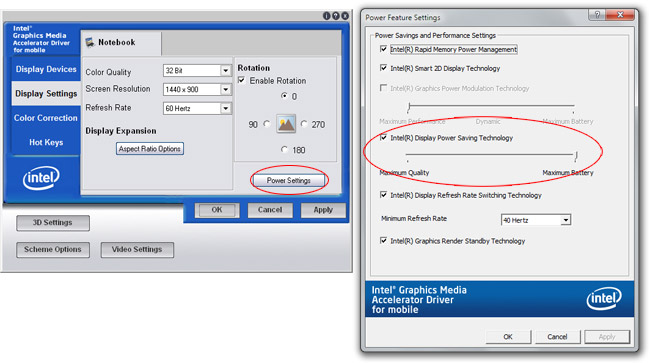
In all seriousness, for a short while, I actually thought there was something wrong with my eyes. As it turns out, “smart” power saving technology by Intel was not only fooling around with my display’s image quality, but also fooling around with my perception. If technology today can make you doubt reality, this is the closest I’ve come to it.
The mystery started this morning when I noticed on my laptop with a recent install of Windows 7 the colors weren’t quite right. The most obvious symptom was that when I started Firefox 3.5, the toolbars gradually faded in contrast over the period of about 3 seconds. Text became harder to read, pictures appeared discolored. I knew at least static colors in the UI should not change, but it didn’t stop me doubting Firefox. I started noticing similar symptoms in other applications too.

Left: Standard Firefox toolbar. Right: Simulated image of Firefox toolbar with discolored effect.
In the hour that followed, I fiddled with applications, color profiles, color calibration tools and many versions of display drivers until I almost decided to format and reinstall. Whilst the new Windows 7 color calibration tool might seem like a very appropriate tool for this problem, it was a lost cause for me since after calibration the problem crawls right back, like if it was a mutating virus.
What pushed me over the line to doubt my eyes and my color perception was the fact that two screen captures of what appeared to me as obviously two different colors matched in a image editor. Just like those optical illusions where two colors appears different turn out to be the same, you’re forced to admit an error in your own perception.
To get to the point, I was not wrong. The colors of the toolbars did change, but at the same time, they match too. The magic behind this is a feature secluded deep in the depths of the graphics settings called the “Intel Display Power Saving Technology“. It’s a power saving feature in Intel’s latest range of mobile graphics chips which is described to reduce power consumption by “altering the brightness and contrast of the display”. What it did was it dynamically tweaked with the brightness and contrast combination like a sea-saw based on what is being displayed on the screen. This was why the toolbars changed in color when I visited different sites, and why it also matched when put side-by-side.
Intel, whilst this idea is noble in cause, it deserves no right to be turned on by default and tuned to “maximum” like it was. The before and after comparison might be subtle enough, but it was enough to drive me and my eyes crazy. No power saving feature should actually distort people’s perceptions.
I’d encourage everyone using a laptop with a recent Intel graphics accelerator to disable this power saving feature. Your eyes will thank me for it.
Good point. More and more I think Intel cannot write a good graphics driver. Considering past issues with the 945, now aero glass breaking on the new atom “Z” laptops with Windows 7RC 1 in Media Player in Aero (but not in Media center) using the Intel GMA 500.
I find myself very frustrated with Intel’s graphics driver folks.. I say this because I just bought a new Acer Aspire one Z250 with the Atom Z processor. Love it so far great unit, but the driver breaks with error and crashes and resets itself anytime aero glass layers with any other surface (like windows media player) and is composited it crashes.
Intel needs to get their driver folks supporting the latest and greatest windows faster, it will make win 7 look BAD.
yep i have that same problem with the intel mobile 4 series express chip set even more i don’t even have those options
lol
Hey!
I’ve noticed this on my Inspiron 1720 as well.. Mine is more extreme (maybe because this is an older version of the driver). When the laptop switches to battery the colors fade away, and never restores itself when the power comes back on, unitll I do a restart.
LOL! This is why I don’t like “automatic” behavior wihtout my knowledge. But yea I’m still LOLing!
How exactly does this save power?
Intel writes the worst graphics drivers, poor performance, bugs and well look at that UI a complete mess. You’d think a big company like Intel could afford to hire an engineer with UI experience.
Though Intel is tight with money which probably explains why, oh and the GMA500 is not an Intel GPU it is a re-branded PowerVR SGX 535 GPU. Instead of developing the Windows driver in-house or through PowerVR Intel farmed it out to a crappy outfit called Tungsten graphics who created really crappy drivers for the GMA500 (Win & Linux) the drivers which in a bad shape with lots of users complaining about bugs and broken DXVA.
Eventually after all the mess, Intel appears to have contracted someone to work on the GMA500 drivers again and they are slowly improving.
Honestly how on earth Intel thinks its is going to make any headway into the GPU market (Larabee) with such sloppy work is beyond me.
I got this same new driver on my Vaio Z series this week, and at first I thought something was wrong with my machine.
Not because of the color problems you described, but because whenever I unplugged or plugged in my laptop, the video mode switched (with a black screen flash and some flickering). This turned out to be a new feature of that driver that will automatically switch from 60hz to 40hz when on battery power. Now maybe this will save power, and maybe it’s even worth it, but it was very jarring for me and I shut it off.
I’m just worried this will impact users’ first experiences with Windows 7, and I really hope Intel issues an update that turns these things off by default (or ties them to the Power Saver profile, which would be perfect for me).
Please help!
This is my first experience with Win7 and I’m getting the same problem. When I unplug the AC cord, I get a black screen and it changes from 60hz to 40hz, and when i plug it in the opposite happens. How do I turn this off? I have an HP dm4-1165dx, and the Intel control panel is called the Intel Graphics and Media Control Panel. Any info would help. I’ve been struggling with this for 2 weeks now, and it’s too late to take it back, besides i love the laptop. Help!
Thanks.
It’s not just Intel. I would say that poor driver (and firmware) software extends to pretty much every hardware vendor I can think of. Do they get their interns to write this stuff?
My Intel GMA X3100 drivers have been horrible but surprisingly the ones that come as part of the OS work without error. The moment I install the latest ones from Windows Update (both are WDDM 1.1) I start getting a corrupted display at times, blocky Aero animations, video tearing (yes I dunno how video tearing can occur in WDDM drivers) and my Windows Experience Index under the same hardware has dropped from 3.1 to 2.5 (which disables the cool transitions in Live Photo Gallery). The lesson to learn is make no compromise for graphics from this point on, always go for ATI or NVIDIA graphics even if you must buy integrated.
@Alex Angas:
Amen to that. Hardware companies seem to be inept at software.
Actually, make that hardware teams, not companies. Even within software companies that also make hardware (e.g. MS and Apple), the drivers for much of their hardware are awful (e.g. MS webcams and their three background processes which poll registry settings non-stop even when the camera is not in use; e.g. iTunes, which is so poorly made on Windows you could write a thick book about it).
I love Logitech’s mice & remote control hardware but they haven’t made a decent driver for them in years (or ever, with the remote controls).
Sony used to make great MP3 player hardware which was completely let down by their terrible PC-side software, to the point that it didn’t matter how good the hardware was. (Now they’ve finally ditched the software, but at the same time made the hardware worthless junk, IMO, which is a shame.)
etc. 🙁
I guess it’s a lot to ask for a company to manage to make both good hardware and good software, given how much of both is bad.
@Leo Davidson: I think the problem is that all of their quality checks are hardware-results-oriented. They probably don’t really care how much memory or CPU usage their software uses, as long as it delivers a minimum level of hardware experience, they’ll ship it.
Good points. I just wanted to tell you that this technology has been around for a long while and bugged me so much when I first got my x61 years ago with X3100 and GM965 chipset. I wonder if anyone actually experimented the power savings effect of this ridiculous technology. Personally I don’t find much difference at all.
Fascinating! I had always thought that my 3-year-old Macbook (with Windows 7 RC on it) was just overheating, or that there was some bugginess in the display driver. Indeed, the problem mysteriously seemed to go away one day after I spent hours trying different driver versions, and I imagine that I futzed with that slider without realizing what it did.
What a brain-damaged feature.
I myself have experienced this with my tablet. I too thought my eyes were playing tricks on me until I found the ridiculous setting. On a side note, that’s some pretty serious spam you got there, Long. :/ ^^^
I found a pretty decent solution to this under windows..
I basically updated to the latest driver..
then ran MSCONFIG from the command prompt
Next on the startup tab I unchecked everything that said “INTEL”. Sure enough all these power saving stuff went away and now I have an almost perfectly functional machine running the Win7 or Vista “basic” themes.. With great video performance.
This is the corruption I was talking about: http://rapidshare.com/files/259409706/Corrupt.png.html
Typical “green” technology which mostly kicks it user to ass. “Oh your eyes hurt but johny polarbear will be saved”.
The Intel Windows7 Integrated drivers are HORRIBLE… (Get the Vista Drivers – they work flawlessly.)
Windows7 users that want a good experience, go get the June 08 or Early 09 ‘Vista’ Intel Drivers and IGNORE the auto-update of the Intel Win7 Drivers.
I’m hope the Intel Win7 drivers will get better, but right now they are trash and not only perform poorly but have lots of graphic problems and will even crash applications and what limited games that can run on the integrated GPUs.
This varies based on the integrated GPU, as newer models seem to do better, but older models like the 945 chipset in a netbook has serious problems with the Win7 driver supplied by Intel.
PS
Please people, STOP turning off Aero – it is not a solution and DOES NOT SAVE battery life.
1) Aero (DWM) is faster – this is not only because of the extra ‘writes’ that the composer circumvents, but also it lets the GPU do some GDI operations, Bitmap processing, and even Font Rendering – this saves CPU usage and is faster than CPU rendering all these things.
2) Aero is ‘lighter’ on usage than people realize, and because of the offset of GPU uses will often increase battery life on a low end or even typical laptop.
If you want to COMPLETELY reduce any performance issues you might think Aero brings or hate the Glass, simply turn off ‘Enable Transparency’ in the Personalization/Color section. This stops Aero from drawing the borders as glass and also reduces the GPU load that the PS Blur effect uses. (And this performance can only be seen on a few old cards like a Geforce 5200 or 5600 with 64mb of VRAM.) Transparency is automatically turned off in Power Saving Mode on Windows7 when running on batteries.
If you are totally against Glass/Aero for whatever reason, you are better off to turn off the ‘Transparency’ rather than ‘gimp’ your system by disabling the DWM and using the Basic or Classic UI.
Sadly too many ‘performance’ and ‘power’ users turn off Aero and end up increasing their battery usage and also slowing down their computer. As crazy as it sounds, the DWM/Aero composer IS FASTER for 99.9% of all the applications out there.
This even includes Games running in a Window with Aero on will often increase in FPS because the GPU WDM scheduler in Vista/Win7 is better about raw display writing of the composed image to the video card than the game. (This is especially true of older games and some OpenGL games.)
**When you go full screen DWM gives up the drawing to the application and the scheduler of the DWM suspends itself, as Microsoft assumes that most games know how to write to the video card better than the OS Scheduler mechanism of the DWM. Ironically there are a few games out there that will run faster in a Window with Aero/DWM enabled than they will run in full-screen native mode.
So please STOP TURNING OFF AERO, you are killing your performance – if you hate it, turn off the ‘transparency effect’, but leave Aero/DWM on.
@TheNetAvenger: good points. except, no one here argued that you should turn off aero…
Hi everyone. I have similar VGA and XP (still) and i have problems with my account in XP – it loads slow and its new install of windows not bloated up. I wonder why – other accounts do not have this issue. While loading for about a minute there is no HDD activity.
I am sure its the VGA as it does the same when using fast user switch and also when opening the display properties.
Can someone advise what have i changed to cause this?
I discovered this whole power management problem before seeing this site, so it was nice to see that my suspicions were confirmed.
The problem I’m having though, is it doesn’t seem to be remembering my settings. I’ll set it to disable, but when I look at it later, it’s set to custom. Anyone else having this problem?
i ve a problem , my all the buttons in power setting windows are disabled!
@nathan118: i have the exact same problem with intel driver setting the power savin technology back on. it happens when i change power profile in windows 7 to power save mode and every time i unplug my notebook from the charger. if the option is enabled my screen flickers slightly and its very annoying so if anyone knows a solution, please tell me!!
The most aggravating part is that by the time I click on the intel icon in the tray, and get to the power saving tab, it starts to brighten back up and apparently turn off power saving!
I haven’t looked to see if there are new intel drivers are not.
Power Savings keeps getting turned back on for me too; whenever the AC Adapter is plugged or unplugged, when it wakes from Sleep or Hibernation, everytime the system is restarted… how do we disable it permanently without sacrificing Aero or effects?
For what it’s worth, I’m no longer having this problem in windows 7. Not sure if it’s windows 7 that made it better, or if the intel drivers have been updated. But since upgrading, I have had the whole colors changing and getting darker thing, and then randomly going back to normal….it has stopped. Haven’t opened up the intel control panel thing since I upgraded.
I’ve only ever had the problem under Windows 7..
Thanks for this! This has been driving me mad on my Dell E6400. I work in IT, and couldn’t quite click what was going on…Making the false assumption that Windows Power Management should control all this….
Finally fixed!!!
THANK YOU!
Oh god, thanks for posting this. I’ve been to those menus over and over but the “power savings” button never caught my eye. Finally I’m rid of it.
I thought that I was going insane. I was about to throw my Dell Studio 17 through the window because the effect in default mode is so extreme, there are some webpages and programs (Picasa) that are nearly impossible to use while unplugged. This tech is similar in both uselessness and irritation to the car audio volume auto-adjusting that was popular about 10 years ago. And worse, how do you describe the problem without sounding like an idiot to Google? search – “my monitor changes color and contrast all by itself”
Thank you so much!
This effect was driving me mad on my new laptop. It only kicked in every other hour or so, and it only lasted for 30 seconds to a minute (desaturated image with too much contrast etc. just like in your simulated image). I also sometimes was under the impression that white areas turned to a slight yellow tint and back to white again – I really started to doubt my own sanity :-). Today I spent three hours fiddling with color profiles and calibration, I updated drivers, deactivated the ambient light sensor service and turned off every “adjust automatically” or “auto-detect” setting in the video driver I could find – just to see the effect return after half an hour. I was close to returning the laptop because after all this I was assuming a display defect…
Worst “feature” ever.
This was occurring on a brand new Dell E6500 Windows 7 laptop that we had just bought and Dell came out twice to replace the screen and then the motherboard.
Obviously the problem was still there until discovering this web page.
Cheers.
Hello,
I have the same flickering problem but when I go on my desktop
I have a rather unusual intel applet “Intel graphics and media control panel” unlike the ” Intel graphics media accelerator for mobile” provided at the top of the page. The applet I have has no Display setting containing the power setting in it and no box to enable or disable Intel power saving technology. I am so frustrated. I’ve been trying to find a solution for a week now, still no luck. Can someone please help me? Hopefully its not a hardware problem. My notebook is an Acer Aspire 3820TG. Thanks in Advance:)
Hey Vlad,
I’ve got the same problem, with the same Intel graphics and media control panel. Especially when plugging/unplugging the AC charger. Did you find a solution yet? If so, please let me know. You’re right, there isn’t a checkbox that I can uncheck anywhere! Help!
got the same problem. there is no options to disable intel power saving technology in my power options.
im using win7 ent, my notebook lenovo 0578AD5! help!
Thanks for the article with the simulated image. This happened to my brand new laptop and i was almost sure something is wrong with the machine.
Thanks for the article. Interested in disabling this on a number of machines under my command. Anyone know of a registry key that may do this? I’ve already tried running proc explorer to see what changes are made when the function is turned on and off, but I cant seem to find anything useful.
You could try taking a registry backup..run the fix..take another backup and compare them
Thank-you for this fix. What I don’t understand is why the display would be dimmed (and contrast reduced) when the items being displayed are darker and lower contrast. That is precisely the time when you need maximum
contrast. Instead, the display becomes bright and high contrast when I have a bright, high-contrast window on the screen — precisely the time when it would be ok to dim the lights a bit. I wonder if some Intel engineer didn’t get the sign reversed somewhere in the driver.
Thank you for posting this–I, too, thought I was going crazy.
Same issue with my Acer 4820T. Thanks for the fix – it’s all sorted now.
This problem seems to be even WORSE than described. I suffer from exactly the same thing on my Acer Aspire 5742 running Windows 7 Home Premium. I go into the graphics driver, select “On Battery” and switch off “Power saving technology”. That works for the current session but I have to do it EVERY TIME I reboot.
I’ve searched on the web (and in the registry) in vain for a setting that will permanently disable this option. How can programmers mess up something so basic??
My laptop has that feature but it’s a gaming laptop and came with the feature pre disabled so I never experienced it. I just noticed something about it in the power settings while I was disabling all sleep and hibernate actions so had to search and find out what it was. It sounds really annoying.
I absolutely HATE this “feature”.
It not only reduces brightness, but also the contrast, resulting in an ugly, bland display (despite the control panel constantly saying “without affecting display quality” all over the place).
It is dependent on the overall brightness of the screen and only manifests when the screen is showing dark images (for example, a dark web page or fullscreen video scene at night).
What is worse is that the option cannot seem to be made permanent; it keeps reverting. I have tried disabling it, setting the slider to the minimum, applying, clicking OK, etc. but no matter what I do, it always reverts to using this stupid feature (at near maximum). In addition to rebooting, changing screen resolutions also seems to cause it to reset.
Obviously it is a bug because there is no rational, sane way that they could argue for ignoring the user’s wishes and resetting it. Moreover, the other options on that page (the performance setting) sticks, so that this one particular (annoying, irritating, aggravating) option does not is clearly a bug. Unfortunately, I cannot find a way to actually report bugs to Intel; certainly not in any way that actually gets acted upon.
Like fiddlestix, the desired settings could not be made permanent on my laptop simply by changing Intel graphics properties. Reboot would reset settings.
The solution it turned out was to tweak active laptop manufacturer power profile settings directly (in my case: Panasonic power plan extension settings) by going to control panel > power options > edit plan settings > advanced power settings, and disabling “Intel display power savings” there.
I seem to have used the same method as “notreally” at some point—exactly when or how, I don’t remember—because I have, thankfully, not seen this annoying behavior in a while. I’m using an Acer laptop, so it is Intel video-adapter–specific and should work with any model system that uses it.
For the record, you have to set it to “Maximum Performance” to “disable” it which is like sliding the slider in the Intel control-panel to the same. There does not seem to be a corresponding option to actually disable it like un-checking the check-box in the Intel control-panel.
Also, I only applied it to the “Performance” and “Balanced” power-plans, while the“Power Saver” plane retains the “Maximum Battery” setting (though it may as well be set to the same since it is not helpful at all).
Hello all!
This is a major problem for me.
I have an Intel Clover Trail tablet. This setting is enabled by default whenever you use the tablet on battery.
Of course. Just go into the panel and disable it… you CAN’T! The Intel Clover Trail Control Panel is the most barebones thing ever, and does not have any sort of advanced – or heck, even basic – control options. So what I was wondering is if someone could get the Registry entries that disabling this changes, or adds, and post them. So that me, and all Clover Trail users can have a tablet with a screen that works properly when on battery.
I am fairly angry at all the reviewers who have, as far as I know, never mentioned this colossal issue with all Clover Trail products. It is so strong too. I load up a photo and the face, and skin, proceed to turn into white blobs with zero detail.
It’s 2013 and Intel still does this! Brand new laptop, and I thought something must have been broken!
I’m so disappointed with Intel, thankfully Windows 8 does not suffer that problem with my HP Probook 4410s, but I had to go back to Windows 7 for some reasons, and I found this old problem again. It only happens when charger is unplugged. THANK YOU for the solution!
While I was reading this post, I was saying to myself..oh yes, this is what I was experiencing for past couple of days and this is all that I tried to fix the brightness and the contrast.
I thought I should take a break as my eyes have started playing tricks due to lack of rest.
Thanks for this article. My eyes are feeling much better and mind even better 😉
This was driving me crazy on my Dell D630! Thanks for taking the time and writing this all up!
I came across this like a year after the fact because i found the intel DPST setting in asus power4gear settings.
When i first got this computer i legitimately thought i was losing it because the screen was changing itself so much it was almost making me nauseous. i tried to explain it to my friends they thought i was imagining it. I had reinstalled a fresh copy of windows and it never happened again, it’s obvious now because i hadn’t installed the power4gear stuff until recently.
Even when following the steps mentioned here ( http://istartedsomething.com/20090723/lesson-intel-graphics-power-saving-feature/#comment-167636 ), I STILL have this problem with the Intel brightness resetting itself! My Acer laptop is from late 2014, so I’m NOT happy Adaptive Brightness is still an issue. Apologies for my harsh tone, I feel extremely frustrated when smart technology frankly acts so dumb.
As a photographer, I found this “power saving” feature super annoying when I would show family or clients a slideshow, because the screen would change contrast/brightness, which distorted the photos I was trying to show.
I have an Acer Aspire V, HD, Windows 8, so I don’t have the same Intel settings as the article’s Window’s 7 photos, but it did put me on the right track. Here’s how I got it to work:
-Click the Intel HD Graphics icon on the right side of you taskbar, then click “Graphics Properties.” (Or, just search “Intel” on your computer and click “Intel HG Graphics.”)
-The “Intel Graphics Control Panel” should pop up. Click the “Power” icon.
-Then click “On battery.”
-From there you should see a section that says “Display Power Saving Technology.” Turn it OFF.
-Click “Apply,” and that should do it!
If that didn’t work, check out lifehacker.com’s article on how to change brightness fluctuations: http://lifehacker.com/disable-windows-annoying-adaptive-brightness-feature-on-1567886994
Thank you.. .Disabling using your instructions solved my laptop’s blinking problem which used to happen while plugin power to laptop or removing power source from it… i mean from 60Hz while my laptop is on charging mode and 50Hz while on battery.. very nicely explained and i really don’t care about battery which can be easily replaced.. i Care for my eyes.. 🙂
wow, thanks for the article. It’s been over 6 years and they still haven’t fixed it. Shows how terrible intel is at everything.
I actually sold a laptop with Intel HD Graphics for this very reason a year ago :O
Wish I had have known!