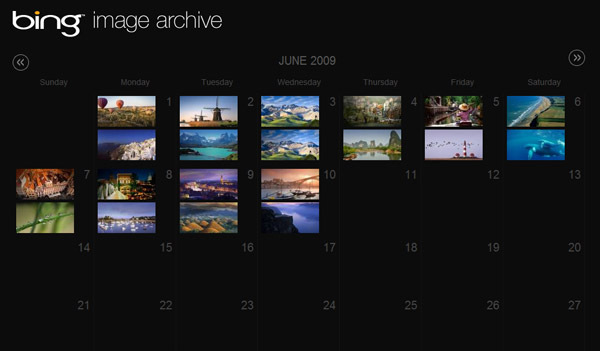
Whilst NASA’s Astronomy Picture of the Day (APOD) sets the bar pretty high, Bing.com’s daily photograph backgrounds are also worth taking a look. Of course not everyone uses or want to use Bing everyday, easily missing out on some amazing pictures. Granted there is a little navigator on the site giving you past 7 days’ photos, but it’s clumsy and time-consuming. Therefore without further ado, I present, the Bing Image Archive.
Here, you can find all background images from Bing presented in a simple calendar format, appropriate to the day which the image was originally displayed on. As you might have noticed, there are two photos per day, one of which is for United States and the other for everywhere else. Notably, the US image comes with richer metadata and hotspots which I’ve also transferred from the site to give you a better understanding behind the image.
The site also allows you to send permalinks of images by copying the URL, for example. Enjoy.
Amazing app man! Love the facts bar!
Hehe, this is handy long 😀 i agree the images are just too good to be wasted.
What would make this really awesome is if on a monthly or quarterly basis these collections were turned into Windows 7 Theme Packs! 🙂
A lot of people have asked in regards to wallpapers, I think their small resolution and quality aren’t going to be adequate for most people’s resolutions. I am however thinking of adding a RSS feed.
An RSS feed could be useful to create Windows 7 Slideshow Themes. 🙂
Lovely photos. Absolutely lovely.
And happy graduation.
Great job ..and yes…..beutiful pictures
Hello. I noticed you haven’t gone back as far back as last year yet. Dunno if you’ve saved daily images that far back, but in case you haven’t, I have a Flickr photo set of when Live Search had daily photos of the Summer Games in Beijing. Just click the link in my comment’s username. Unfortunately I didn’t think of saving the dates along with the pictures, but it’s something that can probably be deduced by analyzing the metadata or by the content of the picture.
Hope this helps!
@bernard: Thanks, but for the sake of simplicity, I’ll just start with what Bing offers.
Long Zheng,
The low resolution issue is easy… just set the wallpaper mode to “Center” instead of “Stretch” with a Bing-like background color and then it looks just like on the Bing site anyway, lol.
Awesome. Now can you please make the images available over RSS? And a Windows 7 theme that makes use of the RSS images.
I agree with everyone else, an RSS feed so it can integrate with Windows 7 would be very, very awesome.
Awesome work, Long. And I agree that an RSS feed would be wonderful 🙂
Anything photo smaller than 1280 x ____ is criminal. Microsoft, make the images high-res please. Nice work, Long.
And there’s even annotations on the ‘barrier rief pic young man, grrreet.
PS: http://istartedsomething.com/bingimages/?m=2&y=1985
Hey Long I just noticed that you typeset the words “image archive’ in Helvetica Light.
U should look up copyright on wikipedia. Man these images are from big ass companies like Getty images. Beleive me you don#t want to get in touch with their legal people.
Any word on whether you’ll provide an RSS feed?
It looks much better than the Google image search.
Hi, thanks for your great work!
But… what a pity that I found the pictures in your collection were modified ones. Compared with the originals, the file size increased a lot (though you cropped the bottom strip in the earlier ones) but the quality decreased (note the sky area in my screenshot).
http://img193.imageshack.us/img193/8696/bingistartedsomethingbc.jpg
Fortunately you kept all the original filenames. So I can go download the originals from bing.com (e.g. http://www.bing.com/fd/hpk2/HorseheadNebula_EN-US1846128122.jpg ). Thanks again! But how about optimizing your script or something so that we can also get the originals from your site?
It’s great you reproduced the © notes! But I cannot see the hotspot things on many pictures (e.g. http://istartedsomething.com/bingimages/#20090601-us ). Something not stable? Or my browser’s problem?
I really hope you will have time to make a Live collection somehow. Since Live “evolved” into Bing, we cannot get the original URLs of Live backgrounds any more.
@sum1: Unfortunately because JPG is a lossless format, when I crop it and resave it, some quality is lost. I try to use the least amount of compression on the new picture (thus increased file size) to mitigate any further quality losses.
The hotspots should appear when you hover over the text at the bottom. 🙂
Yes, different tools result in different JPG, even though the best quality factor is chosen.
Why not just simply leave the pictures intact? I don’t think it’s necessary to crop them. And since June 10, it seems there’s no bottom strip any more.
I can see all the elements on some pictures (e.g. #20090603-us). But on the others (e.g. #20090601-us), I can only see the © note and the X button, no hotspot or the link text, no matter how I move the mouse or refresh the page. Any advice?
@sum1: If the hotspots are showing up for some pictures and not others, then your resolution might not be big enough. It calculates based on how much text there is, the vertical resolution necessary. And if your screen resolution is too small, it’ll hide the info.
Aaah, I kept too many tabs open in my browser. After I toggled off the tab bar (multi-line), everything was there then. Thanks for the hint! 😀
Could you add an RSS feature that we could then embed into a theme? As I’m sure you know Windows 7 allows Desktop Themes to pull from an RSS feed. It would be a really cool feature to offer an RSS of all the different Bing photos.
Thanks!
Thanks for all of your work on this. It’s a nice treat to come and visit regularly. The recent changes are a plus! I just wish Microsoft would label the images better.
Edison
Toronto, ON
Hi again,
Something wrong with the Bing Image Archive since 8/21?
Is there an RSS feed for just the us images?
@bigP: Thanks for the suggestion. I might add that functionality soon.
Thanks for your website.
Bing has brought to me some AMAZING pictures.
Now, your site has given me access to past pictures to enjoy at my leisure.
Any way to search past daily Bing images? For example, say i want to search for any past daily Bing images of New Zealand, or of Jugglers. Thanks! -bil
Can I also filter the RSS stream only to show the images for one country? When using your RSS feed for a desktop slideshow on Windows 7 I get a lot of duplicate images since all countries are included in the RSS.
an RSS feed would be absolutely amazing. I’m not sure how you pulled this off… been trying for a week now.
it would help a lot of people very much
thanks
I agree with Bas. I would like to be able to filter only the US Bing images because of the duplicates.
I also agree with Bas and Matt. A filter of some sort would be useful for the duplicate images in Bing (especially if this filter was for the U.S., since the captions are the clearest.
I love the Bing Image Archive – WONDERFUL idea and very nice job – keep it up
Great job on the Bing Image Archive! One question, though. I’ve noticed that clicking on previous images on Bing’s US page shows images that haven’t been included in your archive. It seems as though they are posting more than 1 new image per day on their homepage (maybe because of these Winter Olympics). Is there a way for you to include these other images also?
Also, is there an easy way to copy the picture description given when clicking the copyright logo for those images which aren’t included on your site. For example, clicking on previous images today (2/25/2010), there is this picture (http://www.bing.com/hpk2/Inukshuk_EN-US1164591538.jpg) which you don’t have. How do you retrieve this info when posting the images on your site? Do you simply manually type in the info or is there some other method you use? I’ve even looked at the the source code for that page, but Bing only lists the image on the first page (and even looking at that, I don’t know where the info for the copyright would be found). If you or anyone reading this has an answer it would be greatly appreciated.
There was a picture from April (PassionBee) that I wanted to save but I missed the seven day window on Bing.
After a little searching…..
there….. lo and behold someone with thoughtfulness to save this valuable photography.
Your efforts shall not go unrewarded.
Thank you
Great job, this is fantastic. I love how you humbly compare it to NASA’s APOD thing and then kick it’s cheery ass with your archive’s awesomeness.
Great work, man. Congratulations!
Fantastic site. Well done and thank you.
Does anybody have the entire collection – from day 1?
nyteshade!
I love the Bing image archive! Unfortunately it appears to have crashed. The Images and calendar dates have all vanished. You only get the header portion of the website and calendar months. It’s been gone since at least midnight Sat Dec 18, 2010. I hope the web adminstrator sees this or someone knows of a working mirror, or alternative site housing the images. Thanks!
It’s Back up!!! Thank you very much!!!
Fine, very good for Bing. I like the images bing, is better that others searchs
Have you seen the Bing Photo retrospective? 365 photos from the Bing.ca homepage! bit.ly/tAbKes http://bingphotos2011.ca/ very cool as well
I was wondering if the functionality for adding specific feeds for specific markets was still in the works, such as being able to subscribe only to US images? Thanks!
Where have all the older Bing pics gone? Did Microsoft just recently do something so that we can’t access any images older than about 2 months? Wondering if anyone has heard anything. I’m going to have to start saving the images to jpg files in Firefox, but I can only see 7 days of the most recent ones.
I think the admin of this website is truly working hard in favor of his web
site, because here every stuff is quality based information.
Hey there, have used this awesome Image Archive in the past but it seems as if thumbnails from the previous months aren’t showing anymore? Just a heads up
All the thumbnails are visible going back over the years of history but after about 60 days back from today, the large photos (i.e., the ones you see when you click on the thumbnail) are not longer visible and hence no longer downloadable. What has happened? Please fix. Keep up the great work. You help me fill in my own personal collection….particularly I cannot myself make still image from .mp4. Thanks
Ditto Thomas’ post. Being so impressed with these images, I went looking for an archive and found it!
August-September can be clicked to full screen, but prior to that? Nada.
Any fix in the pipeline would be great, it’s a visual treasure trove!
Hi Long Zheng.
I’m using your bing image archive since long time now, as the feed source for my w7 desktop background. But since many months now most of the images downloaded from the feed are empty and of 0byte. But they seems to work fine if viewed in a browser. Any advice/solution for this? 🙂
My “Bing Image Archive” has not loaded any photos the past 3 days. No previous problems, and all photos are still visible up to and including Jan 7th 2013, but blank windows on the calendar from then on. Any ideas?
How can I find out where these pictures have been taken
Pictures are great < how about adding names of places shown.
Thank you for doing this!!! I had one of the desktops as my wallpaper but didn’t save the image to my hard drive, and accidentally overwrote it, then I couldn’t find the picture until I saw your site. Cheers!
Beautiful pictures
Background Pictures
Enjoy looking at these also, and appreciate your doing this. Recently, the video files won’t display in the Bing archive when you click on the thumbnail.
I cant seem to save the moving images/ videos. I was able to before. I just get a black box but if I use the switch to image version then I get the image. I like the video versions, I usually download and save them.
Looks like the videos are displaying again in the archive! Thanks for fixing 🙂
Thank you for you Bing Image Archive, I can finally see the picture of the animal that looks like my friend again 😉
thank you thank you thank you!!!!
Keep your BEAUTIFUL DESKTOP PICTURES COMING!!! Like them ALL & so Appreciate them!!!