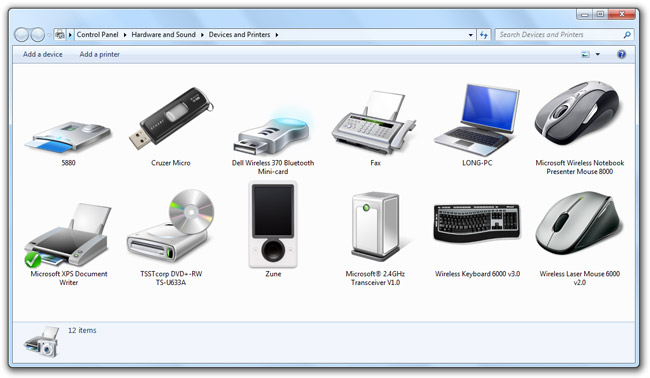
It’s no secret I have an icon fetish, and it makes me smile every time a new high-resolution device icon appears in Windows 7’s “Devices and Printers“. It wasn’t very long ago that most devices appeared in Windows with indistinguishable device descriptions and icons, but with Windows 7, devices not only work well, but look great.
A new feature in Windows 7 allows the operating system to display unique device icons alongwith detailed product information it downloads from the Microsoft-hosted device metadata web service.
If you’re wondering where Windows 7 keeps these high-resolution photorealistic icons it downloads from the device metadata service, then you’d be glad to know you can easily find them as ICOs under the “%LOCALAPPDATA%\Microsoft\Device Metadata\dmrccache\” directory. Inside the folder appropriate to your region (ex. en-US), there should be individual folders with GUIDs for each of the devices with metadata associated with it. The icon resides in the “DeviceInformation” folder of each device.
As it turns out, the GUIDs for each device can also be used to download the metadata package directly from Microsoft’s Metadata servers. For example, the metadata package for the Sandisk Micro flash drive is available here. Rename the file to a .CAB extension and you can simply extract the resources.
Some of you may have also noticed that out-of-the-box, Windows 7 supports a broad gamut of devices with generic device icons. For this, I stumbled across the “System32\DDORes.dll” resource file which appears to be the goldmine of device icons. Here’s a collection of all the icons I extracted with Anolis Resourcer.

By looking at the icons alone, Windows 7 natively distinguishes at least an 81 different types of devices. Of particular note are the 14 different types of sensors, as indicated by the icons that resemble a multimeter, that Windows 7 seems to support.
As with any hardware-related feature in Windows, it’s ultimately up to the hardware vendors to take advantage of them, however they don’t always have the best track record for fast adoption. Along with Device Stage, I think this is a great opportunity for hardware vendors to help distinguish their premium products from cheap generic counterparts with very little investment.
Share what devices (and their GUIDs) you have that’s got some cool icons show up!
I loved it.
Windows 7’s “Devices and Printers“ is a really good and eyecandy resource!
How do you download and open the files to use them
Great work Long, I think, sadly, I share your icon fetish and have spent many hours scouring through dlls for hidden gems.
I love how Microsoft have actually stuck to the same style, for once, for great consitency.
Is it sad to go looking here every time you install a device just to see if it got a cool high-res icon? Probably but I don’t care. My heart gave a little leap of joy when I saw my Microsoft Mouse icon #geek
Let’s hope all hardware vendors do take advantage of it, especially right through to the device stage if necessary, or at least linking to it’s control panel applet.
It does surprise me that there is no link to Device Manager in the toolbar.
IPhone icon!? Me wants! Shame on you, MS.
Very funny that they wouldn’t have this one! Are you sure? So there, Apple!
I have an Iphone Icon I made tht conforms with and works with the Microsoft Metadata Authoring Wizard.
Very nice, I just hope hardware manufacturers support it well. I can easily imagine some hideous 16-colour nightmare stretched to the same size as the other icons and being a real eyesore.
I think I should kickoff the GUID sharing game, if anyone was interested in the icons I have:
b1d19749-0599-4bd7-8745-eff61804b48f
Microsoft Wireless Laser Mouse 6000 v2
b3004f87-774a-4cc6-9c51-89264da4ed5a
Sandisk Micro USB flash drive
cbf0483a-3c36-4130-9bfc-ef5b6e42011b
Microsoft Wireless Keyboard 6000 v3
de7898e7-58f1-4426-803e-e8b6597ad4fb
Microsoft Wireless Notebook Presenter Mouse 8000
The only one I’ve got is
http://download.dmd.metaservices.microsoft.com/dp/winqual/bd269c05-d325-4c38-88f0-3dea4604f827.devicemetadata-ms
Wireless Notebook Optical Mouse 4000
http://download.dmd.metaservices.microsoft.com/dp/winqual/397ffeea-ddc9-49a8-8268-9bb846a8f901.devicemetadata-ms
MX™518 Gaming Mouse
http://download.dmd.metaservices.microsoft.com/dp/winqual/a042693f-0916-4fac-8ed0-1cd36147cc7b.devicemetadata-ms
Xbox 360 Controller for Windows
Try this feedback form for Windows 7:
http://mymfe.microsoft.com/Windows%207/Feedback.aspx?formID=195
It can’t hurt if you let MS know you’d like to be able to manually change the icons without any of the resource hacking what not. It’d be sweet if they actually implemented it. People are gonna hack them anyway, that’s not what MS want. Also there’s loads of people who get the wrong icons or their icons change randomly.
So everybody, let them know you want a “Change icon” option in there!
Does this mean we can replace these icons, or generate them for hardware that doesn’t implement them?
I had a quick try but didn’t get any success
With the latest LifeCam drivers, I managed to get this one for my LifeCamVX-3000 !
http://download.dmd.metaservices.microsoft.com/dp/winqual/a735b3db-8493-4dad-a6d3-c81b6a5432cc.devicemetadata-ms
Thanks for pointing out Anolis Resourcer. Much better than the ancient Resource Hacker that I was using to grab icons from things.
People interested in these icons may also like my HDD Letter Icons which take the Vista HDD icon and add A-Z letters over it, so that each drive can have a unique icon. (Particularly useful if you want to see just the icons in a toolbar, to save space.) Looks like they’ll still fit in with the Win7 icons:
http://www.pretentiousname.com/HDDLetterIcons/index.html
Still admiring that keyboard? Tsk, tsk!
My devices:
Microsoft Natural Ergonomic Keyboard 4000
http://download.dmd.metaservices.microsoft.com/dp/winqual/1e0ead7a-e0ce-4d40-bf1e-74cb43a14ff2.devicemetadata-ms
http://img25.imageshack.us/img25/2412/naturalergonomickeyboar.png
SanDisk Ultra® Cruzer® Titanium
http://download.dmd.metaservices.microsoft.com/dp/winqual/a8fe4043-b10e-480d-baf7-3c826611df2d.devicemetadata-ms
http://img199.imageshack.us/img199/5763/sandisktitanium.png
Microsoft Habu
http://download.dmd.metaservices.microsoft.com/dp/winqual/e150d319-f79b-4608-ba3a-c20e73f9ce20.devicemetadata-ms
http://img189.imageshack.us/img189/3248/habu.png
I miss that in the beta my sony mp was recognized and had a customized icon and lots of info – from the RC onwards it’s basic info and looks very generic
@Andrew: the iPhone icon is really low-res in Win 7 (guess why 🙂
Have you folks succeeded to see a real dedicated Devices and Printers customized window? Every device I have plugged in so far had a generic icon and no special customization, iPhone included (it at least has a custom icon).
Here is my customized hardware:
http://img201.imageshack.us/img201/5306/devicestagert0.png
Unfortunately I didn’t got success incorporating them since the first 6801 build.
Since then device stage is deleting all the custom content in “AppData\Local\Microsoft\Device Metadata\dmrccache\en-US” and downloads only the official ones.
If you disable the “automatically have windows update drivers” option from the devices window (NOT device manager) that prevents the overwriting
Firstly published in NeoWin comments under the Device Stage Review:
http://www.neowin.net/news/main/09/01/10/windows-7-device-stage-overview
Microsoft Wireless Laser Mouse 5000:
http://download.dmd.metaservices.microsoft.com/dp/winqual/6bbd4982-5ab8-4e2e-af16-88f776c65858.devicemetadata-ms
Microsoft Wireless Laser Keyboard 5000:
http://download.dmd.metaservices.microsoft.com/dp/winqual/b284e386-b824-4d00-94a0-3caef16bba13.devicemetadata-ms
Did anyone get the Logitech Rev and the divia edge keyboard icons working… no luck here:(
Great post Long!
And no, you are not the only one with this fetish.. 😉
Could you please post a detailed step by step instruction on how to enable the icon for the Wireless Laser Mouse 6000 v.2?
I am using the 7100 RC build.
Thx
I agree with James above about the beta showing the correct (and more) icons than the RC. My HTC Touch Pro looked GREAT in the beta but now its just the generic icon?! 🙁 How do we change them??
Speedycars – you seem to have this working for you?
wow even big oversized noob icons can’t make that Explorer junk look useful.. what a shity looking UI (Useless Interface..according to Microsoft)
@AboKevin: I think you need to install the WIndows 7 Microsoft Intellipoint drivers for the Laser Mouse to show up.
ok, but how does one change an icon one doesn’t like?
Hi koogle!
Also check out this Powerpoint file (~500kb) “Authoring Device Experience For Multifunction Printers” and WHDC – Windows Device Experience
now if only they could fix the win95-xp era icons in system32.dll
As I said before, you can’t create customized devices in Devices and Printers, because Windows is deleting all of them first, and then re-downloads the info for the devices from Microsoft’s metaservice, which is not quite full right now.
That screenshot above is from build 6801, which is pretty old now.
Good article but I can’t help in thinking that Microsoft should be concentrating on improving the mess that is the Windows source code. Don’t get me wrong I’m into Windows 7 but I don’t understand how Microsoft have the audacity to make us pay for the upgrade from Vista. What they are essentially saying is that Vista was Millennium Edition and “we’ve now sorted it out”, so upgrade. Windows 7 is just a feature pack for Vista that improves it a whole lot.
@Kieran Mann: have you ever used Vista? Idiot.
The BD icon – they should have colored the disc blue – that would have made it better and more obvious.
I have done that Long, but I still get the generic mouse icon… Strange
How do you update the individual icons please? Ive checked the dmrccache folder, and it only has one entry, tho I have loads in the Devices and Printers.
I also want to update the info shown when you right click the PC icon, and choose properties. At the moment it just shows ” Manufacturer: System manufacturer” without any proper entries.
Thanks in advance.
For the screenshot, you should right-click > View > Hide file names so that there won’t be gibberish like “14-2001-1033.ico” appearing.
I cant get any non generic images. Help? Using RC 7100
Wow thats cool. How do you guys find these icons on the MS server?
Well, I have that black Sandisk cruzer with 4GB and I can only find the icon with 16gb for black and the icon with 4 gb for the silver platinum one. Is there also a icon for the black 4 GB one?
Since Windows 7 RTM’d a proper Device Stage for my Lenovo laptop has appeared!
Instead of the generic laptop icon I have a photo-realistic ThinkPad icon (not quite identical to my model).
You can get the icon here http://download.dmd.metaservices.microsoft.com/dp/winqual/43afeccc-d695-4e75-9772-345af494b874.devicemetadata-ms
I’m not sure if it downloaded automatically or if it was part of the latest Microsoft Update I did.
Cool icons!Does anyone know if they can be downloaded manually?
Can anyone post a list of known GUID’s?
how do you find the icons and guid’s?
after dowload the metadata file, how to use it?
At the Microsoft tri-launch in Wembley Stadium, UK I got a free Arc mouse.
I plugged in the tiny transceiver and after a minute I got a lovely new icon! I thought it would give a generic black icon but it actually showed the red version that I had plugged in.
Microsoft Arc Mouse (Red)
http://download.dmd.metaservices.microsoft.com/dp/winqual/ef920254-1592-4c6f-8179-c5d2945db96a.devicemetadata-ms
For those saying that Windows replaces icon back to the generic, you should be able to stop it. In devices and printers, if you right click your computer SOMETHING-PC and select “Device Installation Settings”, and can select there to not update icons.
Why is it that in the betas and RC’s this worked fine for me, but now I got the RTM version, my Microsoft Wireless Keyboard 8000 wont show up!! This kinda stuff really annoys me!!!
Hi…I’ve seen request for a step by step on how to get to these icons and further, change or manipulate them. Does anyone know how? I’d like to change the standard cell phone icon to my enV2
Thanks!
OK, I can view some of the icons with Anolis Resourcer, but after I create an icon how do I add and replace so that it becomes a default?
feel free to email me jfergus1 (at) tampabay (dot) rr (dot) com
Hi Long,
Can u please help me? I just got my brand new Nikon D90. However device stage does not show that rich experience that steve balmer demoed in the beta stages. It shows a boring classic camera picture in device stage. How can I search on the microsoft services to get that update to device stage that updates the metadata available to this camera?
thanks,
Varun
@varun: I’ve noticed the device stage don’t immediately update when you connect new devices.
After connecting a Canon printer to my laptop, I saw a new device stage page immediately. However it took several weeks before the printer on my desktop computer updated to tge new branded page.
@ Long,
Hmm!! really!! Wow!! well…lol…this is the first device stage compatible device that I got. So thanks! i guess I will wait and see. But perhaps…would u happen to know if that microsoft server has any specific files to update this manually myself? I was trying to search on microsoft downloads…couldn’t find anything.
thanks,
V
Hi,
I have a Dell Widescreen, the icon is missing when I re-install Windows 7…
Is it possible to update the icon manually by Windows Update?
thx
none of the icons in devices and printers look anything like my hardware. My logitech marble looks like a mouse, my wide screen looks like the first TFT I owned 15 years ago, with bsod, my printer looks like something you get free with the first cartridge. Why is there no simple icon selection tool? Why can’t I even find a hack to put my home made icons in?
This is so neat, I’ve got to ask – how is everyone providing direct download links to Microsoft Metadata’s pages? I’ve got a Samsung “Story” external HDD that isn’t pulling a custom icon, for example, and I’d like to see if the official Microsoft site may have some other Samsung drives that are similar.
I’ve been searching Google for 20 minutes but haven’t found a page I can go to that allows me to search for metadata packages…any advice?
@Zach – It doesn’t work like that, you can’t change the icon that shows up in the Device Center, that up to the hardware manufacturer (i.e. Samsung) certifying their Device for Win7 and providing an icon for Microsoft.
The only way we have found the metadata links is by using the code in the compatible devices we have plugged in
Thanks for letting me know, Thom, however it would seem that if you wanted to, you could change that .ICO file inside the metadata folder to whatever you wanted, once you found where it was. For example, my Logitech G5 mouse has a special icon for it that I can see in its own metadata folder; what would stop me from changing it to any other icon file I wished?
The problem though, is that my Samsung drive is not causing a metadata folder to be created. Oh well, I guess it just isn’t new enough or important enough to take advantage of Windows 7 features… thanks anyway.
If what you say is true, Thom, how do you explain the fact that I have two of the same model of printer (HP LJ 1320), that I installed one after the other just now, using the same printer driver, and yet they have two different icons! I am simply trying to fix one so that it doesn’t show it to be a MFP, which it currently does for some reason. I wish I could just click on a button to “change icon.”
@Keith I don’t know how it works completely. It does seem a bit hit and miss sometimes. For example, when I used Win7 RC my Arc Mouse showed a (correct) red mouse icon but in the RTM version of Win7 I just get a generic black one?!? I re-downloaded the old red icon metadata and copied the icon into the folder and it shows up fine. So I guess as long as there is a folder for your device in “%LOCALAPPDATA%\Microsoft\Device Metadata\dmrccache\en-US” you can drop any icon in there that you like
After using my MX 5500 combo for a good year, I finally got a custom icon.
http://download.dmd.metaservices.microsoft.com/dp/winqual/04760691-1d6c-4d33-b6a5-f3eac18c8456.devicemetadata-ms
Is there a link to browse the metadata server? I used to have an icon for my Razer Copperhead mouse, but since I formated my HD it’s gone and windows is not downloading a new one…Help…I want my eyecandy!
E.z people.. read this page because i was wondering if there was a way to get hold of a icon for my roccat kone….. anyways.. after reading the comments i thought id upload the very nice icon for my sidewinder x6 🙂 … hope u like
link expires in 7 days
https://www.yousendit.com/download/OHo0Y052cGtEa1h2Wmc9PQ
if anyone can tell me how i can get the roccat one that would be cool 🙂
nice one
Once you have the .devicemetadata-ms file, all you have to do is copy it to this folder: C:\ProgramData\Microsoft\Windows\DeviceMetadataStore\en-US. The icon will change instantly on the devicestage window.
Regards.
Thank you Darookan!
Is there a good tutorial on how to make .devicemetadata-ms files ? Because I just want to add some icons for some old devices I use, and Windows keep deleting the extra stuff I put on AppData\Local\Microsoft\Device Metadata\dmrccache
The GUID for razer copperhead is 28A946E1-E83B-4662-BC7C-23451851489E
I had the icon, but it has dissapeared, I don’t know why.
I tried to download it at :
http://download.dmd.metaservices.microsoft.com/dp/winqual/28a946e1-e83b-4662-bc7c-23451851489e.devicemetadata-ms
But all I get is :
404 – File or directory not found.
The resource you are looking for might have been removed, had its name changed, or is temporarily unavailable.
What am I doing wrong?
Where can we modify the icons of bluetooth devices?
I want to know how to set my realistic Icon for my Printer. When I first installed it should the correct icon. An exact image of my printer. But I had to reinstall the printer a number of times. Now it just shows a generic printer and there is no menu option to set the device to realist icons
Anyone find a good way of figuring out a device’s GUID?
You can find GUIDs in the Device Manager. On Windows 7 open Control Panel -> System -> Device Manager -> expand the desired category tree -> right click on the device select Properties -> Details tab -> select property “Device class guid” -> right click on the Value and copy to clipboard.
For the Cruizer example (which I have and checked, Cruizer icon is shown), this entry gives me {4d36e967-e325-11ce-bfc1-08002be10318} as you describe, meaning “DiskDrive”.
None of the entries in Device Manager gives {b3004f87-774a-4cc6-9c51-89264da4ed5a}, although this is a sub-directory of the dmrccache directory. I have checked all the ID’s shown in the properties, including the USB controller ‘tree’.
There must be some other way tho correctly extract the GUID from the device.
Hi,
Thanks for opening this discussion article… i have like the look and feel of Windows 7 for some time now, but I couldn’t help myself and not get my hands dirty and change a couple of icons. Some of the stuff you find online really look better, or if not better at least more interesting then…use the icons I found here:http://www.creattor.com/icons/vista-hardware-icons-1202
SanDisk Ultra Cruzer Titanium: a8fe4043-b10e-480d-baf7-3c826611df2d
Dell S2009W: 8b1ad97d-82fc-4734-9d2d-c63304bdd86a
Microsoft LifeCam VX-5000: 07f35f66-e771-411e-97f5-5ec46d3b7668
Kodak ESP 5250: 4d40ba91-e86a-405e-ba5f-e753774e623b
the comment was, You can find GUIDs in the Device Manager. On Windows 7 open Control Panel -> System -> Device Manager -> expand the desired category tree -> right click on the device select Properties -> Details tab -> select property “Device class guid” -> right click on the Value and copy to clipboard. Sounds good, except you can’t copy it to the clipboard. that functionality has been removed from win 7.
Nice weblog here! Additionally your site quite a bit up very fast! What host are you the use of? Can I am getting your associate hyperlink to your host? I want my website loaded up as quickly as yours lol
your a nice teacher and you can say to your teacher merry christmas and
happy new year
a WD MyBook Essential external hard drive http://download.dmd.metaservices.microsoft.com/dp/winqual/a969be5e-e922-463d-8833-7e80984d39ce.devicemetadata-ms
and an Wacom Intuos4L http://download.dmd.metaservices.microsoft.com/dp/winqual/de93a637-55d3-4c75-884b-e1bc98615fe3.devicemetadata-ms
Really awesome blog post you have here, unfortunately, I too have a fetish for icons. I theme almost every program’s folder in ordr to distinguish them while browsing the the Program Files directory. I also keep icons of my devices in order to use them in a robust USB device management software called “Zentimo”.
Unfortunately, Microsoft broke the consitency cycle with Windows 8, now I’m trying to find the “%LOCALAPPDATA%\Microsoft\Device Metadata\dmrccache\” directory on Windows 8. Anyone know where Microsoft moved the folder to? Devices and printers still functions in Windows 8 so the folder has gotta be hiding somewhere on my SSD 🙂
UPDATE: I managed to find the new directory, thanks to File Explorer search 😉
Not sure how it’s divided up, but I found the icon of my PC hardware (a Surface Pro 😉 ) in the following directory:
C:\ProgramData\Microsoft\WPD
And found the special “dmrccache” directory, in which I found the icon of my connected device (a Wedge Touch Mouse :P), in the following directory:
C:\ProgramData\Microsoft\Windows\DeviceMetadataCache\dmrccache
Enjoy the icon hunting 😀
Oops, forgot about the GUID game 😛
Microsoft Wedge Touch Mouse:
http://download.dmd.metaservices.microsoft.com/dp/winqual/cc122998-a50e-4b5b-a0a1-20d0d00990c1.devicemetadata-ms
Thanks a lot for the WPD folder! I was searching for Lumia 635 icon… It was there
So we now have microsoft uploading details of any new device you plug into the USB ports and you think that is a good thing given the links between the NSA and MS
As a security expert I can tell you that windows is calling home a hundred times a day even with updates and defender turned off but don’t let me upset the party
Wow, I’m surprised I never thought of that…off topic but any suggestions on FireWall rules you use to prevent these home calls? Or is your everyday computer disconnected from the internet?
I cannot get the SanDisk realistic icon to display in the Devices and Printers. I only get the generic Microsoft icon for the Cruzer Glide. I have a 128 GB Cruzer Glide USB Flash Drive. When I first connected the drive, the realistic icon was displayed, but now I have lost it. I have tried many things to reinstall the icon but nothing has worked. I have tried updating the driver to no avail. I have followed instructions to remove the drive and reboot the computer, then plug the drive back in. That did not work. I have contacted SanDisk tech support and they accused me of formatting the drive and loosing the original installation software and driver, which I have not done. Does anyone have a proven solution to this problem? Thanks.
Microsoft LifeCam HD-5000 : http://download.dmd.metaservices.microsoft.com/dp/winqual/bfe14d26-1f62-48ec-9832-46d9a1ca0822.devicemetadata-ms
Now in Windows 8.1 you can found DeviceMetaData in the following folders :
%PROGRAMDATA%\Microsoft\Windows\DeviceMetadataStore (downloaded .devicemetadata-ms files)
%PROGRAMDATA%\Microsoft\Windows\DeviceMetadataCache\dmrccache (all the other extracted by Windows.devicemetadata-ms files)
Is there a way to somehow automagically scrape the http://download.dmd.metaservices.microsoft.com/dp/winqual/* for all sorts of icons? Would be cool to have an application or a script for that.