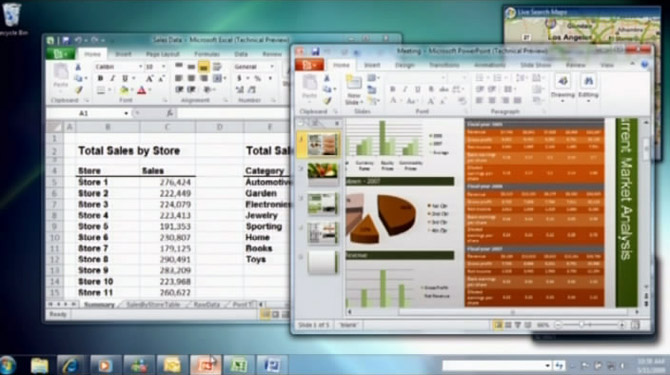
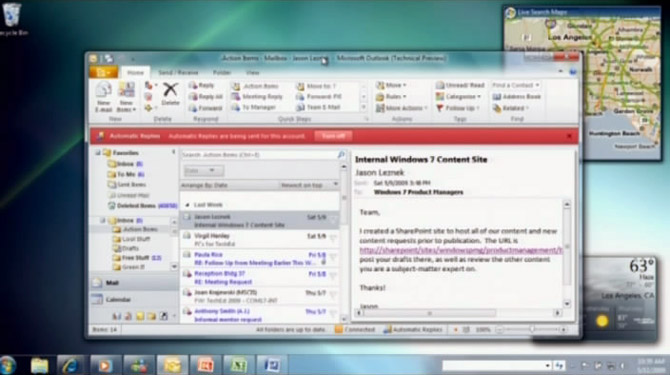
Microsoft’s TechEd 2009 conference kicked off today with a fairly forthcoming keynote that included not only the announcement of a Windows 7 release date season but an indirect demonstration of the forthcoming Office 2010 Technical Preview build. The best-I-can-do-from-a-streaming-video screencaps above comes from Bill Veghte’s quick demonstration of Windows 7 in which he launched 3 Office applications: Excel, Powerpoint and Outlook.
Compared to the screenshots of Outlook 2010 that were leaked to ZDNet’s iGeneration a month ago, not much has changed, but the effects of a new fade-to-Aero gradient in the header bar is much more obvious. In terms of the actual applications, Excel does not seem to have changed at all whereas Powerpoint has a new “Transitions” tab possibly indicating improved effects and animations behaviors. Outlook’s changes are pretty self explanatory. Each application’s “Ribbon button” is also colored differently, allowing easy differentiation between the applications.
Having said all that, I have no idea what’s going on with “Office 2010 The Movie“. A viral campaign for business applications? Sure, bring it on.
Definately looking forward to the technical preview in June… Can’t wait!
Looks really nice, I think this version of Office will be even better than the 2007.
Nice find, I wonder if we’ll see this fade to gradient effect in Windows Explorer anytime soon..
I wish somebody would finally spill some of the detailed beans on Onenote.
Give the Powerpoint good transitions and effects that can challenge Keynote, then I’ll get it. They should update this.
Raffy.A
I thought I saw July for the tech preview?
And is it just me or does the Outlook ribbon look “cluttered” ?
I’m interested to get some more useful jumplists in Office 2010.
In the outlook screenshot I think I can make out an envelope overlay on the taskbar (indicating new mail)
I was hoping 2007 get a “jump list functionality” update but I doubt that will happen now, they’ll want to keep that for 2010 exclusivity. I can see the “Works better with Seven” campaign now
Thanks for putting up the screenies Long, I’m still not convinced on the new look ribbon but any ribbon is better than no ribbon IMO
What’s that search field in the task bar!?
@Phil Walter – It’s the address bar, which is kind of redundant since it was integrated with the start menu search box in Vista and Seven
The Outlook ribbon still looks like a horrible mess. An massive amount of small buttons right in your face, some even with no explanatory text, so many they had to put some in a scrolling area. That looks like an extreme case of bad interface design. And then the Send/recieve button hidden away small at the top, separately, like an afterthought. Whatever happened to K.I.S.S. It looks like it was designed by a committee where everyone got to put their favourite features right on the home ribbon, without any kind of editing down. Appalling.
I am usually a fan of the ribbon but at first glance those ones look intensely cluttered.
Also I have to wonder why anyone would choose to put the address bar in their taskbar these days?
Some of the more cluttered look is likely down to the apps not being fullscreen. It results in more three-tier buttons than two-tier (which is more normal).
As for them looking complex: I’m sure any picture of a ribbon without being able to interact with it looks complex. Using it is rather different as you get all sorts of interactivity feedback.
That Office 2010 ribbon is sooo 2008. It has already been integrated into Windows 7’s Wordpad since M3 at least.
So the Address Bar was brought back? I don’t know about Vista but it was removed from XP SP3. It’s strange that that bar has a Refresh buttun…
I suspect the biggest task for the Office team will be to upgrade the Office Live web service to support many of the scenarios they want to enable. In the client applications I’d like to see streamlined methods for opening/saving documents to local file storage, Sharepoint and Office Live. Today users are confronted with Save, Save to Office Live and Publish menus. And they really need to link Office Live to Windows Desktop Search. I would also like to share MS Access databases from Office Live Workspace. They do these things and I’ll have a compelling reason to upgrade.
i hope office live has the ability to create (at least) simple documents and spreadsheets in the browser. i’d use google docs, but they don’t support the docx format, and docs exported from google docs get all messed up in word. please, MS, try to do something better than your competitors. blow us away, please.
@Ben,
Don’t forget Office is one Microsoft’s cash cows…
… personally I always wondered why they don’t offer a model were I can get a browser based version as well as a the desktop app either as an outright purchase or as a pay per month model.
Please send me an invitation to the Microsoft Office 2010 Alpha. Thanks. Hurry!
This doesn’t satisfy me at all.
This are not even clear. Just go to WikiPedia, you get 1280 by 1024 sizes
http://en.wikipedia.org/wiki/Microsoft_Office_14
Those “WikiPedia” screenshots are almost 3 months old
Really nice…ribbon got some updates…such title bar…..:)