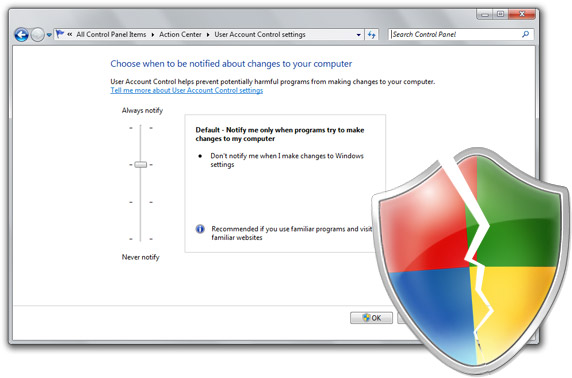
Soon after writing my last blog post on the potential security vulnerability to autonomously disable Windows 7 beta’s UAC system, I had realized that flaw was just one piece in a string of dominoes that fell much earlier when the new tiered-UAC system was introduced in Windows 7.
In summary, a second UAC security flaw in the Windows 7 beta’s default security configuration allows a malicious application to autonomously elevate themselves to full administrative privileges without UAC prompts or turning UAC off. A result I’m sure cannot be classified as “by design”.
This public disclosure comes after a private disclosure to Microsoft and Windows 7 beta testers earlier this week. Whilst Microsoft has not officially responded, I’ve heard rumors it may already fixed in current internal builds. If and until a patch is available, I feel obliged to outline the elevated risk (pun) to the millions of Windows 7 beta user running Windows 7 beta in its default UAC policy of “notify me of changes by program, not of Windows changes” which does not adequately enforce the privilege system, arguably an essential factor to a safe operating system.
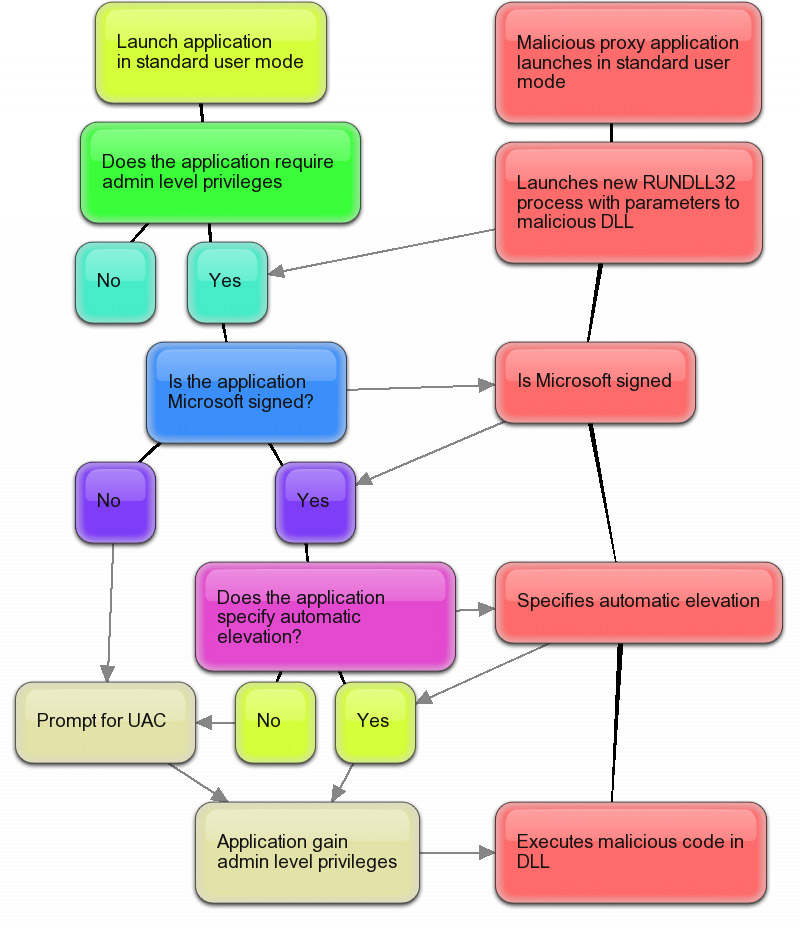 Without going into too much detail, as you already may know from the previous postings, Windows 7 has the ability automatically elevates Microsoft-signed applications and code which specifies “auto elevation” to mitigate the number of UAC prompts. Rafael Rivera has more details how this works.
The fundamental risk with the above behavior is the fact that Windows is a platform that welcomes third-party code with open arms. A handful of these Microsoft-signed applications can also execute third-party code for various legitimate purposes. Since there is an inherent trust on everything Microsoft-signed, by design, the chain of trust inadvertently flows onto other third-party code as well. A phenomenon I’ve started calling “piggybacking”.
To demonstrate, one of the many Microsoft-signed applications that can be taken advantage of is “RUNDLL32.exe”. With a simple “proxy” executable that does nothing more than launch an elevated instance of “RUNDLL32” pointing to a malicious payload DLL, the code inside that DLL now inherits the administrative privileges from its parent process “RUNDLL32” without ever prompting for UAC or turning it off.
For more technical details about this and a downloadable proof of concept, head over to Rafael’s site where he has prepared a non-malicious informational executable and DLL rolled into one neat package to try for yourself at home.
Unfortunately this flaw is not just a single point of failure. The breadth of Windows executables is just too many and too diverse, and many are exploitable. The only solution I can think of is also one I don’t think Microsoft will even consider, that is to revert to a single UAC policy and prompt for every elevation including Windows’ own applications. I’m curious how this will play out.
Important: The advice to every Windows 7 beta user is to set your UAC setting to “high”. This will make sure granting privileges are only in the control of your own mouse clicks and should prevent a malicious application from exploiting this and the previous flaw. Again, the balance between usability and security comes under the spotlight.
In Microsoft’s defense, some people have also argued UAC is not a “security boundary”, a vague term in my books. I argue because UAC is designed to enforce privileges (processes cannot jump to any privilege they want) and control privileges (prompts for privilege changes) it is a security feature. If a security feature can be maliciously and silently bypassed or turned off, I would consider that a security flaw.
Finally, to clarify my perspective on the whole issue, Windows 7 is a great operating system and these UAC issues are just two particular cases in a very small list of notable issues. I disagree with how Microsoft had handled the original issue but I’m sure with the wider public feedback it received we will end up with a more secure operating system as a result. In no part am I trying to “derail” Windows 7’s success run, but ensuring the default security policy is adequately safe for current and future users.
Update: As it turns out, Microsoft had known of this Windows 7 UAC auto-elevation flaw all the back in November of 2008. “For Beta, Windows components that can execute arbitrary code and or apps (eg CMD, CSCRIPT, WSCRIPT, PowerShell, etc) are prevented from auto-elevating.” I guess they overlooked things then.
Update 2: Microsoft’s Jon DeVaan has posted a response on the official Windows 7 blog with an extensive look at the UAC system in Windows 7 and their decision on the default security policy. In conclusion, they continue to stand by their decision and does not indicate they will change the default UAC policy.
Two words – ‘IT’S BETA!’
There seems to be a problem with your statement above – Windows 7 users are not going to want to set their UAC setting to High. The whole point of this whole exercise, which has ended up creating a flaw, is to shut UAC up – make it quieter, comparatively to vista. It annoys the every day user. It annoys me, and I work with Vista machines. Alot.
I do agree that it is a huge problem, but with the way that this seems to be working is you have two choices.
UAC can be REALLY verbose, loud, and in your face, all the time – that way it’ll block every possible code executed on it, unless of course the user presses yes. In this case, the user is GOING to press yes everytime, unless they know exactly what they’re even saying yes to, which I’d imagine almost 90% of users don’t actually know/care, so hit yes anyway.
*or*
UAC can be quiet(ish) like it is now. Which makes it easy(er) for code to execute on it automagically, yes. And even then, if the code did ask for elevation (without trying to use the flaw), is it likely the user is going to hit yes anyway? I think so. I think it’s very likely. So the amount of trouble that MS has to go to, to actually fix this, is probably alot of coding hours that can be used more wisely elsewhere, I think.
IMO, I don’t think MS will do anything about this problem, no matter how many people kick up a stink. They’ll let it slip through the cracks.
But in saying that, good luck Long, please do keep posting about how this is going.
OMG! I can’t believe that this exists…. I hope MS doesn’t give the same bullshit as before because this is even worse! Thank god that this is a beta and I hope this is fixed before RC or at the latest RTM!
In Microsoft’s defense, this was corrected in later builds.
OK, now we need to get the third issue fixed. Clear the keyboard input stack when entering protected desktop mode to prevent automated User Account Control privilegue elevation through keystrokes that remained unprocessed.
I’m assuming that you need to be an Admin for this to work? The correct fix, imo, would be to make sure that the first user created had the name “Administrator” and then you added your own users, such as “joe” and “jane”. These would obviously be just standard users, ie. no admin privs.
It’s good, imo, that you (Long) write about these issues and make them public. Keep up the good work. 🙂
They should just leave UAC like it was in Vista.
Please re-titie all postes with the Title Windows 7 to windows 7 Beta, there are a lot of windows 7 posts out there doing the wrong titles and we are filling up the internet with lots of posts that will make it harder to find information when windows 7 is released.
Also a lot of posts talk as if we have got a release of the operating system already.
SKU’s announced today.
I am noit impressed.
To keep all sides of this story together:
http://blogs.technet.com/rhalbheer/archive/2009/02/03/the-windows-7-uac-vulnerability.aspx
Latest comment by Roger Halbheer (Chief Security Advisor of Microsoft EMEA):
“Got what you mean. Now, give me some time”
I think that is exactly what we should do, give them some time. It’s clear that they are now aware of the problem and of the suggested solutions…
Good reporting Long, very professional in the way you’ve handled this issue and criticisms from those who don’t agree with you.
(Re-posting the same comment I made on Rafael’s excellent linked article:)
Oh wow… just wow… This design is terrible.
I had been wondering how Win 7 verified that the elevation call was legitimate. I didn’t get around to testing it but I assumed — wrongly — that MS wouldn’t be stupid enough to let through any elevation request from any exe with a signature. I assumed — wrongly — that they would at least validate the call stack to confirm the call was from code within the exe module (or an MS DLL module) and not from a 3rd party module…
Since they don’t do this, and since Explorer.exe is whitelisted and loads all kinds of 3rd party DLLs (shell extensions), this problem would exist even without rundll32 being whitelisted. And since the Debug APIs do not require elevation you could, I presume, also inject code/threads from a non-elevated process into a whitelisted process and execute that code with elevation. Of course, with rundll32 being whitelisted there’s no need for anything that complex. What a disaster.
This doesn’t make UAC completely useless — it will still prevent some exploits which don’t explicitly target Win7 from working — but it makes it useless at preventing any new exploits written by anyone who wants to include Win7 users as their victims.
As I said on my page, Microsoft really, really need to give the USER, not Microsoft, control of which applications are on the whitelist. It’s a trade-off of security for convenience but users gain no convenience from mandatory whitelisting of programs they do not use (like I do not use Explorer). And while I won’t leave the whitelist enabled because it’s such a security flaw, people who do want it enabled — since it’s better than no UAC at all — should be able to add 3rd party apps to it. MS not allowing that is completely anti-competitive (whether intentional or not) on top of being stupid.
@Wouter Devinck:
If Microsoft do fix these issues then that’ll be great but we absolutely should not back off them. They have said there will not be a second Win7 beta and the next release will be an RC. Microsoft have traditionally been terrible at fixing bugs in Windows, even when found pre-beta, and especially when found in the RC or actual release.
I think — unless they just don’t care about fixing bugs — they are too afraid that fixing a bug may cause another bug. A valid fear but they take it too far.
For example, the Windows Home Server file corruption bug was found before that OS went to retail and yet it took MS 6 to 9 months to fix it. And that wasn’t a cosmetic bug by any stretch; it corrupted data.
As another example, the June or July Vista Media Center update reinstated a bug back from the XP versions where the screensaver would unpause video. That wasn’t fixed for about 3 months. It was very annoying, though it didn’t cause data loss. As a customer I would much rather have had a fix for it quickly, and taken the risk that it might break some other thing (so long as that was fixed quickly as well) than wait 3 months for a fix… A fix which, I might add, didn’t fix all the problems… Maybe in another 3 months? Or maybe all effort is now on Win7 and whatever bugs remain in Vista are now baked-in.
There are also lots of cosmetic issues, like how the bottom-right corner of non-client scrollbars often fails to repaint (years old, never fixed) or the black rectangles that often appear in Vista’s volume mixer (known about when Vista was in beta; fixed in Windows 7 but never going to be fixed in Vista. Larry Osterman, the person who owns that code, said that Vista was in “maintenance mode” and thus cosmetic bugs would not be fixed for fear of breaking more serious things. Which would be fine if it wasn’t so clear that Vista want into “maintenance mode” BEFORE it even went beta.
You don’t drop support for fixing non-serious bugs that early. It’s ridiculous. and this is EXACTLY why we have to make a huge fuss about this poorly designed UAC whitelist nonsense *NOW* rather than later. If we give MS the benefit of the doubt and assume they’ll fix things — despite past evidence to the contrary, not just from MS but from basically every preview release of an OS, application or game in the history of computing — then we could be stuck with this garbage until at least Windows 8.
Think about it: How many times have you read a preview in a magazine or website where they said everything looked great, except for a couple of issues, but they say it’s only a beta and they expect those things will be fixed for the release… and then the release happens and you find exactly those issues still there, untouched.
Problems do get fixed in betas — if I didn’t think so then I wouldn’t waste my time making a fuss about it! — but only if those problems are considered big enough to fix. This gaping hole in UAC under default configurations is most certainly big enough to make a fuss about and the only time we can do that is right now.
Back to my rant: 🙂
Long test/certification periods and a fear of fixing issues only makes sense if it results in close to zero problems. In the real world, it’s better to have a short (but reasonable) test period, allow people badly affected by problems the patch early — without forcing them to email anyone which is ridiculous — and then be ready to fix any problems that arise.
However long you test a fix for, you’re sometimes going to release a fix that causes problems. That’s just life. You get diminishing returns from continued internal testing. The over-long test periods that MS use do not get rid of those problems so all they really wind up doing is inserting needless delays between fixes (and fix-fixes when needed, since they seem to go through this ridiculously long test period as well). And being too scared (or not caring enough) to release a patch at all obviously means there are issues as well, so that doesn’t work either.
I stress again, I am not arguing for no testing at all. Code shouldn’t be shoved out the door the moment it compiles… But Microsoft’s turnaround at responding to bugs is terrible, especially for a company of their size and resources and with products which are used by so many to do so many important things.
@Wouter Devinck again:
Also, Roger’s Security Blog is responding to the *previous* flaw in UAC. The one that this post is about is much more serious than that one and will be much more difficult to fix.
WHY do people find vista UAC annoying? It like prompts me once in a blue moon: changing settings or managing services or installing a driver.
Are you folks running old applications that manage stuff on a shared desktop? That kind of code will trigger UAC whenever it runs.
UAC is like human nature… if it’s bad we criticize… they change it… we criticize. They are going to change it again and guess what? We will criticize again…
ok s, hang on.
If I set UAC to max settings, I get Vista behavior therefor both issue won’t affect me. right?
@Bruno Moniz: Of course people will complain if the solution is as bad as this It’s like amputating a foot to cure an ingrowing toenail.
I think they could have changed — and maybe still could change — it in ways that would have reduced the complains about prompts being too often without throwing away most of the security benefits it gave us. See my comment here for a list of just some ideas:
http://blogs.technet.com/rhalbheer/archive/2009/02/03/the-windows-7-uac-vulnerability.aspx#3196897
(If the # link doesn’t work search for “Leo Davidson”; it’s a long bullet-pointed comment that you can’t miss.)
@Good_Bytes:
Yup, if you set UAC to max then it’s just like Vista. So you could see this as more of a user-education issue, where we still need to make people aware that the default UAC settings may be fine for the first few days of setting up the OS (where UAC prompts are most frequent and annoying on Vista) but that they really should turn it up to full after that (where UAC prompts should be infrequent unless you’re using poorly written software that, two years later, still doesn’t do the right thing).
Security Boundary: a mechanism that (when properly configured) is a 100% bulletproof barrier to attacks. If a boundary is breached, MS will release a critical patch right away. Examples: ACLs on NTFS files, .NET CAS, and CPU “supervisor mode”.
Security Feature: a mechanism that can help mitigate (make less severe, less likely, or less obvious) attacks. Examples: ASLR, remote login disabled for accounts with blank passwords, and running IE/Chrome without write access to most of the disk.
UAC is squarely in the “security feature” camp. MS quite obviously knows that if you’re running code when logged in as admin and UAC is set to a low level, your code can make the right COM calls to do anything you want. But suppose your chat client had a bug that would allow a remote attacker to select any file on your disk and zero it out (truncate it). Because of UAC, your buggy chat client can’t render the system unbootable. That’s a mitigation.
I’m annoyed that this non-news continues to make shrill headlines.
JT: Bypassing UAC on Vista is a pain for exploit code to do. It certainly mitigates problems there.
Bypassing UAC on Win7 with the whitelist is *trivial* and *obvious*. So it is not much of a security feature, by your own definition. It will only prevent exploits which don’t bother with Win7 at all. Like I think I said already, that means that this default UAC level in Win7 will be fairly useless once Win7 is the baseline OS (i.e. the one that all exploits target as a minimum).
Keep in mind that we’re talking about things like buffer-overflow exploits which, in bad examples, can do much more than make a chat client zero a file. They can make the chat client run any code at all and, if they’re written with Win7 in mind, that chat client can then be made to launch any code, elevated to full admin, via a trivial-to-implement call to RunDll32.exe (or, slightly less trivial but still very easy to do, by finding any whitelisted process and injecting code into it via the debug APIs).
Sorry to be blunt but if you don’t think this is a major problem I don’t think you’ve understood it.
Owen Williams has it more or less sussed, but let’s take it one step further.
UAC is conceptually flawed. How does asking clueless end users to decide whether to run an executable or not. make a system secure?
They should use a opt-out system like the firewall does.
When you get a UAC prompt it should have a check-box that says “remember this choice” that then adds that programs digital signature to a white/black list.
Thus you always get the first UAC prompt but not more from the same app.
@Phil, It does work.
Sometimes I get a malware on my computer (the executable), because it is stuff I got from another person. In XP, when you run you see. But in Vista, you run and you go “Waiiitt… why this auto-extra tool require Admin?!”. Sometime I know it’s malware and I want to click on it and do delete, but I accidental (because it’s really late at night and I am very tired) , double click on it.
Vista UAC saved my life at every time I fell into such issue (2 times). That is 2 system re-install saved.
@Long and @Rafael
I think you are blowing out these issue out of proportion. The first UAC “flaw” was stretching it already. This one sounds somewhat impossible to pull off. How would the malware get on a system in first place? If it is an executable it will be marked as such by IE and Firefox.
I like what you both usually do/post but this time I am beginning to wonder if you are being attention whore.
I think this is being overblown especially with this being a beta release. The reason things were changed in the first place was to make it more friendly.
The anti-vista contingent caught this at ZDNET and are running with it as Windows 7 being flawed. Please it’s not EVEN a release product.
Thanks Long, for starting the negative press even before it deserves it in a release product. This posting has caused paranoia and more than a few out of porportion responses.. This could easily be fixed in the next beta or via a Windows Update. You should be probably making those comments to Microsoft so they can fix it while it’s beta (isn’t that the purpose of beta) instead of blogging about it being “FLAWED”..
You don’t know what the release product is like and while these are good things to know it doesn’t belong in a blog entry yet, it belongs in a bug report..
ok. on this one i do agree and see it as a valid flaw.
@dhan and @A fan of Windows7: Regardless of it’s beta status or not, this is a product that’s already in the hands of millions of users and even if it was fixed today, every one of them remains affected. You are not at all concerned this flaw exists in a Microsoft product that’s in the public, in 2008? I can admit we’re drawing attention to it, but only because it’s a serious matter with pretty bad consequences.
Interesting, you have gotten quiet far Long, nice job. Good posts and tech.
– Old IPB community friend
Update: As it turns out, Microsoft had known of this Windows 7 UAC auto-elevation flaw all the back in November of 2008. “For Beta, Windows components that can execute arbitrary code and or apps (eg CMD, CSCRIPT, WSCRIPT, PowerShell, etc) are prevented from auto-elevating.” I guess they overlooked things then.
So does that mean this has been fixed in the beta?
@Long:
you did the right thing by publishing this now. Now is the time to make some noise, while it is still in beta. MS has enough time to fix this.
@impakt: The beta was released a month ago 😉
Clueless users are always going to end up having problems, no matter how well the system is designed. The only way to fix that is to educate them, which is really hard and can never happen overnight.
The way I see it, this fact doesn’t mean that the OS should ship with an insecure configuration by default. I’m not buying any of the excuses Microsoft is giving. UAC’s default configuration was secure by default on Vista, it’s not on Windows 7. It’s as simple as that.
Picture the “We heard you” slogan on the Windows 8 – or hopefully by Windows 7 SP1 – website…
…and traditionally, it will be eventually fixed in Windows 9. *cough*stubborn*cough*
GOOD JOB, they listen to us. It will be fixed for RC
http://www.neowin.net/news/main/09/02/05/m…ws-7-uac-issues
this exploit is so stupid i cannot believe it. when i first read that ms signed code can auto-elevate i immediately assumed, that only ms-code that is on a whitelist can elevate. instead, they have blacklistet which is always death to security.
btw, uac is in my opinion not a security feature because is can be circumvented even in highes mode without prompting. i have read how it works about a year ago. THE POINT OF UAC IS TO EDUCATE DEVELOPERS to write non-admin code. this will pay off within 5 years.
Hi, Long!
I know this is an off-topic comment on this serious issue but I would like to tell you that I just LOVE your blog a lot and follow it regularly. I don’t know if it matters to you but this Windows 7 UAC issue which was raised by you and Rafael has appeared in PC World India. The article was written by Gregg Keizer.
Congrats!
Continue to do this wonderful job. 🙂
…and if you go in PC World India then you really are in the heart of programmers!!!
@Owen Williams:
Funny, you don’t sound like someone who works with Vista machines “alot.” Granted, a lot of Vista users will “balk at dealing with more than two security prompts per day,” probably none of them being familiar with Mac OS X or Linux. But you make a critical mistake when you talk about alert fatigue, comparing UAC to a HIPS engine. UAC does NOT query you when IE tries to connect to the Internet or contact an unknown IP address, or when Skype tries to act as a server, or when TinySpell tries to monitor keystrokes. It was designed to make developers start digitally signing their drivers, and can add to security as an authentication mechanism, particularly if used with a limited account. Bottom line, UAC only queries you for processes that require administrative privileges. And it only queries you ONCE, each time the program is run; you won’t get ten prompts while installing a new program, and ten more after the fact, as you would with a HIPS firewall like ZoneAlarm or Comodo. Your claim to experience with Vista is suspect, I’m afraid.
The moment you expect Windows to be safe, secure, its gonna let you down. I’ve been using it for last 8 years, and now switched to Linux. Now I know what an OS actually is. So, geeks out there, switch to GNU/Linux and feel the difference.
It doesn’t matter if you’ve been using Windows for the last 20 years; things change. Apple was once bigger than Microsoft. When Windows XP was released in 2001, we didn’t have drive-by downloads. Since late 2004 and early 2005, drive-by downloads have been everywhere. With their very next operating system, Microsoft addressed the problem with assertion. Those who point out that UAC has more to do with driver signing than security are correct; DEP and ASLR are just a couple of the real mitigations working against Web-based threats, and I’m still waiting to see a remote exploit surmount them.
That said, Linux is hardly a solution. Just in case you try the rebuttal that every Linux fanboy under the sun can conjure up on the fly, and claim that your grandmother has been using Linux for years with no problem; I’m going to say that I don’t know your grandmother, and that mine could not use Linux. Not only is she lacking in savvy, but she also uses applications that do not run under Wine, and for which there are no open source alternatives. MailWasher Pro is just one of them. And even if Quicken, Family Tree Maker, and AnyTime Organizer all worked, and even if WordWeb could be installed and set to autostart; no one distro will run on all processors, or get online with all WiFi devices. Not even Ubuntu will run on a Mobile Athlon 64 X2 TK-53. Out of twelve different distros I tried on my Aspire 5050-5430, only three of them would actually boot. Of those three, only PCLinuxOS detected my Broadcom WiFi chip, and yet it still couldn’t get online with it.
Beyond that, one thing Unix-based operating systems have that Windows does NOT have is problems out of the box, before you ever install a third-party application or driver. I will not trust Linux or Apple with a flashdrive unless I have a backup. Run a portable application off a flashdrive for too long, or use too many devices at once (e.g. Targus USB mouse, PSC 1410, Kingston DataTraveler, WD Passport), and the USB subsystem will crash. If you’re really unlucky, your data will be zapped in the process. And after the USB drivers crash the first time, they will crash inevitably every few hours afterward, until the OS is reinstalled. Another issue that can happen without warning is when the icons in the panels rearrange themselves (e.g. clock on the left, quit button in the middle, launch buttons on the right, etc.). And nobody seems to know what causes the problem; they just overlook it and continue to swear that Linux and Mac OS are (*cough*) MORE stable (*cough*) than Windows.
Another problem is the sleep bug. If I leave Firefox open in a SINGLE tab and put a machine to sleep, it wakes right back up. And this is not an anomaly; CNET actually has a tutorial to address the well-known flaw, advising you to unplug all peripherals, close all running applications, and log off all users. RIDICULOUS!!! I very frequently put Windows in standby with three or four applications open, and sometimes over ten tabs in Firefox, so I can get back to what I was working on later. Standby is an indispensable function to me. The biggest problem with Windows is not the registry, contrary to popular belief, but installing and uninstalling tens of applications (without terminating them first), installing a poorly-written program from a vendor who doesn’t appear on download.com or anywhere else, or malware. While a lot of Linux and Mac problems turn out to be “phantom bugs” that never get resolved in the forums, every Windows problem under the sun has been addressed (usually more than once), and is searchable through Google. And with Vista and the upcoming Windows 7, you can once more surf the Web without merciless pummeling, even if you don’t use antivirus.
Since drive-by downloads became such a big issue with Windows XP, a lot of people threw up their hands and emigrated because they couldn’t figure out what to do about it, settling for the first platform that could get them online and let them check their e-mail without getting infected (unfortunately, Apple’s market share is making it a target now, and the first PoC drive-by downloads have started to appear on the Web). This is not an option to everyone; some people need more than an Internet appliance that can perform a small handful of misc. functions (and I’ve already heard the BootCamp and Parallels arguments umpteen times; you just waste resources and HDD space when you could simply stick to the standard). For XP and 2K users, there are now third-party tools that can block drive-by downloads, such as Norton, McAfee, LinkScanner, and the policy sandbox GeSWall. Users who want to free up resources could just use the techiques at http://invincible-windows.blogspot.com/
Macs are expensive, and you can’t upgrade the hardware like you can with a PC. You can run any Windows application by adding Windows, or you could save money and get a PC. Linux is one of the hardest platforms to use, out of the question for Average Joe. @Shantanu Tushar, recommending Linux to geeks won’t get you very far, because Linux isn’t for geeks; it’s for nerds. Geeks have lives and girlfriends, and prefer productive equipment over tinker toys; geeks prefer to get things done.
Emo, I think you have some great points……and to confess, I am a switch-hitter. At home I use a mac, at work I use a Windows PC. I love both, and am a little worried about what that makes me.
Anyway, I think the point of Windows 7 was that it was harnessing Web 2.0 power into transforming the platform by addressing the issues circulated by this and other blogs. Calling out Long for drawing attention to this problem in the beta phase defeats the purpose of Windows 7.
Windows was looking to social media platforms- blogs specifically- for editors who would use a lot of red pen. Sunshine and butterflies, win7rules, do no good.
So, has this been completely fixed in the release version? There must have been a reason that the folks at Windows left this in, especially considering that they were aware of it way ahead of time. Still, even in beta, I am pretty disturbed that they would leave open a known malware (www.sophos.net) injection point, especially on an OS that was not stably running most security options. What is to be gained from this?
@Mike:
It’s not a bona fide “vulnerability,” per se. It’s the default setting for UAC in Windows 7, which is Microsoft’s response to customer complaints. There is a fix for anyone who wants it; all you have to do is turn it back up to “always notify.”
@ebo Well your definition of geek at least fits me, and Windows didn’t get me anywhere for all the time I used it. GNU/Linux took me a lot of places in a small amount of time. And about drivers, if companies don’t make drivers for GNU/Linux whose fault is it? Two years back, the thing you said applied to nVidia graphics cards (same for Broadcom), but now they have drivers for Linux so it runs awesome now.
Anyway, not being a “fanboy” as you pointed out, its always a personal preference which OS to use. I tried both for a long time, and I find GNU/Linux is better. That is the beauty of choice, you keep what you want.
(Btw, I know geeks want things to be done, thats why I like Linux, I can get anything done (emphasis on anything) with it.)
Good for you. I’ve tried both for a long time as well, and my finding is quite the opposite. That said, how long did it take for you to figure out how to get DVDs to play on your box, (assuming you converted to Linux as a novice or beginner, and did not start with Mint)? I’d be interested to know. If there is a particular program you use to convert video files and author DVDs, I’d be interested to know. If there is a particular program you use to record screen and sound, I’d be interested to know. If there is a particular product you use for capturing video from a camera or other device, I’d be interested to know. If there is a particular program you use for MIDI sequencing, and especially creating MIDI files from scanned sheet music, I’d be interested to know. And if there is a scanner for which Linux drivers are readily available (preferably in an HP PSC or AIO unit), I’d be interested to know. Until then, your “emphasis on anything” is really a poco forte (pf) to my fortissimo possibile (fff), a subjective emphasis at best. Your computer cannot do as much as mine can do, and that’s a guarantee.
My machines are the community Swiss Army knives. I am the one who converts back and forth for Mac and PC users (including helping an uncle convert MOV files to AVIs for presentation at church services two time zones away), converts LIT to TXT and vice versa, converts multiple audio files of various formats and sampling rates into uniform MP3s for burning to disc, mixes, overdubs, crops videos, compiles CDs and DVDs, and prerecords PowerPoint slideshows whose transitions are synchronized to the music. Aside from the locally installed apps on my internal drive (SSD), I have 168 portable programs, not including the PStart menu launcher. And more are being added all the time. Am I an average user? Certainly not. But unless your system is already completely flushed with Kool-Aid, you know as well as I do that there is more freeware for Windows than there is total for Linux. And if you think you can challenge me, and make a claim as bold as “emphasis on anything,” then best you be prepared to name off your list; I do NOT take empty assertions.
“And about drivers, if companies don’t make drivers for GNU/Linux whose fault is it?”
>>>>No one’s, really. But what difference is that supposed to make? Is absolving Linux of any fault for its deficiencies supposed to cover up the deficiency and declare Linux suitable for all-purpose use? Sorry, I think not. We need something that works, not excuses and passing of the ball. When one of your converts (if you ever score any) comes up with some need for which a suitable application doesn’t exist, “we haven’t gotten to that yet, but it’s getting better” is not a good answer. And finger pointing is the very sin for which mankind fell; you just made Linux look worse by going there.
I service PCs and Macs for a living. Do not make the mistake of assuming that you know what people want better than I do, because you don’t. Most people do not want to become hackers; they do not want to learn all the intricacies of the machine and the software running on it. There are only a handful of machines out there with some flavor of Linux pre-installed, and most of them are hidden deep in the OEMs’ Web sites. Most people do not want to learn how to install an operating system, much less how to identify, locate, and install drivers for a processor on which a particular distro will not boot, much less open up a terminal and type in a bunch of Swahili to install a Windows driver for an unsupported WiFi device using NDISWrapper, much less write their own scanner drivers for SANE.
If Linux facilitates all of your needs such that you have not once had any need for Windows in years, then there are three possibilities: 1) you are nowhere near as prolific as you think you are. 2) you are a programmer. 3) you know a programmer. Whatever the case may be, one thing is clear: you are an exception, not the rule. And you recommended Linux indiscriminately, as if it is suitable for everyone. If someone buys a Linux-powered unit because of your recommendation, is dissatisfied with it, and has to pay a restocking fee in order to return it, then they have you to thank for it.
Most people want something they can grow into, and are willing to learn a LITTLE (mouse clicks only, no commands) if it helps them save some money. In this case, Windows is best. If somebody wants to avoid a learning curve as much as possible, wants all their programs and devices (e.g. iTunes, iPod, etc.) to sync automatically, and is willing to pay extra and let others choose in order to see it happen; then Apple is best. In all reality, anyone who is better off with Linux probably already knows about it and how to get it. Average Joe and Jane would not be better off with Linux, and you do them a disservice by telling them that they would. That’s outright misinformation, and I won’t stand for it.
Ok, and no need to tell me that you’re someone experienced, your posts show that (this is not sarcastic, I mean it)
So, “how long did it take for you to figure out how to get DVDs to play on your box”, sorry but for me VLC played them fine.
“particular program you use to convert video files and author DVDs”, Can’t really say, as I’m generally not doing that conversion stuff, I just watch things directly off a DVD, call it my laziness 😉
“And if there is a scanner for which Linux drivers are readily available” My HP PSC 1315 All In One works fine, because HP has drivers for them.
“Your computer cannot do as much as mine can do, and that’s a guarantee.”, I won’t be sure of it, let me put it in another way “There are things which my computer can do better than yours” as there are things that are impossible with Windows (though I’m sorry, they’re nothing related to video/audio stuff).
“that there is more freeware for Windows” Perfectly correct, and that is one of the prime reasons I don’t use Windows, there is only freeware, which I can’t be sure about, which I don’t know what its doing. Its like having someone get into your house, do the job for free, but with the catch that you don’t know what he does, its all secret. This is not a philosophy btw, its a security issue. (and as you know freeware != free software)
“Is absolving Linux of any fault for its deficiencies” Again, kindly read my point, its not a Linux deficiency, if I make a xyz device and never tell Microsoft how they work, even they won’t be able to write a driver for it. So, its the *manufacturer* that decides what drivers it will make, *not* the OS.
“I service PCs and Macs for a living” Yes, this is an important point. Personally, I use Linux because I can’t afford to wait for a service guy to come to fix things up, and then charge me a lot for just some clicks he did. I’d rather fix it myself in a better way, because I know my system better than any service guy. If people start using GNU/Linux and learn to do things themselves, service men will lose their jobs, better that not happen, better let the people be unaware of things, while let learn the ones who want to learn.
“Most people do not want to learn how to install an operating system…” Now you’ll actually realize some stuff I’ve been saying, I’ve been talking about geeks, who are always ready to learn and to experiment. I *never* said Linux is for the average Joe, who is scared to even boot into Safe Mode if something goes wrong, for example.
On a more explanatory note, just consider buying a car, I give you two options-
1. You get the car you choose, pay for it, but under the conditions that It will remain my car, and I give you the license to drive it. You’re not supposed to open the hood and make modifications to the components, that will make you a criminal. But, you’ll never get any problems, and its very easy to use.
2. You get to buy the car, and its yours. You do whatever you want to do with it, but we are not responsible for anything that happens. You tweak it, you run it, but it might not work because you modified it.
So, choice 2 has no guarantee but it has flexibility, and choice 1 is guaranteed to work with everything properly (that is Windows).
So
1. You choose whichever is good for you.
2. I said geeks should use GNU/Linux, not the Average Joe
3. Its just personal taste, for more info http://linux.oneandoneis2.org/LNW.htm
(P.S. Unless the author of the article okays it, I will not post further replies, I just realised that people turned my comment into a debate, sorry on behalf of them for that on a security article)
“So, “how long did it take for you to figure out how to get DVDs to play on your box”, sorry but for me VLC played them fine.”
>>>>Not copy-protected DVDs, unless you’re using Mint. If you’re using anything else, then you’d have to install the CSS libraries yourself; they don’t come stock for licensing reasons. With Mint, you have the option of downloading a distro with those files included, and they have some manner of a disclaimer such that they are not liable for conflicts of legality. So, unless you’re using Mint, or playing homemade/bootlegged DVDs, you’re lying to me. And I don’t take kindly to lying.
“‘particular program you use to convert video files and author DVDs,’ Can’t really say, as I’m generally not doing that conversion stuff, I just watch things directly off a DVD, call it my laziness.”
>>>>In other words, the answer is #1: you are nowhere near as prolific as you think you are. And going back over your above statement, I wouldn’t expect you to be doing conversion at all, as it looks like you don’t even know the difference between DVDs with and without copy protection. Hint: most store-bought DVDs in America are copy-protected.
“‘And if there is a scanner for which Linux drivers are readily available’ My HP PSC 1315 All In One works fine, because HP has drivers for them.”
>>>>Does your scanner actually work, or just your printer? I see no mention of scanners on the HPLIP page. If it actually does, then I’m glad to hear it. Last time I tried with Ubuntu 8.04 LTS, the scanner unit of my PSC 1410 AIO didn’t work at all. And you’ve likely seen the 1410 somewhere, as it was one of the very most widely used models of its day.
“I won’t be sure of it, let me put it in another way ‘There are things which my computer can do better than yours’ as there are things that are impossible with Windows (though I’m sorry, they’re nothing related to video/audio stuff).”
>>>>I’d be interested to know what is “impossible with Windows.” And I’m sure there are SOME things an app for your platform can do better than the counterpart I use, and vice versa. Every platform and its respective universe of apps have their strengths and weaknesses. What’s your point?
“Perfectly correct, and that is one of the prime reasons I don’t use Windows, there is only freeware, which I can’t be sure about, which I don’t know what its doing. Its like having someone get into your house, do the job for free, but with the catch that you don’t know what he does, its all secret. This is not a philosophy btw, its a security issue. (and as you know freeware != free software)”
>>>>That is a poor argument, and it’s not even correct. What do you thing Firefox is? It’s OPEN SOURCE!!! In case you didn’t realize, most people who have the time on their hands to write open source software for Linux have written Windows versions as well; in fact, they usually write it for Windows FIRST, and then PORT it over to Linux.
And as far as security issues go, I’d call that an opinion, rather than a fact. On the one hand, black hats (criminal hackers) do not have access to MS’ source code. Most exploits come out after a patch has been released (unless obtained from a careless grey hat, or a black hat in disguise); hackers use system monitors to track which files and registry keys are added, deleted, and altered by the patch, and then compare side-by-side with the original code (if any) to pinpoint the loophole. On the other hand, everyone has access to open source, and the bad guys would have more motivation than the good guys to find zero-day holes if the market were large enough. There is a big difference between inherent security and relative obscurity. Just FYI, it is the latter that has kept you safe, while vigilance and Google Chrome have done it for me. BTW, I don’t use antivirus, not even in XP.
“Again, kindly read my point, its not a Linux deficiency, if I make a xyz device and never tell Microsoft how they work, even they won’t be able to write a driver for it. So, its the *manufacturer* that decides what drivers it will make, *not* the OS.”
>>>>I read your point the first time, and of course I don’t expect YOU to come right out and say it’s a Linux deficiency, because it’s your subjective agenda to conceal all of Linux’s faults as you make your pitch for it. The manufacturer decides what is commercially viable. Because there are so many different distros, and because they’re harder to use than their commercial competitors, no one is interested in them. So you don’t see very many units with Linux preinstalled. And yes, lack of third-party support IS a Linux deficiency, because it is a deal breaker for Linux (not to mention that it is traceable back to inherent Linux deficiencies). Argue this until you’re blue in the face if you like, but you’ll still be wrong.
“Personally, I use Linux because I can’t afford to wait for a service guy to come to fix things up, and then charge me a lot for just some clicks he did. I’d rather fix it myself in a better way, because I know my system better than any service guy. If people start using GNU/Linux and learn to do things themselves, service men will lose their jobs, better that not happen, better let the people be unaware of things, while let learn the ones who want to learn.”
>>>>Good luck campaigning for that. I fix my own systems and many of others, and don’t have to be a command-line guru to do it. And whether or not I know someone’s computer as intimately as they do, I can usually make it run smoother than they ever can. BTW, there are Linux technicians as well, just FYI. It looks like you’re conjuring arguments up off the top of your head. If you start posting lies, chances are that I’ll catch you as you try to expound on them. I HAVE used Linux, and know fact from fiction.
“Now you’ll actually realize some stuff I’ve been saying, I’ve been talking about geeks, who are always ready to learn and to experiment. I *never* said Linux is for the average Joe, who is scared to even boot into Safe Mode if something goes wrong, for example.”
>>>>Just for the sake of semantics, you were not talking about geeks; you were talking about nerds. Geeks are fairly smart, and have some computer skills, but they also have lives; they learn to use preexisting software, rather than program their own (or jump through hoops to make it run). Nerds are especially smart, and spend more time programming and tinkering with their computer and/or gaming platform.
Geeks prefer shortcuts; geeks like to get things done. And I’m sure you’re going to say you can get things done quicker on your Linux box, because your whole deal here is promoting Linux. But I know otherwise, and so will everyone else who tries it. I think you yourself know it deep down, but are trying to convince yourself otherwise because you had a problem with Windows in the distant past, and have this bizarre need to believe that Windows has no advantages over Linux in order to justify your decision to emigrate and stay satisfied with a less capable machine. I don’t need to defend my position; 92 percent of the world agrees with me. Especially in China, where they would rather bootleg Windows than acquire your platform for free! http://blogs.techrepublic.com.com/hiner/?p=525
“1. …But, you’ll never get any problems, and its very easy to use.”
>>>>Nonsense on both points. First, everyone knows Linux is NOT very easy to use; there is no ambiguity about this point, and you’re wasting your time flogging that dead horse. That out of the way, what’s wrong with Windows 7, and since when does Linux NOT have problems? Most Windows problems are caused by constantly installing and uninstalling third-party software, especially because so many developers feel the need to make their software auto-start with Windows (one of the biggest trouble-makers is antimalware, which I don’t use). Most people who come to see me either have a virus, or 25 icons in the system tray. Others don’t have any problems at all, and are simply inquiring how to use a specific function (Outlook’s obscure send-receive button brings quite a few people in).
Linux problems, on the other hand, seem to be unavoidable, and start to occur right out of the box. As little as I use it, I have always experienced problems within days of a fresh installation, and sometimes immediately. Ubuntu 8.04 LTS scrambled the panel icons after the VERY FIRST update, and I hadn’t even installed anything yet! I’ve also left flash drives plugged into my desktop overnight while it was running Ubuntu, Mandriva, or MEPIS; only to find later that they had been sporadically dismounted, and could not be recognized again until I rebooted. In the case of Mandriva, my data was once zapped after the reboot (and no, it wasn’t a hard shutdown, and it shouldn’t matter anyway). And after the first time this happens, it will increase in frequency until the OS is reinstalled.
And then we have the infamous sleep bug. I quite often have multiple applications open on one or more of my machines when I put them in standby. With Linux, if I leave something open and try to put the unit to sleep, it wakes right back up (again, right after a clean install). I will close every application I had running, and the problem persists; I have to log out for sleep mode to work. I finally reloaded XP, and all my problems were gone. My flash drives worked just fine, no matter how long I left them plugged in and the machine running. Windows slept like a baby until I woke it up myself. And my icons stayed where I put them. 😉
“1. You choose whichever is good for you.”
>>>>Precisely. That’s why 92% of the world’s population chooses Windows.
“2. I said geeks should use GNU/Linux, not the Average Joe”
>>>>Linux isn’t for geeks, either. It’s for nerds.
“3. Its just personal taste.”
>>>>And it’s best kept personal. Again, try as you might (and even if I hadn’t said anything), you’re unlikely to score any converts. Anyone who has the necessary skill set to be productive with Linux knows about it already. Anyone who didn’t previously know about Linux, and tries it per your recommendation, is almost guaranteed to drop it in disgust and return to what works…Windows.
“I just realised that people turned my comment into a debate.”
>>>>If that’s what you call it. I call it making corrections, as very little of what you’ve posted is credible. Sorry to bust your bubble, but I will not stand for deceit.
BTW, I just remembered that Linux-based netbooks had four times the return rate of Windows-based models, in spite of the fact that Windows models were about four times as prevalent! This means that Windows users are 16 times more satisfied than Linux users: http://gizmodo.com/5058953/linux-netbooks-returned-4x-more-than-xp-editions-says-msi
Just in case it means anything, Vista came out 4-1/2 years ago, and I’ve still yet to see so much as ONE drive-by download in the wild that affects it or Windows 7. XP is the only OS that is getting pummeled mercilessly, despite the fact that most of its vulnerabilities affect its successors as well. The difference? Vista and 7 have Address Space Layout Randomization (ASLR), making it 256 times more difficult to reliably exploit a known bug. The only people who have managed to do it are security researchers (white hats), who have access to MS’ source code.
Furthermore, most of the XP users who are affected by drive-by downloads are in China, using bootlegged copies and not updating them. And even they have the option of locking it down per the instructions at Invincible Windows, and having the best of both worlds. 🙂 Still another option is to pay out the nose for a Mac, which enjoys the same obscurity advantage that Linux has, while being a bit more polished, quite a bit more streamlined, and MUCH more user-friendly than Linux will ever be. Still not my preference, but it beats the heck out of yours.
P.S.: You don’t know Utopia, because I live there, and your kind are nowhere to be seen.
HI nice article about the concerns regarding safety and so forth.
I have a more average question about Windows7 UAC and it’s utterly irritating pop-ups though.I recently attached a second hard-drive inside my PC, and guess what. Every friggin’ time I try to move one or more files from one harddrive to the other. Windows7 nags me about “you’ll have to give administrative permission to move these files”. Because I;m moving not a huge load of files at a time but a mere one or few files. this nagging pop-up gets on my nerves. And I ask myself Microsoft Microsoft, why Microsoft why?
I’ve some articles til my eyes turned sore about this issue. Right-clicking the drive and giving full permission to my main admin-account i;m using, doesn’t help. Right-clicking the sub-folder and telling windows that all sub-folders can be shared with full rights, doesn;t help. Using the options provided in secpol.msc. doesn’t help.
So.. do you perhaps have any solution for this?
Hi Ethan,
You might try running the file manager as administrator. Click the Start button, type “explorer.exe,” right-click on the file, and select “run as administrator.” This way, you’ll only deal with one UAC prompt, right when you launch the program.
Any more questions?
Nice post. I was checking continuously this blog and I am impressed!
Extremely helpful information specifically the last part 🙂 I care for such info a lot.
I was looking for this certain information for a long time.
Thank you and best of luck.