
Direct3D backwards compatibility has always been “you get what your graphics cards run”. For example, Crysis may be a Direct3D 10 game, but if you only have a Direct3D 9-level graphics card, it might only make your jaws open instead of hitting the floor. But that’s all going to change comes Windows 7.
Simply put, in Windows 7, you will experience the same graphics fidelity and detail whether you have a Direct3D 9-level graphics card or even no graphics card. The magic fairy dust which makes this possible is called Direct3D 10Level9 and Direct3D WARP10 respectively.
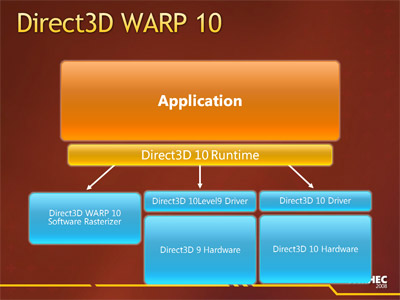 Direct3D 10Level9 is exactly what the name describes, it allows you to run Direct3D 10 applications on Direct3D 9 hardware with the same visual output but at the cost of performance penalties compared to running on native Direct3D 10 hardware. On the other hand, if your graphics functionality or partially or wholly non-existent either by design (I’m looking at you Intel) or due to anomalies (graphics driver), that’s where WARP10 comes into play.
WARP which stands for Windows Advanced Rasterization Platform is a complete implementation of Direct3D 10 in software form – that is using only the CPU. It’s even capable of anti-aliasing up to 8xMSAA and anisotropic filtering. What’s amazing is that it is parity with the output of a native Direct3D 10 device. The MSDN article describes “the majority of the images appear almost identical between hardware and WARP10, where small differences sometimes occur we find they are within the tolerances defined by the Direct3D 10 specification.”
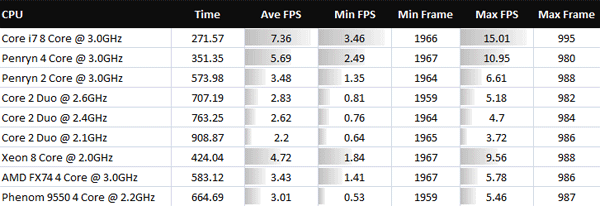
The question every one of us is asking is of course, so how well does it run. And the MSDN article answers with no other than our good friend Crysis. So this is the benchmark results of WARP10 running 800×600 with lowest quality settings.
And compared to graphics cards…
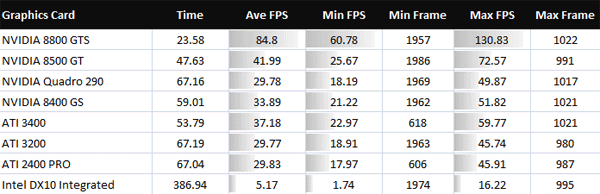
Now before you laugh so hard you cry, remember in the WARP10 scenario the CPU is not only rendering the game now but also continuing to process everything else that it originally had to process with a graphics card. Taking that into consideration, I applaud it for even running at all. Remember this is Crysis.
If you’re gamer, obviously this is not plausible and the developers agree. “We don’t see WARP10 as a replacement for graphics hardware, particularly as reasonably performing low end Direct3D 10 discrete hardware is now available for under $25. The goal of WARP10 was to allow applications to target Direct3D 10 level hardware without having significantly different code paths or testing requirements when running on hardware or when running in software.”
Personally, I’m just glad the DirectX team is taking a positive turn for Direct3D backwards compatibility. Instead of just plainly not supporting older hardware, offering some alternatives to achieve the same visual result,.which after all the goal of Direct3D. Now who’s up for some Crysis slideshows?
Update: This should once and for all end the debate, “but can it run Crysis?” Yes. Everything can.
Update 2: Some examples outside of hardcore FPS games where this might be useful include: 3D CAD applications, casual games, simulations, debugging 3D applications and medical applications.
Great stuff, but theoretically this means that they can also make AERO run on older hardware, which I think they should, as the AERO-less experience just ruins the image of the OS>
So they’re paving the way for larabee(sp?) then?
*cough* intel *cough*
I think the real news is the DX10 on DX9 hw forward compat news – although I wonder why there is no DX9 on DX10 hw; that would be a real back compat move.
Warp 10, engage
I love the “Look ma, no GPU”.
But can it run Cry–
Oops, wrong post. 😛
*flashback* Hasn’t this been done before with Swift Shader? Looks like ms bought it and made it compaible with dx10
@Walt: Hmm, never heard of Swift Shader before. The difference of course is that Swift Shader only supports DX9 for now.
The trend is +++ cores. More cores means more parrallel computing power, means pixel pushing power.
x86 has proven resillient over time, and with Larrabee things are going to get interesting.
Sounds GooD.
I was wondering the same thing as Fowl and wanga, will this help Larrabee into the GPU market or something like that?
One other rather funny fact was that Intel’s 3 GHz. Core 2 quad and their Core i7 was faster than Intel’s integrated graphics solution. Sure tells you how crap Intel’s IGPs are 😛 (or how good their CPUs…..)
Could I suggest that another use for this is enabling Windows 7’s DX10 exlusive parts of the UI to work with non-compliant machines? Poorly of course…
Think to the first bugs that will activate WARP even if a DX10/11-capable card is detected 😉
Cool!!
Now i can use my Super Mega GTX 280 SLI CUDA to process all this!! –
“Look ma, my GPU being used as a CPU to process all the graphics!!!”
I wonder how this differs from the reference rasterizer that has always been a part of DX (though only available in the debug runtime). Probably it’s faster, the reference was insanely slow the last time I used it.
@Sven – that’s pretty much it. The reference rasterizer is intended as a reference for determining problems with the accelerated implementation (because it should match the reference – if the reference gets it wrong, it is your fault, not MS and not the GPUs). It was never intended for actually being used in a release application, whereas WARP is.
I think MS got off on the wrong foot by using a game as a demo/benchmark. Using CAD software such as Solidworks (with a 3D view) might have been more appropriate (less distracting).
It’s /still/ unplayable. Who in their right mind would want to sit there playing crysis at 800×600, no effects, and crawling along as a measly 7fps? Its an interesting idea, but completely pointless. If you’re the owner of a machine with any of the cpus mentioned chances are you already have a half decent to good graphics card capable of running crysis at a meduim to high level so would have no interest in driving yourself up the wall running it with crappy sowtware rendering.
No one said anything about playing Crysis. This is a benchmark to indicate performance.
Long keep an eye on http://www.custompc.co.uk/ in the future they seem to be recycling your finds not ripping you off directly but I’ve noticed a few time stories of yours pop up on there site (which are then linked to & mangled by sites like Engadget) with there own spin from looking at what you found on public links.
Nothing you can do to really stop them but its bad form.
Anyway the software renderer will be handy for some real low end stuff which is what the Swiftshader crowd were targeting (it is really them thats built this ?) and also help avoid repeats of the Intel GMA900/915 clusterfuck as the CPU should be able to handle Aero if the GPU cant.
I wonder if this means virtual machines will be able to use DirectX.
@David
“I wonder if this means virtual machines will be able to use DirectX.”
_____________________________________________________
VM companies will still have to write a “Direct3D 9-level graphics card emulation driver”,
which is the required low-end for this code. As most of the VM’s provide a limited
DirectX 8 and lower virtual video solution; it won’t work as you’re thinking. ::sadly::
But it may give them an easier path in developing a future driver model for their VM’s
that can now use an alternative to a “real” hardware accelerator (a software route)!
Though it will be “”SLOW””, as it steps through even more software hoops…..
This is such a good development – although I think some people (not commenter’s here, but on the web) are getting a bit too excited about running a DX10 game on something like an integrated graphics chipset.
Having said that, I would still be tempted to try running a game in software rendering mode just to see how it performs 😉
@David & @Atom
This was the same thing I headed over here to the comments for, thinking along the same lines.
With VM’s current limitations on VRAM some simple offloading of the avaiable VCPU resources to process graphics in the VM would be very handy for some low-level app’s that need a bit more than 4 or 8 MB of VRAM.
AERO emulated would be really nice – like Aqua on older MACs…
Some ppl here state that the performance of it is too low to be useful. I don’t agree. WARP is not supposed to replace a 3D-graphics card, it is only supposed to a assist a graphics card. It will emulate only those features that are not available on the graphics card. The tests above show the performance of WARP when no 3D hardware is present. But that is not what it is for. I think it is a good thing that Microsoft takes OpenGL’s example.
Some ppl here state that the performance of it is too low to be useful. I don’t agree. WARP is not supposed to replace a 3D-graphics card, it is only supposed to a assist a graphics card. It will emulate only those features that are not available on the graphics card. The tests above show the performance of WARP when no 3D hardware is present. But that is not what it is for. I think it is a good thing that Microsoft takes OpenGL’s example.
—————–
EXACTLY!!!
u got it right 🙂
Im a PC Repair Specialist, 2 Years in the making, I say kick arse and leave a footprint WARP, ! Up Nvidia And Up ATI they can go to hell.