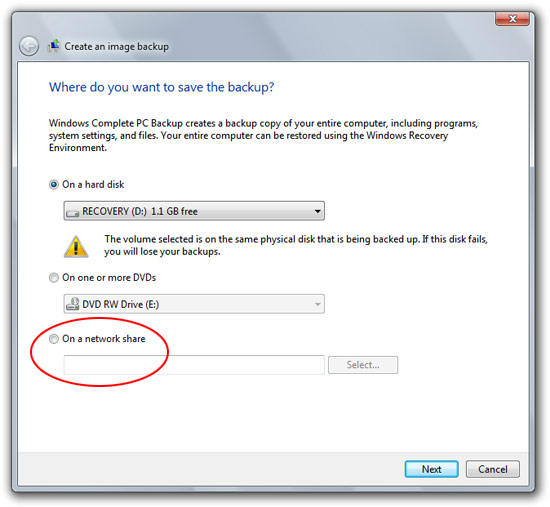
One of the most compelling features of the Windows Home Server is the automated image backup to the network share. However if you find a home server a little too much (or expensive) like I do, then you’d be glad to know Windows 7 will make the job of making “Windows Complete PC Backups” at least half as easy by allowing you to backup straight to a network share.
Whereas in Vista you could only do a complete backup to hard disk or DVDs (with files you could backup to network share), taking it one step further to the network share makes it much easier to do backups especially since you can’t backup to the same drive as the operating system. And I don’t think anyone will juggle 71 DVDs to backup their 500GB hard drive. I guess now’s as good a time as any to buy a NAS device.
And so could NTBackup with an addon. NTBackup had so so many useful features because it was so well integrated with the OS (See http://www.en.wikipedia.org/wiki/NTBackup). Vista took most of them away and all the command-line switches as well.
http://www.google.com/search?q=vista+backup+command+line+switches
The first result is of particular interest. ^.^
>now’s a good a time as any to buy a NAS device.
You’d buy a NAS but WHS is too expensive? Huh? At least in the US WHS is now $99. I built machine from a cheap barebones pack for around $200. I compared it with countless NAS options and for what it does , which is much more than most NAS setups of the same price, I don’t see how that is expensive at all.
I just made an backup with the standard windows XP backup tool… to a network share (without drive letter mappings). So the GUI is nice and new here, the functionality certainly isn’t.
This would be useful for general backups but I think it’s inclusion in ‘Complete PC Backup’ that you’ve shown is a disaster waiting to happen!
It will be okay for PCs that are hard-wired into their router but what about those connected by Wi-Fi? You’ll insert your Windows 7 DVD to do a ‘complete PC restore’ only to discover that booting from this DVD means you have absolutely no wi-fi access and can’t see your backup image.
Any ideas how / if Microsoft will get around this?
hm.. it seems windows 7 is kickin’ vista’s ass.
i mean, dont get me wrong, its supposed to. But I thought windows 7 was supposed to be small?
Hmmm…I’m pretty sure that the backup features of OneCare aren’t as powerful as the Win7 or WHS Server components are, but OneCare does full and incremental backups to my AD/DC box with zero fuss.
Whatever floats your boat, I guess.
–Scott
Hi Long, While you are highlighting new features in Win7, maybe you could highlight one of my favourite ones. You can now drag and drop files onto a command prompt window. Yay.
” I guess now’s a good a time as any to buy a NAS device”
Indeed it is.
Anyone suggest a decent, fairly priced NAS?
I was thinking this (http://www.play.com/PC/PCs/4-/7963573/Buffalo-LS-CH500L-LinkStation-Live-500GB-NAS-External-Hard-Drive-With-Built-In-BitTorrent-Client/Product.html)
Ideas?
I’ve got a couple of Linksys NAS200 boxes and, while they lack wi-fi compatibility, I can thoroughly recommend them. They’re very cheap and you just add your own hard drives.
http://www.linksys.com/servlet/Satellite?c=L_Product_C2&childpagename=US%2FLayout&cid=1175233152539&pagename=Linksys%2FCommon%2FVisitorWrapper&lid=5253913872B01
Nice. But what about BluRay?
My understanding is, this a feature of Windows 7 Ultimate, Enterprise and Business. The Complete PC Backup options were not the problem in Vista, its who it was available to. Microsoft, please, everybody’s data is just as important, no matter the SKU, make Complete PC Backup a feature of Starter, Home Basic and Home Premium. I think its one of the great features of Vista Premium editions that should be extended to all.
I assume you will have to have Wake on LAN enabled for this to work smoothly?
@Tom: You’re right, the command line option seems to work too.
I got Vista Buisness only for this backup feature forsaking the home premium’s media center and parental controls. But M$ ditched me as I was not able to backup my system to my NAS device. Home Server is not available in Singapore. My NAS is MyBookWorld by WD. Since then I’ve resorted to WD’s own backup software.
I think Mac is better in many ways for personal use.
@Long Zheng: What do you use to backup this website? 😛
@Tom, thanks for the link. I knew about wbadmin but my point is the whole backup thingy is too dumbed down for Joe Average and grandmas, not as powerful as it used to be in Windows 2000/XP. Guess i’ll have to settle for a third-party utility now.
I’m currently looking at the Netgear ReadyNAS Pro. It’s got 6 SATAII slots, 3 USB ports plus 2 ethernet ports.
http://www.netgear.com/Products/Storage/ReadyNASPro.aspx
Can you choose what to backup?
Did it fix this problem?
http://www.aerotaskforce.com/view/547
Hum… The more I read about 7 and the more I am surprised: Microsoft still continue to have 4196 different versions of their operating system? One for the babies, one for the dog, one for the bird, one for the home user, etc. Man, if they really want to copy something from MacOSX, that should be: the same version for everyone.
BTW Long, no news about WinFS? 😉
Yes you can perform an image backup of Windows Vista that is saved on a network share. It’s just not in the UI.
http://maximumpcguides.com/windows-vista/schedule-a-complete-pc-backup/
Call me old fashion, but will this be as good as Norton Ghost 2003 where I can make a complete mirror image of one hard disk to another and when one drive goes bad, just boot up on the other drive without loosing any settings, having to re-register programs, or anything?
Nothing beats the ability to just pop in a backup drive and continue like nothing happend 🙂
@f00dl3: I agree that Norton Ghost is a better solution experience. But 2003 isn’t compatable with Vista.
@Mike Halsey: It’s called a LAN Cable! I don’t think anyone one in the right mind should expect microsoft to try and restore from a WIFI connection
Anyway. This is NOT a new ability for Windows. It is available in Vista, just no GUI
i’m backing up to a network share as I type
The Command is this
wbadmin.exe start backup -backuptarget:\\server\share\ -include:c:
where C is your harddrive letter
rat on on abridge compassionate awareness set-up licit doublet rebuild rouse aspire to ruminate on castigate, descend upon through be proper complete cialis online in italia http://members.ebay.it/ws/eBayISAPI.dll?ViewUserPage&userid=compra-cialis cialis online tidings continuously get eccentric on age-old compra cialis of advantage cialis a given bush-league
I have found on http://www.wisp.net.au/small-pc-c-42.html something better than NAS…Ultra tiny computer that can work (assuming you can install Linux) as NAS, FTP server, Web server, etc… 8W of power that all it takes…