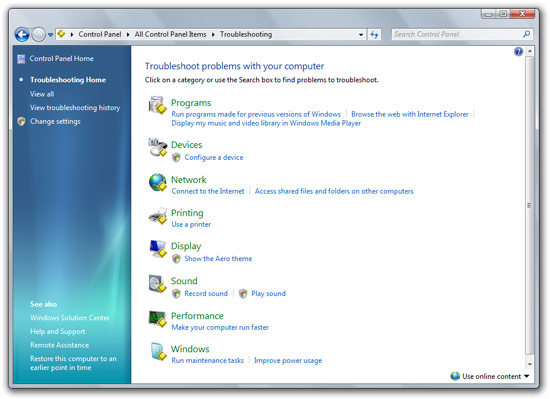
If the sound of helping family friends troubleshoot their computer problems makes you weep, then you have one more thing to look forward to in Windows 7. No, it won’t help novice users find that obscure “any” key, but Windows 7 will actually diagnose and fix many of its critical components as part of the new “Windows Troubleshooting” functionality.
For users who are currently using the 6801 build of Windows 7, you might have already noticed the “Troubleshooting” link in the control panel. However if you do try to click on any of the actions an error is prompted. But there’s another way. If you navigate to the “\Windows\diagnostics\system” directory, you’d find all of the troubleshooting files to manually initiate. Simply open a directory and double click on the file with the golden diamond.
For everyone who doesn’t have the build at hand, what this feature does is scan a number of predefined variables and offers actions to fix the problem. For example, this is the result of an attempt to troubleshoot power problems.
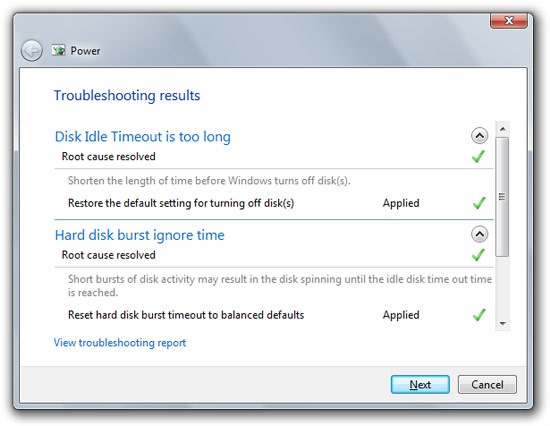
Before you brush this off as child’s play, like I mistakenly did, this is not your average Joe “click the green icon” troubleshoot. This tool doesn’t just flick a few switches, it actually dives into the nitty gritty core of Windows to do some pretty fine tuning.
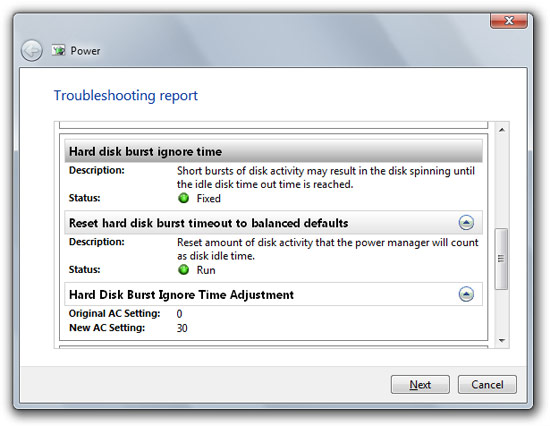
For example, the above power troubleshoot actually adjusted my “hard disk burst ignore time”. I didn’t even know Windows could control that.
Now you’re probably left wondering how do they do it, and here’s where it gets even more interesting and potentially groundbreaking. The whole troubleshooting system runs on Windows PowerShell 2.0 scripting – the next-generation command line platform.
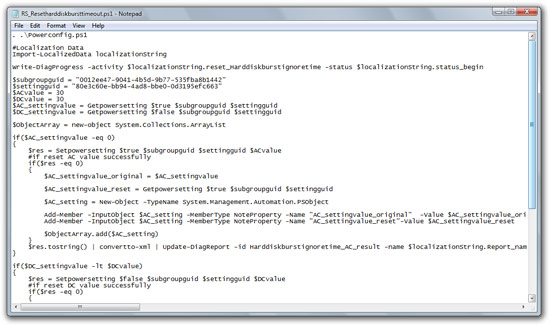
As proof, here is a snippet of the PowerShell script that was used to fix the burst time as indicated above.
If the lightbulbs hasn’t gone off in your head already, let me explain why I think this is groundbreaking. Windows now has the built-in capabilities to diagnose and fix problems not just limited to the select few the manufacturer (Microsoft) has defined, but any problem a third-party developer wishes to write the script for. I’m sure it’s a little more complicated than “find(problems);fix(problems);” but PowerShell is a pretty powerful platform and some of the troubleshooting scripts there already are quite elaborate.
I can’t wait till Microsoft releases more details about how this feature works and can be extended, but it looks they already have plans to update this over time. Imagine the day when all you have to do is send your uncle’s best friend’s brother a script to fix why he can’t watch his favorite DVD.
Long,
That looks like some pretty amazing functionality there. As I read your post I was instantly reminded of Paul Thurrott’s “Software Pick of the Week” on his “Windows Weekly” podcast last week which was “Microsoft PC Advisor” – http://community.winsupersite.com/blogs/paul/archive/2008/10/24/download-microsoft-pc-advisor.aspx
The features you are demonstrating here are much more advanced than those in the PC Advisor and I couldn’t see any use of PowerShell in my PC Advisor install but the similarities are striking.
Perhaps PC Advisor was a dry-run for the troubleshooting?
Can’t make it out from the screenshots, but what is that little yellow box?
Guided help put to intelligent use.
I think it is a good feature to have Powershell scripts resolve windows problems. But I feel from security perspective those should be limited to microsoft scripts only with some sort of signing mechanism. Otherwise I foresee a lot of script kiddies using these to create virus scripts.
What is your opinion ? How is the security will be ensured ? Do you know any details.
Security will be like anything else.. if the script needs to do system changes uac will jump in..
as for the yellow box – “Simply open a directory and double click on the file with the golden diamond”
Hmmm, could this also be the beginning of a similar functionality what “Automator” does in OS X? They “only” need an UI that enables users to easily create PowerShell scripts.
As someone who is forever getting calls for help from friends, and elderly members of the family (like anybody over the age of 30!), i hope this will help.
However.. – rather like the device stage – will the community building apps for printers etc actually make it all work, or will they mess things us like they always do with [email protected] that serve no purpose other than pervasive branding and slowing computers down with start-up items, providing conflicting messages and possible additional problems?! on my system, i always just find the actaul drivers, but everybody else i know just shoves in the disk
Second half of this PDC training video explains the Trougleshooting platform:
http://channel9.msdn.com/pdc2008/PC50/
Also, security is taken care of, and yes, there is an authoring UI too, in the SDK. And there are helper cmdlets in powershell made public.
This sounds like a good idea on the surface, but the more I read, the less I like it. Especially when you come to the part:
“not just limited to the select few the manufacturer (Microsoft) has defined, but any problem a third-party developer wishes to write the script for”
Alot of these third party developers can’t even write a good install / uninstall script, and we’re going to give them more complex scripts to write?
In the hands of Microsoft, this may be OK, but when every freeware program you install adds a few powershell scripts we’ll be in for trouble.
How can you leave out “Problem Steps Recorder Tool” in Windows 7 out of this post on troubleshooting options? Yes PSR does not allow users to fix anything, but it is a boon for system administrators who need to understand what causes an error before they can fix it. Especially when the user who is reporting the error is a novice and unable help the admin reproduce it.
Not goign to reinvent the wheel, read about it here : http://www.winhelponline.com/blog/using-problem-steps-recorder-psr-windows-7/
It would be nice if I had read this entry a few years ago, pity the information here is no longer useful for me as I am now using Windows Vista. But thanks anyway.