 If you share your PC with many users, some of whom may be messy users with a habit of littering files and changing settings, or you might just be a privacy nut who doesn’t like to leave any traces behind, either way, a new and previously unannounced feature in Windows 7 called “PC Safeguard” might just be what you’re after.
First noticed by the enthusiasts at JCXP.net, “PC Safeguard”, as it is called in the Windows 7 user account settings, prevents specified standard user accounts (cannot be applied to admin accounts) from making permanent and unwanted changes by removing all changes and files saved after the user logs off.
Credit where credit is due, this feature is not fundamentally new. Since 2005, Microsoft has offered a tool previously known as the “Shared Computer Toolkit” now “Windows SteadyState” to both Windows XP and Vista users to do exactly this function and a little more. The interesting thing however is that the feature is now baked into Windows 7 – making it more widely known to users as well as simplifying the process drastically.
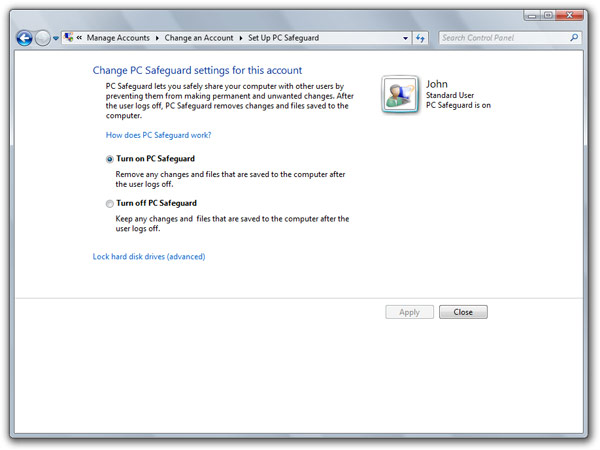
To enable this feature, click on the “Set up PC Safeguard” link when managing a user account. Select the “Turn on PC Safeguard” option, apply and wait approximately 5 minutes whilst it ponders about the question of life. It might seem like it’s not responding, but trust me, the magic is happening.
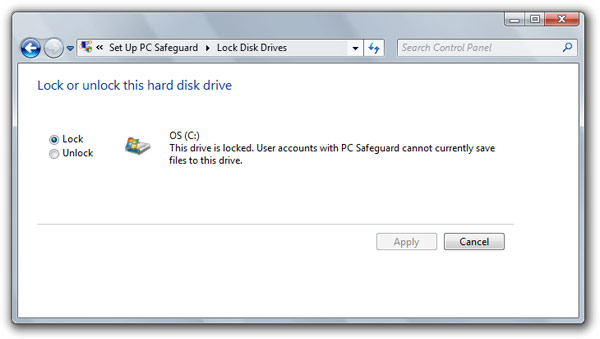
If you’re big brother with a soft spot, you can also tweak the Safeguard feature to allow users to access individual hard drive volumes. One scenario where this might be useful is to set up a small 1GB partition where the user can secure their files without resorting to removable media.
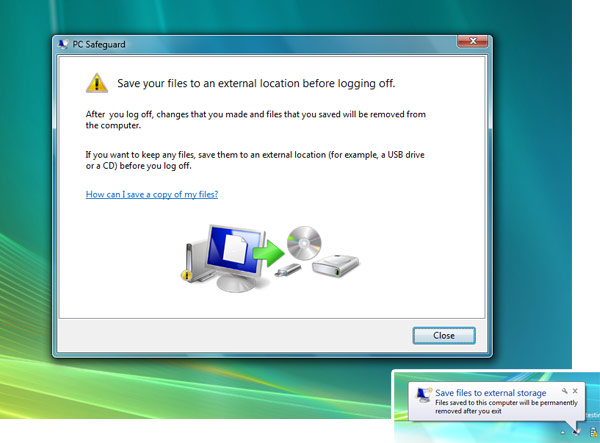
Now when that user logs on, they are presented with this message window reminding them their files will be removed after log off. Also when they try to add files to their user folders, a popup appears, reminding the impending vaporization.
From this point on, the user experience is identical to any other standard user’s. They can access applications installed for all-users, change wallpapers and themes and download files. There’s no performance impact, nor additional restrictions. The difference however is that everything will be reverted to a blank state the next time they log in. Metaphorically speaking, it’s like IE8’s InPrivate or Google Chrome’s Incognito for user profiles.
I suspect this feature will be fined tuned in the coming Windows 7 builds to inherit some of the more advanced features of SteadyState (ex. time restriction and application blacklist) but I can already see this very popular with home and public computers.
Update: To the contrary, this feature has actually been removed from Windows 7 since the beta builds.
Hopefully this will be the default for the Guest account. It is quite anoying having to manually set the acl on the guest account’s profile as to prevent it from:
a) becoming huge
b) privacy
Nice, but I still would’ve preferred some sort of sandboxing tool that I can just install an application to without it affecting anything else, without having to log into a different account. Would be ideal for when you have to download some poorly written third party app just to convert a file or something.
Great for Internet Cafes or when my friends ‘borrow’ my computer. Im loving WIndows 7 more and more by the day. I think Vista was a required pain to get to this. I take my hat off for Sinofsky and all the microsofties. If Apple dare carry on thier stupid childish adverts Ill throw my iPhone in the bin!
I’m glad they’re finally offering SteadyState as part of the core OS. A feature I’ve been using for quite some time for public-access computers, I’ve always felt that this is something that should at least ship with the enterprise versions of the operating system.
Long Zheng………. is the writer Chinese?
He’s Australian.
Is there any hint as to whether this will be available for domain-joined systems, and available to be setup via Group Policy? I’d love to be able to stop paying for DeepFreeze license renewals and use this instead, however being able to have a degree of remote management and be able to turn it on or off based on a User/Group or GPO would be absolutely required.
i can’t really imagine this being useful for anything other than the guest account which should have it on by default.
surely any account you actively set up is going to be using the computer frequently enough that deleting all their files when they log would just be inpractical.
Long – can you get a copy of the cool Windows7 wallpaper that doesnt seem to come with Windows7 that we got at PDC? The login screen wallpaper? The blue, underwater looking light from above wallpaper? Gracias and ciao!
Madonion: This feature is targeted more towards schools or public environments such as a web cafe, or even for families with young children that might have fun messing around with settings.
Chris Haaker: http://istartedsomething.com/20081028/download-the-official-pdc-2008-wallpaper/
it’s the Windows Disk Protection feature of SCT/SteadyState? Awesome!! Best of all, it’ll work with 64-bit since it’ll be part of the OS. I guess this offers “registry safeguard” as well because the registry eventually is a set of files in %windir%\system32\config and %userprofile%.
You know, this reminds me of something our IT does for our lab computers. They use a program called Deep Freeze which essentially does the same thing, and works both for the MAC and PC. I’m going to tell them about it, see if when we upgrade to 7 if we should use this technology instead of Deep Freeze.
You brought up an interesting point actually theoriginalsomeone , and that is PC Safeguard doesn’t appear to be included in the 64-Bit build.
http://www.jcxp.net/david/NoSafeguardIn64.PNG
NTUSER.MAN ??
Woot, it’s like ‘pr0n mode’ for the desktop. save files and movies, then log off and know youre safe.. all under the unsuspecting guest account 😀
I’ve had a pretty bad experience with something like this. We were setting up the college comps for LAN Gaming and the lab in-charge did not tell us that the machine was sand-boxed, they had a software called Deep Freeze installed on all the comps, we installed the games unawares and shut down the comps only to come next day and find everything gone. We performed the sequence 3 times only to hit our heads with the wall on realizing that the machine must’ve been sand-boxed.
@Manan
LOL, I’m sure exactly that’s why they sandboxed the lab computers!!! 🙂
Bad experience for you as a student, great experience for the admins.
Do you have any information on the link “Link Online Accounts” to your user profile in W7? The link seems pretty interesting, but is broken and I haven’t seen anything else on it.
@trent: Good point.
I’m using build 6801, 32 bit, but I can’t seem to find this feature?
I’m having the same screen as the 64bit screenshot posted above by David.
@Rowdy: Are you sure it’s a standard user?
Rowdy,
I also have build 6801, 32-bit, and i cannot find this feature anywhere.
Why the heck wouldn’t SteadyState let itself get installed on Windows Server 2008?
@Long Zheng:
Yes, i’m sure it’s a standard user. I also tried it with/without a password and things like that.
I suppose this features depends on the processor used then, the same as with DEP, that won’t run on older processors either.
I agree with Frank. When I first saw the title to this entry I thought it was a built in application sandbox. I hope hope they integrate that as well… oh wait, I’ll just submit it to the Windows 7 Taskforce site. =]
Lol I also had a similar experience to Manan.
I never had this option before. I had it installed along side another operating system.
I decided to reinstall windows, letting it take the entire drive. During the installation, windows created a hidden
system partition at 200mb, and afterards, after creating the standard account, the pc safeguard option was available. Perhaps it could have to do with letting Windows 7 take the entire drive, or to have a Windows System partition.
How is this fundamentally different from mandatory profiles (ntuser.dat –> ntuser.man) apart from being easier for the lay person to work with?
Hey Long,
I recently installed am currently dual booting Win7 RC and Win7 Beta 7000 and I have a question regarding the PC Safeguard feature. Is it missing for a reason in RC?
I have followed the guide and done some research and no luck. Please help me.
@Win7Guru: Yeah it appears to be removed with Windows 7 since the beta.
el calendario de niurka y bobby
maricopa county jail records
formal letter format
sss online inquiry
media player 10 codecs
resignation letter sample
chopper frames
free printable graph paper for kindergarten
writing worksheets
arm numbness
^ That’s SPAM, Long, and do you have any idea why this feature was removed? I was looking forward to this one.
ausome !!
updates …
hi…
im not sure if it work as much with deep freeze interprise…BUT can’t find dp for win 7
il try this…
gudluck to me wewewewewewewe
i cant find it lol is it guest mode???
They have removed the Safeguard program when Windows 7 went live (no more beta)
I’m freaking PO’d that M$ removed SafeGuard. How the frig am I supposed to run a Sandbox in Win7 when Sandboxie is incompatible and they removed Window’s built in one?
I Hope my school gets 7 and puts this on, I hate deepfreze, it just blows so much, you can not even install anything, I like to be able to install stuff like Firefox, but school only uses shitey IE
I’ve been looking for something like this and had no idea that Microsoft had this. I’ve ran into something called SteadierState, but it is only for Windows 7 Enterprise and Ultimate. Thanks for the write up.
I am MILE Technologies and I am looking for a Windows 7 Professional solution. Does SteadierState work with Pro?