The Microsoft Zune team has officially become “region control” extremists. First, they locked down the Zune Originals site with geographic IP blocking so you couldn’t even fantasize about the cool and stylish new Zunes if you didn’t live in the United States. If that wasn’t enough, they’re also blocking enthusiasts from populating their Zune Card with play lists. Now comes a third restriction which hides the Zune Marketplace in the latest version (2.5) of the Zune software.
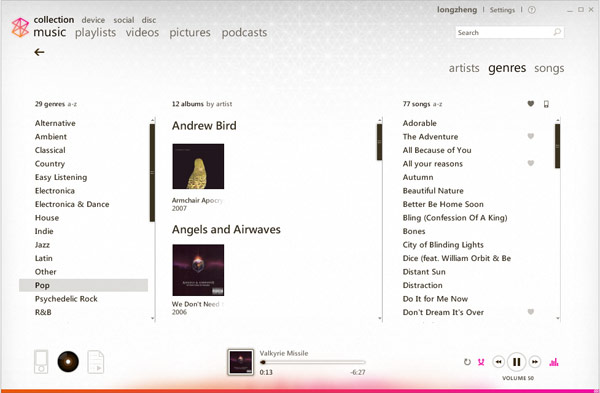
If you installed version 2.5 of the Zune Software and you don’t live in the United States, this is what you see. There is no “Marketplace” button in the menu bar.
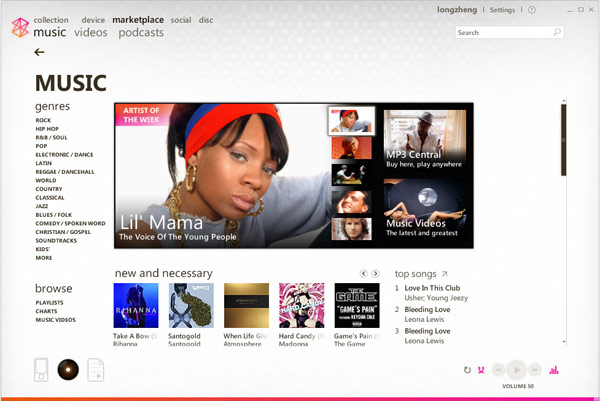
After some digging around, I’ve found a quick and dirty, but effective, workaround anyone can use to restore the Marketplace back in the Zune software, until at least the Zune team realize there are people outside of the North American continent who share a passion for music too.
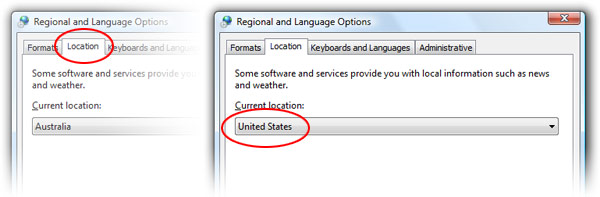
To apply the workaround, find the “Regional and Language Options” settings in your Control Panel. Vista user can get to this by searching for “regional” in the Start menu. Under the “Locations” tab, select “United States” as the country. Apply generously.
If you now launch the Zune software, you should be in business.
As far as I know there’s little or no side-effects to this workaround because the “Locations” setting is not widely utilized. At most you’re losing a bit of national pride. Perhaps one day you won’t have to lie about your nationality to discover some music on Zune.
I love my Zune 30, but these regional restrictions are stupid (i live in Brazil).
thank you so much, it was really helpful.
This is worrisome, because at least, if you didn’t have a credit card from the US then you couldn’t buy, but at least you could get the free songs and podcasts. How does it fit anyone’s mind to ban users from getting their favorite podcasts… Amazing… not.
I’m getting tired of all these restrictions. I bought a Zune from the US Amazon store. I don’t live in the US (I live in Venezuela), but I should be able to get my FREE podcasts.
It’s easier to use firefox and change the location only in its settings 😉
Install a crappy browser just for this? No, thanks.
This isn’t really the Zune team’s fault, Long. The issue has more to do with licensing agreements between Microsoft and the record labels. These labels are very controlling about how their music gets distributed around the world and it normally takes a long time to get the right structures in place. Don’t be so hard on the Zune guys.
But Patrick, the Zune guys are blocking even the play counts for those who aren’t US residents.
I think this has something to do with the new TV content and licensing.
This fix sorts out the plays not uploading problem as well. See here: http://jamiethomson.spaces.live.com/blog/cns!550F681DAD532637!3149.entry
Pharod, why can you not get podcasts? I live in the UK and it works fine.
Damn, I really want to use the Zune social but im in the UK and it keeps telling me to naff off.
It’s stupid, I have an Xbox Live account so I have a Zune account automatically with all my friends, but I cant sign in to it?!
The whole regional thing is ridiculous, the one part of the Zune experience I hate.
WELCOME TO THE SOCIAL*
*social available only in United States of America.
It’s pretty frustrating that the Zune is USA exclusive. Even though I live in Canada and the Zune is coming here soon. I can see how annoying it is for other countries to have nobody (Microsoft) assuring them that the Zune is coming wherever.
JaimeT,
I meant that if i don’t change the region, I suppose that I wouldn’t be able to get podcasts because the marketplace link wouldn’t be there (haven’t tried it yet). Of course, I can, but not everybody is not as resourceful as us.
Aw: I love that.
And Long, that’s a good song ya got playing. 😉
how do i get rid of marketplace? i’ll never use it.
Ok, this works, but when it comes to actually buying something you need a credit card. The credit card form only allows the country as US, so if you submit it won’t you end up getting a fraud call from the bank or something??
that’s why people wanna go to america
To buy things from the marketplace, you need Microsoft points. There’s sites on the internet that sell them (e.g. Xbox live points). To buy from the marketplace you need to make sure they’re US MS points though as I don’t think MS points for your Xbox in your country will work (the marketplace will recognise it’s not the right region).
gary: just rename the ZuneMarketplace.dll to something else.
Mel: I’m using Singapore XBOX Live Points, and it worked.
Its crap that i cannot buy Zune here from UAE, its truly crap while Ipods are available in truck loads
sice dec 07 I have a zune 30 – and I’m living in austia. with my austrian credit card (I typed the adress from an friend in the us and I can purchase MS points for songs, etc) I buy microsoft points music, music videos AND tv shows 😉
this little hint is necessary if you want to sync your zune with your computer. I had some issues, but I solved them by changing my area.
To sum up: never had problems with regional restrictions here in austria.
Something weird happened to my zune account after the 2.5 update.I live in Uruguay and zune card never worked for me
http://social.zune.net/member/Not+falling5
I can see your zunecard…
http://1985bestyear.19.funpic.de/Zune.net%20-%20Profile%20-%20Not%20falling5_1210196844643.png
@Ignacio: after the 2.5 update, I got a message asking to accept the new terms and aggreements. Until I did this, it wouldn’t log me in. The annoying thing is that everytime I have to log in to the web I need to use a proxy server to get past the regional restriction.
I now have the problem that I can’t install the 2.5 update onto my Windows Home Server. If I could find a redistribution then I know how, but otherwise I get the message ‘operating system not supported’. I’m wondering if I can change something in the registry to make it think it’s xp, not whs.
@Mel and Marijan: Thanks for the ideas on buying MS points, I’ll give them a try.
What The Hell is going On?
I also live in Venezuela, a friend of mine did me a huge favor (that´s what I thought, now I don´t) and bought me my Zune 80Gb in New York only 2 months ago! When she went there on a trip.
Everything was going fine until 2 days ago when I upgraded my software to the 2.5 version and now I can´t access to the marketplace!!!! I loved my Podcasts, there were my windows to the world & now just because I don´t live in the US I can´t download them!!! THIS SUCKS. I PAID 270 BUCKS FOR MY ZUNE,JUST LIKE EVERYBODY ELSE I SHOULD HAVE THE SAME RIGHTS AS EVERY OTHER CONSUMER!!!!
dude, chill out. close the zune software. go to start->control panel->regional and language settings (or something similar). change the location from Venazuela to United States. Open the zune software and the marketplace tab should be there. it worked for me (from the United Kingdom).
hope this helps. 🙂
worked for me too – allthough I’m from austria 😀 I’m buying TV shows, music, etc with me MS points, never tried the zunepass, because I don’t own the music and because I cannot burn the songs.
ms points rock, because the dollar is weak and the euro is strong 😀 that’s why I pay only 50 euro cents for one song; and that’s cheap. in the itunes store one song costs 99 euro cents…
lol kl. shouldnt matter where you are, as long as the software THINKS your’e in the US.
my zune card is working!!!II can use all zune social features and im not in the US!
@Joeszune74
Do what Long said in his post and everything will be fine. I can attest for that.
Thanks for the advice, I did as you said and I’m Okey now, Marketplace is up and running.
I apologize for my initial reaction.
Joeszune74…..
Hope to keep on receiving e mails from my new zune community.
yh the zune social features and tab arent affected by the update but the marketplace and the marketplace tab wont appear or be usable.
Simply outreageus.
I thught I was making the right decision over an ipod. Not sure anymore.
Right, so I’ve got MarketPlace going, but to register I had to make a new Windows Live ID, when I got as far as creating a “ZuneTag” (How original) I discovered that the tag I wanted had been taken, by none other than myself, I haven’t registered my true Windows Live ID to the Zune Social but apparently, my Xbox Live Gamertag seems to be auto-tied to it, so has my friends.
To test this, go to http://social.zune.net/member/PhenomenonTom (which is my Xbox Live Gamertag), then replace the PhenomenonTom bit with a gamertag from xbox live you know is not tied with Zune, if you look at mine, it is obvious that I live in the UK, as I said, I tried this with my other British friend’s GamerTags and it works. So it looks like either Microsoft auto-linked everyone over to the Social or perhaps the Zune is about to land not only in Canada, but in tke UK and perhaps elsewhere…
Just upgraded to ver 2.5 and now when I sign in it says I need to accept the new Terms of Service, but when I click to accept them I just get a page saying “Not available in your region”(UK).
Is tere anything I can do to get a workaround? btw I have changed all my regional settings to US and can see the marketplace link in the software, just can’t sign in.
You shoud be able to. You say you have changed your settings to the U.S, which means you should be able to sign in (you may want to just double-check those settings). If that doesn’t work then you could try to make another zune social account and using that one in the zune software.
@John, You can try a proxy server to get past the regional block – or otherwise ask someone you know in the US to login to your account and accept the terms of service. It’s not as simple as others are saying – I know because I had this same issue myself.
It worked out for me that one particular company machine let me in, I don’t know why, perhaps the companies network was based on a US server of some sort. I tried for a while with proxies when originally trying to make a login and had some success, but this can takes ages to get past because of the SSL (https encrypted).
Overall, I’d recommmend emailing a friend in the US to help you, it’s only a one off because the TOS was updated to account for the video store.
Hello i live in Denmark and i just got a Zune 80gb from United States. I tryed to change my computer to United States, but that option isent there. I can only choose USA… Please help me fast 😀 i just got it two days ago and i hunger for music 😀
Hello,
I bougth a 30 Gb zune, I am in Spain and I can’t register in the web. I tried to use a USA proxy address and changed the location to US. Anybody can help me to register my account in zune.net.
Thanks in advace.
hi, I’m trying to log in but the link it gives me for the terms of service i need to accept is bogus. it links to set up a new account. do i have to set up a new account or something weird like that?
well can you still purchase music i let say canada?cuz if you cant i might just go back to pyrating music the free way
I am having the same problem as Jeremy.
Every time I try to sign in to my Zune account, it says I must accept the new terms of service, but the link takes me to the page to create a new account. This is getting really annoying.
I have had my zune over a year in canada (imported it from the usa) and I managed to get into the zune account (marketplace and social) before they blocked it in canada (the Canadian zune release was this year) but since the release I cant buy music. I also can not create a new zune account for my friends due to region blocking.
Thankyou!
Well this is just retarded. I feel guilty downloading music for free, since technically it is stealing (yes even in Canada now) so I thought that I would buy things legit with the marketplace. Oh Wait! thats not allowed because your not american and your canadian ms points dont work either! Im not 18 so I dont have a credit card to use with lets say Itunes ( and .99 a song seems kinda ridiculous ), I thought I could work around the whole credit card problem through using Zune marketplace however it appears that this isnt working out for me.
If they dont want us to steal music then how about allow us to BUY the music legit. Dont release a product in Canada and then say “whoops sorry guys you cant download music, just a minor problem” I guess ill probably just “steal ” it and buy some CD’s at HMV or something
i checked this out and changed it to the united states but it still doesn’t work???:S
thx
works in zune 3.0 too
posting from Russia. it took me half an hour to fix this completely idiotic restriction. thanks.
I changed the settings in the control panel, can now see the marketplace info in the zune player, however I wan’t to set up an account and buy music with a zune prepaid card, I have opened a new ‘live’ email address and used a US postcode and state.
But it says I need to accept the terms of service, is there anyone here from the states that can accept them for me?
It would be interesting to see if it works then after they are accepted.
thanks so much!
My regional setting are US, but i’m in Iraq and when I attempt to purchase a TV show it states “Zune Marketplace is not available in your location” How do I get around this.
i hav got marketplace on my zune software but i still got it in my zune device
help me with this……
Yo thanks a lot , this worked. I should have thought of that
thank you soooooo much i have been so F***ing mad because i couldnt get market place till i tryed this and it works. i live in canada so i changed my region to united states and it worked!!! 🙂 🙂
Thanks a lot!!!!!
Hi.
If any of you are still having trouble accepting terms and conditions for zune, this is how I did it.
If you happen to have a windows mobile phone try to install the web browser skyfire on it. This US based software renders all the pages in the US and feeds them to your device. Therefore zune website thinks you are in the US and allows you to sign up for an account, accept the terms and conditions and you can then do a runner.
I don’t know if there are any other browsers that do this on a bog standard desktop computer but it works on the pda version.
adios.
thanks.. man ”
it really helps…..
i neeed that market place so badely u have no idea
I just found an easy work around. I know this is an old post but It comes up high in Google searches so I thought I’d give it a go.
Download Google Chrome and open up an incognito window. Go over to Zune.net and log in. You won’t be told that you live in the wrong part of the world and you can accept the terms from there.
Thank you soooooooooooooooooo much to you writer &
Fuck you sooooooooooooooooooo much to Zune.
Thanks. I followed the instructions and i got it to work.. sweet. Now I just have to change my Windows Live Canadian postal code to an American one.
Thanks so much, this worked for e, I wonder why zune should shut other people out…
I bought a 32g zune yesterday and downloaded the latest version of zune onto my windows 7 eqiupped laptop and it wouldn’t let me use the marketplace because apparently I was in the wrong region, I live in wisconsin, not the uk like it says I do. Now it won’t let me sign in or display the marketplace…so frustrating.
I was so confused by this because recently I switched my control panel settings to Russian since I study the language and wanted extra practice/immersion. I had no idea why the marketplace was suddenly gone!
this is so shortsighted on Microsoft’s part.
Work around for Canadian Zune customers – so you can buy tunes and watch tv (Cost 160 credits).
1. Change regional settings to US on computer to be able to see marketplace
2. Cross the border and go to Best Buy (or any other retailer who sells Zune Passes and MS Points) – buy monthly Zune Pass(es) $14.95 USD & MS Points $25.00 (or find somone to buy them for you and ship them) – buy as many as you like. We usually stock up on 3 to 6 months worth. You can enter them immediately and the software will keep track of the number of months you’ve purchased.
3. Download software to hide IP address – only for TV and videos – we like Hotspot Shield (if you don’t mind the ads) – this hides you IP address and allows you to purchase and watch TV and Movies
We live in BC Canada, just across the border and go down every 1 – 2 months. We’ve been able to come across the border with as much as $100 of goods without having to pay duty or tax and they never ask about the Zune Passes or MS Points. Works out great and feels good to get around the stupid rules. If we’re allowed to watch US TV on our CDN TV channels we should be able to purchase them. 🙂
yo haters stop your hate (I don’t live in the US (I live in Venezuela), but I should be able to get my FREE podcasts. remember times are hard so zune musics gota keep its busineses runing smoothly
so stop moaning and move away to the US of A
yes we can.
I live in P.R. and apparantly we’re only considered part of the U.S when it benefits them. My region says United States but the stupid box still comes out saying it’s not available in my region. Why in the hell of its does this happen?!?!
I’m from Puerto Rico (a territory of the United States) and they don’t even allowed me to have the marketplace. Thank you so much.
Thanks a lot, this was extremely helpful…=D
Need to know if anyone can help me get on Zune thru the xbox 360 already bought the points and everthing we are in South Korea . when we get ready to watch movie it says cant watch in region , anyway around this would hate to have wasted my money thanks
this is sad i live in canada and i can’t get marketplace on my zune hd now i can’t download apps that kinda sucks
Wow, I feel like a retard now but this mos def helped me a ton. All my problems are gone. Thanks!
I live in greece, what is going to happen with this?
At least they MUST do smthing about the credit cards.
It is not possible not to be able to by apps. i need translator and medical atlas, its impossible not to have them in my phone. its outrageous not to be able to buy them.
Hope it gets solved.
Super cool & Super easy.. 😀 thanks.
Stupid feature, brilliant workaround! It worked instantly! Thanks!
Thanks Long Zheng …u rock…
Man, i was already worrying that i wouldn’t ever be able to get my markeplace back again. But now that you’ve shown me this it really work. Thank u so much. I needed that
thanks help me alot
Hey. i can do this but my ZUNE says to sign in and after my pwd entered it says that my Location of Account Detail and my PC does not matching..
Im living in INDIA and i’ve changed my Account Detail To USA and my PC too..
but still same message..
I can see FREE apps but cant upload to Phone.. :(( can any one have deep idea for this ??
thanks in advance…
-MEHUL
Thank’s it helped me alot
Thanks man! 🙂 this helped a lot 🙂
10ks a lot man. I live in nigeria n ur post helps, feel bad though. I cant put my country as my region cus i wnt 2 use zune marketplace
how can i connect internet via data cable to pc?
thank you so mach dear you very smart.
it worked really normal, very good!!!!!!!
thank you friend…..
Thanks much dude your a time saver. Thank you so much for sharing.