 During the betas, one of the few new functionality Windows Vista Service Pack 1 added was the ability to create a Windows recovery CD with an easy-to-use GUI interface. Up and until then, it was slightly harder but still possible to do so through a command line. Update: To avoid confusion, this is not the type of recovery discs you find in prepackaged computer systems. This recovery disc does not reinstall Windows, it merely offers tools to fix it if it ever becomes unbootable.
Whilst all Vista install DVDs include the recovery functionality natively, it’s probably useful to burn yourself a spare copy to take with you. You can also download an ISO from NeoSmart.net but you might not have bandwidth to spare.
For unknown reasons, the functionality was then pulled out of the final release of SP1. If you look inside your system files, you can still find recdisc.exe which is the utility’s executable, but clicking on it does not launch anything. The shortcut in the Start Menu was also removed, indicating it was removed on purpose.
Out of curiosity, I decided to find out if by copying a version of recdisc.exe from a beta build of Vista SP1 and placing it in SP1 RTM would work. Thanks to Chris123NT for digging up a copy, it did work. If you also want to make it work, there’s a bit of file permissions involved, so here’s how.
Step 1. Download a pre-final release of recdisc.exe (x86 version) or (x64 version).
Step 2. Open your system32 directory. Start menu, type “%systemroot%\system32” and click Enter.
Step 3. Find recdisc.exe, right click on it and click “Properties”.
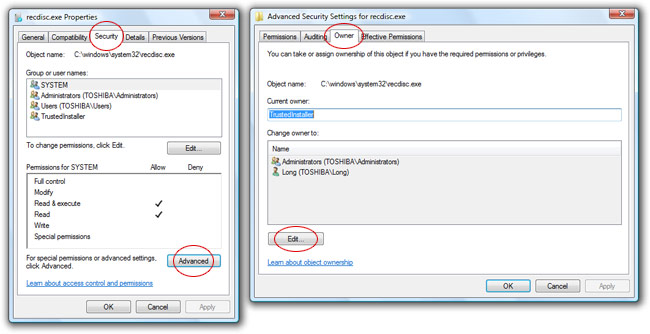
Step 4. Select the “Security” tab and click “Advanced”.
Step 5. Select the “Owner” tab and click “Edit…”.
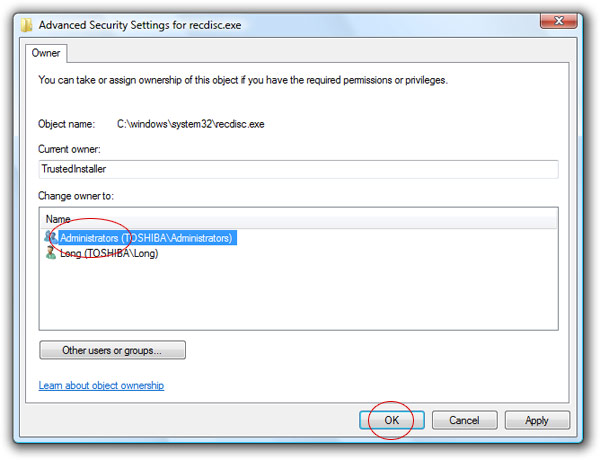
Step 6. Select “Administrators” to change the owner to, click “OK”. Click “OK” again on the dialog.
Step 7. You should be back at the file security settings dialog. Click “Edit..”.
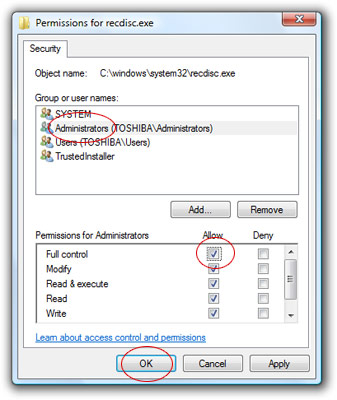
Step 8. Select “Administrators” and then tick the checkbox under the “Allow” column and “Full control” row. Then click “OK”. Click “OK” again to finish.
Step 9. Rename this file (press F2) to something like “recdisc.old” to keep a backup of the original file in case you need to restore it in the future.
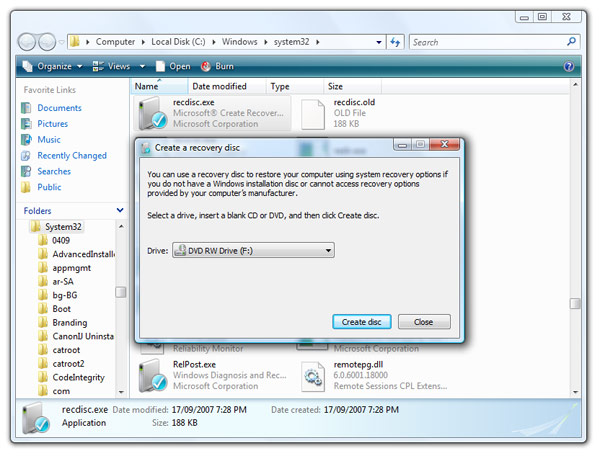
Step 10. Copy the “recdisc.exe” file you downloaded earlier. Double click on it to run.
I really wouldn’t recommend doing this. This wouldn’t have been removed if there weren’t some major issue with it that was found too late to fix. Long, you might be exposing people to some sort of major issue here – I’d recommend adding a disclaimer to that extent.
Strange that it was removed before RTM. I suspect this may be “reactivated” later or updated …
Byron, my guess is OEMs bitched that people wouldn’t buy recovery discs (yes some make you BUY them) or that you wouldn’t use their proprietary tools, so MS took it out.
Not necessarily. MS always loves to remove features. It may be planned for 7.
wonder how long before the A-team strikes for the recdisc.zip download
@bernard: At least after Easter break 🙂
Im really starting to question Long’s creditability as a safe user, this is seeming more like a hack, or a work around.
I dont come here to visit that, i got to tweak xp to see stuff like that
@Trent S: I never said I was a safe user, in fact I love to fiddle with system files and configuration files. Most things I post here though are procedures that are pretty safe by Windows-tweaking standards. Having said that, I don’t imply each and every one of you should do everything I say so if you feel this is not appropriate for you, then please don’t.
Now, if only this existed for Windows XP
One reason I can think of why MS removed such feature is the fact that it may hurt MS or OEMs. Let say the recovery disc is created from an ACTIVATED OEM machine, then by applying on other pc, you get the same activated state. Wouldn’t that defeat their anti-piracy strategy and SP1’s purpose (cut down on exploits).
@Namiie: The recovery discs are created using your install discs and do not contain any customization or activation information. They are purely technical diagnostic and recovery tools.
CRAPWARE! That’s why the recovery option was taken out. If you recover your computer with an OEM copy, it also reinstalls the crapware, while I’m guessing it doesn’t do so with this one. Question, can’t you use this disc to recover a computer than never had vista in the first place?
You guys are mistaken. This isn’t the recovery disc type that lets you reinstall Windows. All this does is offer you a bunch of utilities which can help fix Windows if it ever becomes unbootable.
Will these feature be back as part of Ultimate Extras?
Whoa Long, you should consider writing up computer manuals. I would do it too because I like to, but you even put little tricks for new users (Rename: F2, Opening the System32 Directory, etc.). Kudos, and it worked like a charm.
You guys are acting noobish! Is it best for the people who dont have the vista CD! Once you create the disc, you can restart your pc, and then a little menu will appear saying, press any key to continue (something like that), then it will take to a menu to repair your PC, by either system restore, backing up files and etc, Thats all it does! But if you already have a Vista cd then you dont need to create one really, It already does all above. Long, thanks for the file! Surely it will be very useful for me 🙂
By the way I’m new to this blog!
This is for a recovery option in case your system fails. I don’t see how this negatively affects the OS in any way, shape, or form. If/when my system dies I want every recovery option available.
I remember the days when you needed the Windows 98 install disk to do any work with USB devices. I also remember that disk being few and far between for OEM computers. When will you be able to make a backup Windows install disk with the click of a button that doesn’t install OEM crapware or get the disks with the computer without extra cost, and at a level of ease that gets computer illiterates able to do it?
All well. A recovery disk is something that everyone needs, and not from the OEM, you need it from the OS maker.
Sorry for mistaking. I own a HP dv2000 laptop and so I thought this is the same thing as the Recovery Disc that asked to be created by HP. Well I guess this is still useful for normal users.
Where do you find all the icons that you use as photos for these articles? Are they grouped somewhere in the Windows folder where I can access them? Is there another way to get a hold of them?
You are looking at this all wrong…. They pulled this out of Vista SP1 so that they would sell more ‘Windows Home Servers’…. Home server lets you backup your entire hard drive and even do point-in-time restores of the entire volume. 🙂
I tried using this. I got the permissions changed OK. Then copied the downloaded file to the System32 folder. Neither double click or Run as Administrator will work, though.
I get an error that the device failed to accept the command within time?? It does show the disk create menu next but no CD or DVD burner is shown and it cannot find it so I get another error.
I was able to create a successfully bootable disk using NeoSmart’s ISO. I had to juggle to get the CD to be bootable. Using NTI you can check Bootable Disk AND burn an ISO. I Nero I could not find a way to do both at the same time and the disk was not bootable.
A funny little thing happened on the way to the folder…LOL…that is, the system32 folder. The recdisc.exe utility was ALREADY there. I upgraded to SP1 via Windows Update last week. Apparently it came WITH recdisc.exe, albeit, a slightly larger file size than the one posted here.
Has anyone come across the same situation?
I remember the Beta people telling me that since most of the OEMs dont give a Windows Vista Disc, there was no point of having this feature and most of the people who complained that they werent able to produce a Recovery Disc were the people who had the Recovery Partition given by the OEM instead of the Recovery Disc. This is really bad that OEMs are not ready to supply a disc with them. I like Dell for that matter, they do supply discs 😉
I have replaced the disabled build of recdisc.exe (18000-1840) with the earlier version and now it does work but in an extremely funny way:
First it says “you can create a recovery disc if you don’t have an installation disc…, insert a blank SD or DVD”
When I do so and click “continue ” a window pops up “Insert the Windows installation disc to create a recovery disc”
If I insert an installation DVD into my DVD drive it starts working and then asks for an empty disk again to
write the recovery disc which works actually fine.
But why does it ask for an installation disk at all what I’m not supposed to have, once I decide to create
a recovery disc.
And why should I create one once I have an insallation DVD to repair Vista from?
Any ideas?
I get into this page looking for a way to obtain a Vista Ultimate with SP1 disk. I purchased Vista Ultimate without SP1. After installing SP1 I went to Windows features dialog from control panel and it came blank, no list of options.
Searching on the Internet I read that to solve the problem you have to re-install or upgrade since there is a known bug but there is no fix yet. Problem was that when I inserted the DVD it the update option came disable and it said that I needed a newer version of windows i think it was because my laptop having SP1 but not the DVD.
Is this process going to provide me a repair disc with sp1?
Downloaded before the ninjas come 🙂
Works here.
Dear Long,
Tried the method,(as an adminstrator) and the process won’t let me save the changes, after I click Ok aa box says it eill make the changes and then one pops up saying that i don’t have permissions to do it.
Did i miss something, I followed the instructions.Any thoughts on it?
Thank you,
Olino
I have Vista Ultimate 32 W/SP!. followed the directions faithfully and it works fine. Thanks a lot.
Don Williams
finally got it to work after a little maneuvering hope i never have to use it now
hopefully better than new convoluted! ghost!!!
It asks me to insert the Windows Installation disc.
If my computer had come with an installation disc, I wouldn’t need this hack in the first place.
No longer works – ASKS FOR A WINDOW INSTALLATION DISC before creating the recovery CD. Windows Home Premium SP1
I’ve been doing repair and recovery work since the days of DOS 2.1. Times sure have changed. These days, a repair / recovery disc is as essential as having the OS itself. I’ve used a Windows XP PreInstall environment for years. With it I can preform virus scans, file recoveries, and a whole bunch of neat stuff. One thing it can’t do, is repair the OS. If an XP Install disk is unavailable, there’s no access to the Recovery Console and you’re pretty much assured of a reinstall via the manufacturers “Recovery” disc.
I don’t have much experience with Vista because I’ve advised my friends and customers to avoid it like the plague! But when my son’s Vista loaded HP refused to boot, his only option was to have the computer center at his school re-image the drive. (Too lazy to do it the right way, I guess….) Anyway, I’m going to need some new tools. I started with the NeoSmart download.
I’m not surprised that MS deleted the ability to create a repair disc. One thing MS is good at is deleting promised functionality from it’s new releases. Anyone see that new file system Vista promised? Me neither. Plenty of cute bells and whistles though……..
wen i did all the things as said above and open recdisc.exe it says
class not registerd (0x80040154)
The process itself worked fine. Yes it asked for the windows installation disk, but for me at least, that’s not a problem, as the object is to create a spare emergency boot disk, so I don’t put my precious windows disk at risk by taking it all over the place – it sits safely in the garage in the box the computer came in 🙂
Next step is to see how I can install it on another partition in the machine and make it a hard disk boot option like the good (well, bad actually) old 2K/XP recovery console.
I confirm what already said above by Raymund Dobay and Scott:
No longer works – ASKS FOR A WINDOW INSTALLATION DISC before creating the recovery CD. Windows Home Premium SP1
I have the same problem. Please help.
ASKS FOR A WINDOW INSTALLATION DISC before creating the recovery CD
Hi Chris.
I’m not trying this way anymore.
You can dowload the ISO (look for the words “download an ISO from NeoSmart.net ” in this article).
About me, I’ve found that booting with my Toshiba recovery DVD1 inserted, a dos windows opens for a while. Breakind that batch (CTRL+C) I can access the command prompt with a lot of useful command, like DISKPART and IMAGEX.
My pc was crash and I have formatted well but I have deleted recovery disc on disc D is any way to format again and created recovery disc on hard drive D how it was from manufactory .please
The recipe works with Vista Business 32, SP1, but asks for an install disk. We have the Vista DVD that came with an MSDN subscription, which was accepted. Our HP dc5700 came with only a “recovery partition” gratis HP and “OS partition” gratis Microsoft. Using them would erase all installed apps and data. We wiped them out, made a backup partition big enough, and generated a complete recovery point. The recovery disk boots and provides a Repair function that will restore from the recovery point. All data generated since the recovery point will need to be backed up separately.
This worked perfectly fine for me. I set it all up on one Vista computer to get another one to boot. The other one would simply start up and say BOOTMGR not found. The disc was created perfectly and the other computer fixed on the first try.
It may be a bit convoluted, but you can create and customize a vista pre-installation environment using Windows Automated Installation Kit, even with an OEM system. However, I found the Recovery Environment package absent. Still, very nice to have. Even with a bare bones Vista PE disk you can run notepad, diskpart, chkdisk, and the like from the command prompt.
http://www.microsoft.com/downloads/details.aspx?FamilyID=c7d4bc6d-15f3-4284-9123-679830d629f2&DisplayLang=en
this was re activated in windows 7
My grandson just started some basic computer courses and has somehow deleted my “C” drive. I now cannot boot up my computer to run the repair disk program. Is there any way around this or do I have to go out and get another system?
I can’t seem to get the exe file to run. I double click on it and it does nothing. I’m in windows 7 right now.
Followed the instructions. WHAT A WASTE OF TIME. You need the installation disk in order to make the recovery disk. If I had the installation disk, why on earth would I want to make a recovery disk. That’s the whole point. I want to make a rcovery disk BECAUSE I don’t have the installation disk.