First, a few words about the following screenshot. To be perfectly clear, this is not an original image. The window and its contents (address bar, tab, window title, page content) have been heavily recomposited to better fit in a smaller image size as well as to obscure any traces where this might have come from. I did not take the screenshot nor do I have access to the beta (so no emails please but do send bribes regardless). Having said that, I can easily vouch for its authenticity.
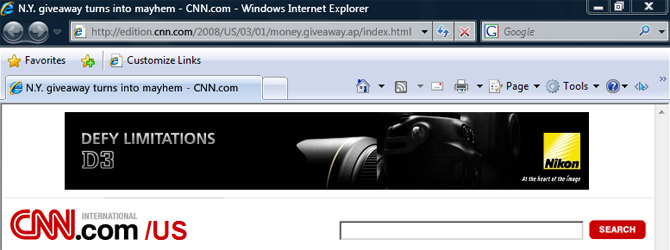
It appears Internet Explorer 8 doesn’t stray far from the new hybrid menu/toolbar interface of Internet Explore 7, not in Beta 1 at least. Contrary to the ribbon-interface speculation, I think after the rather drastic transition from IE6 to IE7, a more consistent user interface is a good thing as users won’t waste any time relearning how to use a browser.
From top to bottom, the address bar now boasts a new UI trick being able to highlight just the domain in the URL. It’s a very insignificant change but its something that you wish you had thought of. It’s a smart thing to do because it dramatically decreases the risk from domain phishing attacks – where it convinces you to click on “paypal.com” actually taking you to “paypal.com.maliciouswebsite.com”.
The search box now sports the ability to display an icon for the search provider you have currently selected. Currently in IE7, it only displays the name of the search provider in italics which unfortunately means as soon as you type something, it removes any indication of which search you’re using unless you manually click the drop-down button. Glad that’s fixed.
The bookmarks menu makes a much welcomed return above the tabs having endured a year of seclusion inside the side-pane. You can now bookmark links to always appear on this menu bar and I might add is no longer separated by an ugly black line, as well as access to all your other bookmarks accessible from the “Favorites” button.
Last but not least, the whole toolbar has received a very subtle color change. Those who were a fan of #C5DEFA will now have to face up to #C1D5ED. Tough love.

I really like the url highlighting, hopefully it becomes a feature to users will pick up on.
Hey… where did the quick tabs button go? Also why did they move the favorite / add favorite button on top of the tabs? I like how IE 7 is sleek and minimal.
@Jonanthan: Quick Tabs is still there I believe. It only shows up when you have more than one tab open like it does in Internet Explorer 7.
Now that’s a real update 😀
It’s not as sleek as IE7, but I still think a bookmarks toolbar is a welcome addition, though it should be a little skinnier. It’s a little too obese now.
Also it seems like the fonts are a little more Cleartyped (forgot the word). Or Ubuntu’s doing that. Or this is a photoshop mockup.
I wonder what the new cursor button does…
@Edootjuh: The font is a result of my edits. More on that in the first paragraph.
The blue cursor icon is the shortcut for the Internet Explorer Developer Toolbar. http://www.microsoft.com/downloads/details.aspx?familyid=e59c3964-672d-4511-bb3e-2d5e1db91038&displaylang=en
Unless an interface redesign is a major part of the new version, the UI is usually the last thing to be changed during the development process of a software update – developers focus on getting the features ready first, then concentrate on making it look pretty. So the IE8 UI will probably change further down the track.
@Jono: That is true, but for Internet Explorer 7, the new interface was pretty much unchanged from Beta 1 with the exception of a few icons.
@Chris McElligott
Firefox had an extension for similar feature for quite some time now.
https://addons.mozilla.org/en-US/firefox/addon/4014
it looks shit and chunky.. a lot like IE7..tbh I don’t really see IE8 really getting much of better GUI or tools and really don’t care what the do with it they could never beat Maxthon. But I do hope MS have actually improved the engine a hell of lot more this time around so it doens’t look absolute junk compared to opera, firefox engines.. then at least Maxthon users who prefere a better GUI and browsing experience than all the other junky browsers get the benefits of a better IE8 engine.
Maybe IE9 might actually be a real improvement for the MS browser. With stuff like disabling sounds per tab! and other useful designed features for the user to be in more control of there browsing experience.
It looks very good. I think they should not change the UI dramatically, because IE7’s is good and does fit well to the Windows Explorer.
Are there more toolbar items hidden?
@pantaz:
Thanks! All this positivity about IE8 was giving me an ulcer. Finally a negative comment. Yay!
@Andre F:
I know, you can morph Firefox into anything with extensions, but eventually, those extensions start compromising speed.
IE7 toolbar is better than IE8. IE8 favorites are on a new line, and this is bad because it uses more screen space.
As a current IE 8 user, do I have to back- grade to IE6 in order to be able to configure a one-line ToolBar.
Since the format, spacing, sizing, and inclusions are a matter of personal taste and usage, the next big up-grade of most browsers should include the option of designing a browser’s toolbar to conform to the user’s preferences.
Think that well ever happen?
I need to add this one: It is so bad that they haven’t erased that ugly old-style border around the website content. These two pixel wide border anticipade the scroll bar to be at the border of the screen to follow Fitt’s Law. (Or is the shown website content from IE7? Than I am sorry.)
“Over to you, Chris.”
Awww, you and liveside.net are still having your lovey-dovey relationship.
You’ll find that most of the “top blogs”, LiveSide, this blog, Mary Jo, WinConnected, Bink etc. all have a similar relationship. It’s nice, really is 🙂
I still find that IE8 is too bulky at the top. Some may accuse FF3b3 of being “too compact and cluttered” at the top, where I find it’s not. It’s probably just personal taste, but I find that too much space is left with nothing there and could easily be filled or moved around to save “white space”. But that’s just a personal opinion 🙂
Lol not much is new UI-wise, but I like it nonetheless.
Chustar, Long was referring to the fact that he posted the install screen yesterday and I followed up within a few hours. I guess he was expecting me to followup again 😛
I really liked the more “streamlined” look of IE7. Keeping it simple really seemed a step ahead of the time, and if you can’t figure out the new layout and super simple icons, it shouldn’t be that hard to adjust.
I hope to see more IE8 goodies come out in time.
So far so good, looking forward to some more features!
Looks like IE folks use google as their search engine….:)…. Live search anyone?….
Now just waiting for it to show up… I wonder if they still hide all the toolbars in fullscreen mode, which makes it totally freaking useless.
From what I know of people working there – even the Live Search team (in the UK) used Google. Ironic, but it’s a far better search engine.
Like I said, you change UI early on if the UI change is a major focus of the software update. If you’re just updating the UI a bit to make it easier to differentiate between versions, then you generally leave it to the end. In IE7’s case, the UI redesign was one of the major points of the upgrade. In IE8’s, it probably isn’t.
I’m not sure about the UI.
They call it a TECH beta. So it might that they are still developing the UI and release that with the first PUBLIC beta.
I kinda think the comparison to Firefox is a bit silly. Describing it as a “staggering” difference, when obviously IE7/8 hides the toolbar by default.
Anyway I turn it straight back on when I have to use IE7, sure its nice to be able to turn it off, but i think its far from groundbreaking or “staggering”, you should watch people try to use it for the first time, “wait you mean the toolbar that is in 99% of all applications i use as a standard aid to usability is gone?”
Completely unrelated to IE8 of course, but you did bring up the comparison to firefox all yourself 😉
Well this update will make and excelent addon to my firefox ietab XD
Cya later ie fan boys!
FIREFOX IS THE FUTURE!
“Cya later ie fan boys!” + “FIREFOX IS THE FUTURE!”
Look who’s talkin’
what about URL adress? i mean the color of other parts of URL. At the screenshot we can see that part of adress in Aero theme have other color, maybe when we move mouse pointer onto “black/strong” part of URL we can see a management history/adress menu ? can you explain to us this feature in new web browser? And how about classic view (not Aero) how it’ll be realised????? i can’t imagine =(. thanks before for explaining.
wbr, invader, vista site owner
MJ told me the beta starts soon – I’ll send some screenies to Long (as far as I know he’s not in the beta 🙁 ) so you can all have a look.
just think of the downloading size, when you want to download the toolbar. Has to be a good size toolbar……
Long, maybe you have the magick.
i just can’t seem to find the resource where the Safety toolbar icon is hiding. i wanted to make a shortcut for the InPrivate browsing but wanted a decidedly different icon for it.
it’s not in ieframe.dll and it’s not in inetcpl.cpl
you have any idea where the heck it is hiding?
@tucan
Spot-on re IE8 favorites button sitting a new line all by itself using my valuable screen space – how do I get rid of it?
the loss of the ability to rearange the toolbar to my preference sucks,it has to many unneeded dropdown menues for a search engine toolbar and just gets frustrating.we donèt need more junk and gadgets just to start a search.
How this for a negative comment? I absolutely HATE this IE8. I loved IE7..nice & uncluttered…..now the entire top third of the screen is filled with crap I’ll never use in a billion years. And I tried to streamline it a bit yb getting rid of a few of the tool bars (or taskbars, or menu bars…whatever) and accidently hid the (I think it’s called) MENU bar…the one that gives you VIEW, TOOLS, FILE, EDIT, etc. and now cannot get it back cuz TOOLS and VIEW are both gone now (the only 2 ways I know how to remove/add tool/task bars). And that entire bar that is 2 inches wide filled with all the Yahoo stuff….useless. And worse, I tried to re-download IE7 and can’t cuz it sayd I already have IE8 and I’m afraid if I just uninstall IE8 and re-download IE7, I’ll lose all my favorite places that are in IE8 (over 100 of them). This sucks.
AND…..the forward/back buttons are now in those tiny circles…I really liked them in the larger square areas. Wonder what else I can find to complain about here? 🙂
“If it aint broke, don’t fix it!”………no good can come of this!
@Jeff, forward and back buttons are like this in IE7 too, as well as Windows Explorer in Vista and above.
To bring the menu bar back just tap the “alt” key. simple. You could also right-click any whitespace around the tabs to get a menu of what toolbars to select. Yahoo stuff was something extra you downloaded and isn’t part of IE8.
I really hate the new explorer….the previous one was so much more interesting….the set up now is a complete mess with boxes everywhere….the toolbars are placed so randomly and it looks straight out of the 80’s. What happened to the nice icons and the simpleness shown before. TOO MANY BUTTONS NOW!! Please fix it…its ugly.
I really hate internet explorer 8!
I accidently hid the menu bar that had my File, Edit, Veiw, Etc. on it and now there is no way to change any of my toolbars! I tried right clicking in the white space and nothing happened. As to right before i dowloaded IE8 my right click worked fine!
Is there anyway to go back to IE7?? If so please tell me because I would LOVE too!
I want the slim one line tool bar of IE6 back. This is crap, crap, crap. I didn’t want mozilla, or IE7 because of the clutter. Chrome is a waste. IE8 is even worse.
Microsoft forgot, KISS. IE6 wasn’t broke- no need to fix. The only reason I installed this junk was because You Tube doesn’t support IE6 anymore, or won’t for much longer. I am not a happy camper.
I have done registry tweaks until my fingers are numb. I still can’t get rid of the tool bars I don’t want cluttering up my viewing space. What kind of ignorance would cause Microsoft to make an aggravation out of every single browser opening ?
I want a one line tool bar. I want my links button back. I want my Back & forward buttons on the right of the address bar, and the links on the right of that , with my home page and refresh to the right of that. I don’t need some little star for favorites. What a waste of space. I have a favorites link in the menu. Why the clutter of duplication. I don’t get it. What fool designed this?
Basically , I want Microsoft to get out of my way.
Give me the tools to fix it the way i want it. If they want it all cluttered, they can keep it cluttered on their desktop.
But not on my desktop. I like it neat. I want my window space back.
just use ie7 & uncheck ‘Enable Tabbed Browsing’ under ‘Tabbed Browsing Settings’
(to go to Tabbed Browsing Settings, Alt+T+O, then click ‘Settings’ under ‘Tabs’ category in General)
Please, please tell me how I can get rid of the useless third row on the top of the screen in IE8. The first row is fwd/back buttons and the address bar, the second row contains the pull down menus. The third row is totally redundant, there’s an orange or yellow star on the far left and a couple boxes to the right of it. Why would I buy a nice size LCD monitor and then turn right around and throw the extra screen space away by cluttering my screen up with this crap? I despise taking up more screen space than is needed, and I haven’t been able to get rid of it yet. If it can’t be removed, someone suggest another internet explorer alternative, I will quit using this autocratic mess until Microsoft provides something usable.
My question is this:
WHY CAN WE NOT HAVE ALL THE TOOL BARS ON THE SAME LINE????
Laptops now a days have wide screens, most desktop monitors are the same, so why all the blank space on a toolbar line and why can we not just throw them all on one line like we could in IE6? I will never upgrade to any new IE until they allow this. Do they not listen to the people. I see blog after blog with people asking for this. Microsoft needs to understand that we go to websites TO VIEW THE WEBSITE, NOT TOOLBARS!!! Especially now that netbooks are popular, you know those cheap little laptops that have the 1024×600 screens??? All you seee is toolbars with IE7 and IE8 on those things.
Microsoft, you need to wake up. Google Chrome allows all on one line, why not you?
i tried to get rid of explorer 8 and go back to 7..when all was said and done i was still stuck with 8 but lost my entire information bar..how do i get that back??
I’m not a novice. Where’s the checkbox that says “TURN OFF ALL THE NOVICE UI BS NOW” where’s the checkbox that says “ALLOW USER TO MOVE TOOLBAR ITEMS TO WHERE THEY WANT THEM” – hardcoded micro$oft screen real-estate wasting bs I will NOT being using IEx.
They really should’ve recycled their own MsoCommandBar. It treated menus and buttons as the same thing and let you move them between all the various bars, change captions, icons, keyboard accelerators, etc.
Instead, I had to hunt to figure out how to put the menu back where it BELONGS, turn off all text labels and wipe the Links folder to get a useable UI.
Web slices are useless [for quick access] if you have to dig for them. Web slices go in the Links folder. Favorites/Links bar appears to be designed to consume real-estate and does a great job of it by forcing you to have both turned on with extra buttons (show favorites, add to favorites). All slices have the same icon unless you want to go through and change them all AND trust IE not to screw up the icons. So to be able to tell quickly which slice you want, you have to donate tons of screen space to it or only have a couple and memorize them by location. I have one. And the bar takes up three buttons. And I have the mobile ones on the right side. And MS tore the bar in half to put one of them on the left.
The only reason I upgraded from IE6 to IE8 is because web sites are dropping IE6 support. At the same time, MS has finally convinced me to test-drive FireFox and Chrome.
Quote: “…a more consistent user interface is a good thing as users won’t waste any time relearning how to use a browser.”
Allowing users to place user interface elements, icons, toolbars, address “bars” etc. (like they USED to be able to do) where they prefer, IS A GOOD THING, otherwise IT’S BACKWARDS “PROGRESS”.
Are you serious? I can’t personalize this thing? It takes up half my viewing screen with redundant unwanteds! I need to get rid of the second Favorite icon (one is plenty), for instance. And that whole fourth (out of 5!) lines with e-bay and suggested sites? Get out of my life. This is so awful. I downloaded this for security reasons, but I really need to get rid of 90 percent of these icons and if possible, reduce it to only one line blocking my screen.