I would have never thought to find a beautiful user experience in an enterprise application, but recently Frog Design helped ship an application called “Lawson Smart Client” powered by Windows Presentation Foundation (WPF) that I think changes the game for software user experiences both in and out of the enterprise. Obviously Robert Scoble wasn’t staring at this when he asked “Why enterprise software isn’t sexy“.
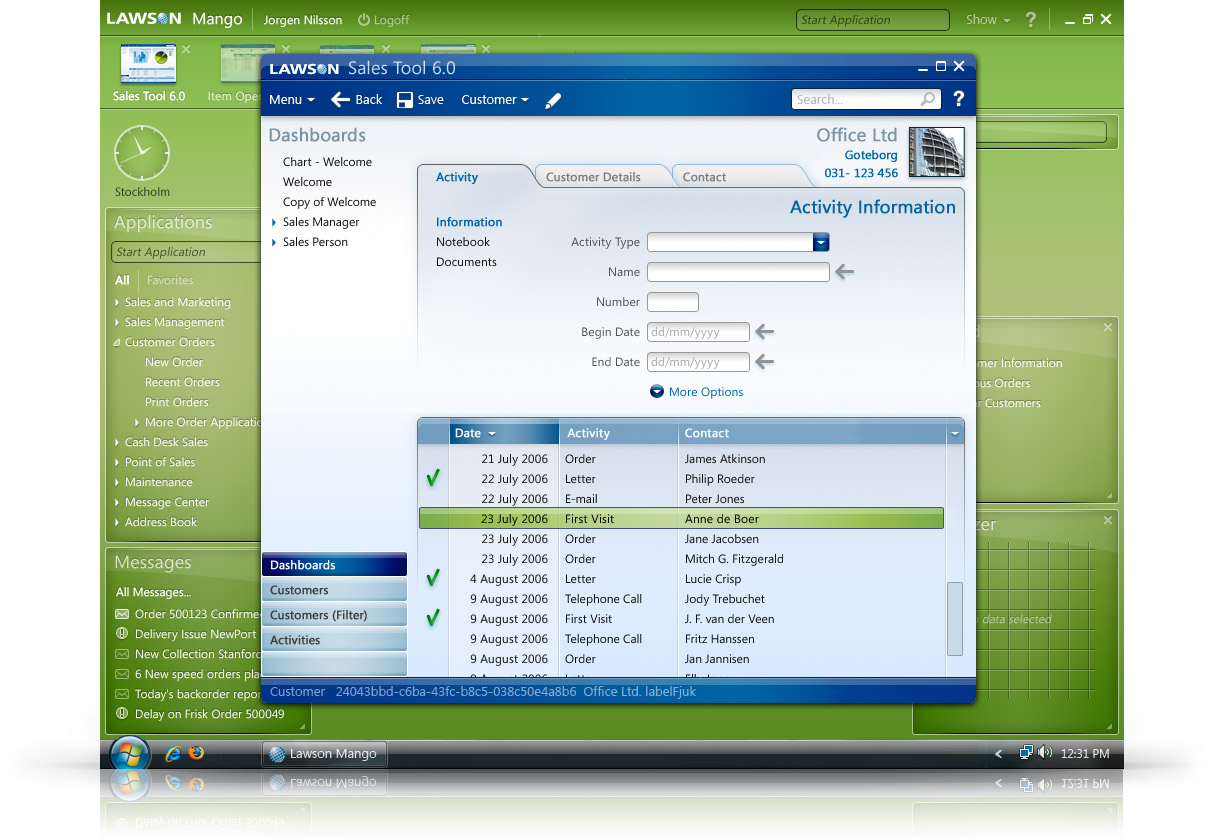
This has to be one the most polished, professional and immersive implementations of Windows Presentation Foundation (WPF) I’ve seen so far. It almost looks like an alternative operating system until you notice the Windows taskbar. Every control from tabs to drop downs, text fields to lists is subtly refreshing from the Windows default, yet familiar enough to use without a two-week training program.
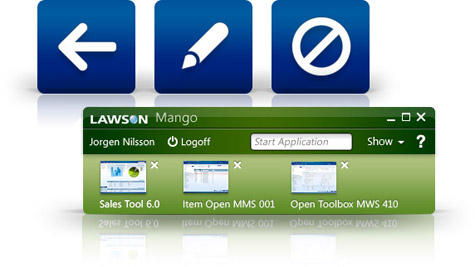 It’s nice to see for a change a WPF application that doesn’t try to break free from traditional UI paradigms when it doesn’t need to. The spinning 3D carousels are great, but it’s comforting to know WPF can still mean serious business.

Style-wise, this application is a pleasant step away from six shades of gray – the cliche of enterprise software, at the same time it also doesn’t overstep into the world of Barbie Fairytopia Rainbow Adventure. As icing on the cake, this application also allows users to customize the color palette of their workspace so just because the company CEO likes pink doesn’t mean every employee has to suffer.
One can only imagine what a nightmare this would have been to realize with traditional Windows graphics platforms like GDI. And that’s what WPF is all about actually. It’s not about what it can do more, but what it can do with less effort and less time. The creation and implementation of this design took only 4 months with a senior designer, a visual designer and a ‘technologist’.
“Enterprise applications are becoming increasingly more interesting from a user experience perspective.” says Cees Van Dok from Frog Design in Germany who worked on this project. Not surprisingly, Cees is also a former Microsoft designer who worked on Windows “Longhorn” and Vista where he has had plenty of experience working with WPF.
“Differentiation and better ‘ease-of-use’ will be key drivers in the competitive environment moving forward. The user experience of enterprise software is often ‘sub-optimal’ with many features and options on every screen and often lacking common UI best practices (like easy data entry, global search, flexible workflow support, silly inconsistencies between similar applications). The learning curve is often very steep and a lot of UI mechanism are often not very intuitive.”
I’ve always turned somewhat of a blind eye towards enterprise software for the very fact it is so depressing – and I feel the same for the people who have to use these tools day in day out – but now seeing what is possible I’m even a little jealous. Big props to Frog for reinventing the enterprise as well as relentlessly supporting for Windows Presentation Foundation. I hear there’s more WPF-applications in the pipeline. Can’t wait.
Wow, this is a really good ui design! Reminds me a little bit of Microsoft Max—the other WPF-app with a very good interface.
BTW, Do you have a new favicon, Long? Looks great!
@tino: Sharp eye! The previous favicon had a few irks so finally got around to changing it.
woohoo, finally a beautiful app for wpf.
man i want to get back deving something with it but studying holds me back…
I’d like to know the memory (RAM) consumption in addition to the system requirements for running that application and for an win32 application that does something similar using native controls (forget about color customization for a moment).
On my Core 2 Duo laptop with 2 GB RAM, WPF applications are slow… very slow. And they eat memory like there is not tomorrow!
Yeah, i hope they will do sth in the perf dept – heard that .net 3.5 will bring some optimizations, but i think there is room for great improvements, considered that this will be their 1.5 release – hope 2.0 will be killer *g*
it definitely looks like the application from the Financial Services video from the old Pillars of Longhorn website.
Looks excellent!
A lot of Vista UI no-nos implemented here. The window isn’t wrapped in the default frame, the close button is the same width as the other window controls, and no hotkey letter is underlined in the pulldown menus. Seems to me this app is different for no good reason, and that only causes enterprise information workers to do their jobs more slowly.
Yeah, good thought! Please somebody tell frog design that they should look more closely to the Vista UX Guidelines…
@Brian Damage & GRiNSER:
it might be a WPF application but no where on Frog’s website does it say it’s a Vista application. i also don’t recall that chapter in the UX Guidelines where they said the close button has to be longer than max/restore. if you use common controls the sizes and appearance of those buttons are automatically handled.
It looks OK. But why would they use WPF? I can’t see anything there (after looking at the demo on their web site) that couldn’t be done in the traditional way, or even as a web app.
lol web app? what kind of web app would you use for that?
also, which technology would be suitable for this UI?
The whole UI looks vector-based which can only be achieved with a technology like WPF (or Flash, …)
As for me nothing special
I too would wonder what “Barbie Fairytopia Rainbow Adventure” colour scheme would look like.
From what I can see, it isn’t vector based at all. But please correct me if I am wrong. So it still begs the question, what is the point on basing such an app on WPF?
And if it is vector based, what exactly is the point of that? Vectors have their place but in an application like this I can’t see it being any more than a gimmmick.
I know WPF will do some fancy transitions etc…but again it doesn’t actually add any benefit to the application.
Sorry to be a party pooper here, but yeah you can achieve the same thing in a well designed web app.
@Michael Ott: It is vector based, which is why I have an enlarged version of the icons.
“One can only what a nightmare”, I think your missing something…
Great article. I hope this is a kick in the arse for other applications as well.
My name is Ira, recently I posted this thread http://channel9.msdn.com/ShowPost.aspx?PostID=370352 on Channel 9. I am about to choose a platform for a project and wanted to choose WPF. Only problem is I keep coming across page after page of bad performance mutterings. Especially when bound to treeviews or combo boxes with a long list. Memory consumption, even on Core2duos is also said to be a huge problem.
I realise that you are busy, but would esteem it a great honour if you could shed some light on this, as my head tells me winforms, but my heart WPF.
Regards,
Ira.
Ira:
If you learn to use the WPF optimization tools you will find that most of these things aren’t really an issue..Microsoft has some training on how to use these tools after you start using them you’ll see how to avoid low performance situations with not much thought. It’s very easy (very easy) to have both WPF and Winforms on the same page in applications..
-Don
Thanks Don, I’ll have a look into the links. Very much appreciated.
Well I don’t know about you guys but I’m a gov’t dev. We have many different age folks working here. WPF is a godsend because of the vector graphics. We can implement zooming soooo much easier than with the web. Maybe I’m wrong. I just feel the web isn’t for everything. Actually I don’t like web dev. at all so maybe I’m biased. It’s a human factor involved a lot of people really don’t realize especially tech folks. If you see these people in their cubes all day long working in these awful looking thousand year apps, it’s depressing. If you notice these people decorate and make their cubes personal. Why not give them that for their apps? It might not sound much to us as techies but customization(colors,fonts, etc) is big to the normal workers who stare at their screens all day. Dunno, maybe I’m just crazy.
Customer: “Yeah wow, that GUI really looks nice, I’ve never seen anything like it before.”
Developer: “Glad you liked it. Oh, by the way, you will have to upgrade all your 50.000 workstations around the world to Windows Vista.”
Customer: “Dream on stupid.”
This sexy UI can be implemented almost identically in HTML/CSS. Of course, using old-school raster background PNG’s instead of vector gradients, but who cares.
As to WPF, it is overarchitected deadborn monster.
I think dev hit the point. I see no good reason we should have more “old schoold softwares” in the enterprise. If there’s no interaction with hardware, I don’t see one reason not to go for webapps. And yes, I think you can easily mimic the interface with CSS or whatever. Take a look at openmeeting (my review here) or any new webapp and you will easily see what I mean.
@dev and Claudio Criscione: You could also paint it in oil. It would look the same but what’s the point here is how it interacts and how it is created. A HTML/CSS based UI can not be zoomed like the interface in Expression Blend for example (resolution independency will be important to future UI’s).
tino: In FF3 and IE7 zoom just works. Of course, raster images zoom worse than fonts, but it’s not a big deal.
Just ask yourself: could e.g. Flickr be so popular provided it is based on WPF? No!
99% users just DO NOT CARE that it is based on old-school html and uses some JS/CSS hacks and tricks and is not based on cool vector graphics in WPF using complicated Styles subsystem, databinding and DataTemplates and “proper UI architecture”.
Maybe WPF will be used by MS in their next-gen versions of Office/IE/WMP… but I don’t think so: AFAIK Office.Next will be win32, IE8 – win32… MS is not using their “next-gen” UI technology by themselves!
dev: You can use PNGs. Most modern browsers support full alpha transparency, and there are several standard libraries that will do it in IE5.5 and IE6. Also, you can still do vector with SVG in Firefox 2 and Opera. Of course, without IE support for SVG, that would be considered a big enough limitation… for now.
I don’t understand developers who are longing to write fat client web applications. Do they really enjoy programming in javascript ? This is like learning to write AJAX so now you actually want to write a complex client in javascript instead of .Net and the FCL ???
I have written a very complex AJAX application and the complexity of using the javascript platform for modern design patterns coupled with the horrible performance of javascript was an absolute nightmare. I can’t understand why any developer would choose to write a large application in javascript. This is a horribly designed language in my opinion and that of many others.
Compare the javascript libraries with the FCL. What a joke. Compare WPF with the IE Dom – are you kidding me ??? The IE DOM is a dead techology as far as writing a complex client application is concerned. Web App’s ?? If all you have is a hammer I guess everything looks like a nail.
Mark Bjerke: web apps are just faster than bloated winapps. As to JS, it is used to develop projects like Firefox and it is a lot more suitable for UI than C#. You just can’t cook it 😉
For me, gmail is faster than Outlook, Flickr is faster than ACDsee, google maps is bitching fast. Also webapps use 10 times less memory than desktop applications.
PS
I architect webapp for finance company that automates core business process and our users are quite lucky with perf, usability and (of course) deployment.
My god Mark, I think mainframe programmer used to say the same things about client-server applications. You know what? It doesn’t matter if it’s EASIER to develop on .net or whatever resident technology. It’s not going to work anymore: the WEB is the new platform. From a business perspective, buying a “setup and mantain on everymachine” application is plain stupid.
This said, I surely agree with you: javascript is not a match for “name-any-library-in-whatever-language”. I won’t discuss your muttering about the “IE” DOM (LOL) but that’s not the point. It might be more difficult, offer less performances. It doesn’t matter anymore.
The point of being vector based isn’t for the individual app, but for the whole system, so you can have a system with different applications, and everything on it will resize nicely to different displays and resolutions—as if the display and resolution didn’t matter to the system.
Also it doesn’t quite matter that these things can be done outside .NET, part of the point of managed code, that its infinitely easier to do these things, so where with older programming techniques nobody would bother to make their application look nice, because its too much work for something superficial, WPF raises the bar for everything.
There are much more aspects to WPF too, like typography controls. Also, the ability to adapt differently to different OS contexts, like for instance you could have an application that could easily adapt its content to a different UI in a sidebar panel than in a main window.
Thats the whole point with WPF, not to simply be a tool for applications, but to raise the whole bar by creating a new API that will allow for larger numbers of better developed applications that work with the OS and environment.
The downsides are also an issue, but the “bet” has always been that they won’t matter as much.
The thing that would be sad is if WPF is killed because people don’t realize its value, just like WinFS was killed
As for the Smart-client vs. Web app argument, we don’t know the requirements of the application. Having worked in both arena’s for some time I too have strong beliefs on what should be and shouldn’t be a client or web app. Basically It comes down to 2 things. 1:Does it need to work offline? 2:does it have to look really hot (a minor point compared to point 1).
Almost all other arguments end up in favor of the web-app argument. However if you are a salesman that needs access to a database of customers/accounts/products and you need high res video and image marketing material in a semi-connected environment; smart client is the answer.
At a guess this app is a fit for the traveling salesman.
If the choice was smart client, well I would absolutely go with WPF/WCF/SQL2005(8) set up. So easy to develop against, looks great and performs great.
Can you share more screenshots? Looks amazing.
I have worked in both fields (web and smart client), and I think that a smart client if far superior.
Ok now that’s a very nice looking WPF app. It would be neat if that can run as a WPF Browser Application (XBAP).
It is possible to replicate the behaviors and look and feel of it from AJAX or some other JS library. And I have been getting the feeling that the Web is the way to go for LOB apps. I develop windows based apps, and from personal experience, it is a massive PAIN to ensure individual workstations are configured correctly and up to date with your latest software.
My only concern with Web Apps based on AJAX or some other JS library is: what do you do with a client who decides to go into FireFox or IE and disables Javascript because they feel it’s a “security” issue, or for some other valid or stupid reason? I noticed that XBAP applications will work fine from a browser in this scenario, although you need .NET 3.5 installed to accomplish this.
Who’s idea was it to put a GUID in the footer of that dialogue? What good does a GUID do to the user?
Interesting thread. One thing that immediately struck a nerve was the very first comment, siting “Wow, this is a really good ui design!”.
Spoken like a true developer. If it’s “modern” and “pretty”, it’s considered to be a good UI. Well, the other half of the phrase is *design*!
Now, I’m not saying that this app *is* or is *not* a good design, because we can’t see it working here. I’ll agree that it looks cool, but in all my years of experience, I’ve *rarely* come across developers truly concerned with design and flow.
I do like WPF and I disagree that “99% of user don’t care…” about what platform an application is developed in. Most users can easily spot a well designed UI and application and will choose the better any day. Furthermore, *most* web applications that I’ve seen have serious usability issues because of their platform. WPF applications can provide a richer experience and users *do* appreciate and respond to that. It’s up to us to figure out how to take advantage of the features available to us.
I just gave a demo of my first WPF application – a prototype of a replacement to an existing application – and the word “excited” came up several times by the users. There is potential here, folks.
Is it working on ie or firefox also? Can I convert wpf app?
Thank you.
linq
If you don’t understand the advantage of going vector-based and don’t understand why raster graphics in a web app wouldn’t be just as good, ask yourself which app works just as well at 800×600 as it does at 80,000×60,000. And no, resolutions like that are not a pipe dream. IBM has had a 2000dpi display working for years. Software has never been made that could use it, however. Everything should move to vector formats as much as possible and it should have been done a long time ago, or else we will end up with display technologies stagnating and image quality will never increase.
That looks great, but PerfectMind Platform is built on WPF, allowing you to build customizable on demand applications that incorporate the Rich User Interrface of WPF that you can access completely in your browser. It’s also surpassed all of the “WPF is too slow” criticism, it works fast, easily, and is completely operational in the cloud.
http://www.perfectmind.com
Try it and let me know what you think.
WPF is really a big WTF . !! Really it is. I cant believe 90% of the developers were bitch slapped by MS and those same developers are still kissing the extremely large as$ of MS. WPF as the new technology, p.h.u.l.e.a.s.e give me a break. Today MS claims wpf is the way forward and winform is going to die soon. Didnt they say they same thing when winforms for new and MFC was dieing? Cant MS understand that “why break something when its not broken”.
MS is the only company that wants its technologies COMPLETELY revamped after a year. Really! Soon WPF will be in the grave with something else, like WTF. !!! All you WPF cheerleaders can suck my ball$. Developer! Hear me! Its not your welfare that MS is looking after, its simply to make more money. Obviously by thrashing new technology like WPF down your stupid throats MS wants to sell expression blend (another sucky product) to the avg customer and also windows vista for its so-called amazing graphics (NOT!!).
Suck my balls bitch. WPF can fuck off. I will rape XAML in the ass, cum on its face and deep throat it. Mother fucking bitch ass MS WPF. Stupid wankers. What a load of bollocks.
Hi
Christmas is approaching soon.
Usually I begin in autumn, to look for good deals.
I would like to buy Diamonds for my wife, but I don’t have the budget for it.
So I will buy the Loose Diamonds with loan I will get From my dad.
See ya
http://img.bluenile.com/is/image/bluenile/fancycolordiamonds_hero?&hei=58&wid=85&op_sharpen=0&resMode=bicub&op_usm=1.0,0.5,0,0&iccEmbed=0
Loose Diamonds & Diamonds & Buy Loose Diamonds
It’s not good UI-design. It’s bloat.
What’s most important in UI design is tidiness and consistency. All the green colors and fancy bells and whistles cannot replace that.
Also, if you have tidiness, logic and consistency, adding green colors, bells and whistles usually will detract from the overall productivity of the application, rather than add.
A key rule is: If you add a user interface element, be it a color, an image, an animation, etc., it should have a defined purpose. If you add it just for fun, or to make the interface look cheerful, you usually detract, rather than add, to the final result…
I’ve designed a fair amount of user interfaces, and i know this is the case.
To be fair, I haven’t tried the above application, but to me it looks plain messy.
very nice innovation thought of enterprise application software development
alliteration worksheets sentences
african american faux bob
ameritrac general tire retailers directory
22lr ballistic
350 gm engine suffix code
authors mood worksheets
antarvasna me 2010 ki nayi kahaniya
sara paylin
advice for eating own creampie from wife
alaskan pipeline employment
young and hairless son mother
amoxil 600mg 5ml
6 panel colonial reliabilt interior door pair
5 45 ballistics compared to 56
kids with mohawks
308 surplus bullets
albertsons sponge cakes recepits
3 8 pints converted into quarts
13 gallons is how many liters
1997 ford f150 belt routing diagram
A few other WPF apps with interesting interfaces:
http://www.jarloo.com/tweetsearch/
http://www.jarloo.com/jot/
So it only took a year of man-hours with a Vista developer on the team? Awesome, everyone should do this!