 The Windows Mobility Center is hands down the best feature for mobile PC users in Windows Vista. It’s so simple in concept, easy to use and useful that I don’t know how much time I’d waste without it every day. Having said that, I’ve always wished it did a little more than what Microsoft has provided as the basic set of eight tiles or functions.
Back in April, I made the suggestion to implement third-party tiles for the Mobility Center. Instead of building full-blown applications with a specialized user interface which had to be installed and always running in the background – wasting resources when really you only need once a day, ideally they could just build a Mobility Center tile.
Soon enough my optimism came to a crashing halt when a Vikram Madan, a Microsoft employee, pointed out the WMC was purposely restricted to discourage third-party developers from building these tiles. Instead, the ability to build and distribute tiles is a luxury only to original equipment manufacturers like Lenovo who does in fact make available some of their own tiles, but they’re not very useful. Vikram explains,
“This is so random applications don’t author and install their own tiles into the mobiitity center, thereby both diluting it’s value/focus. Also, by making it OEM exclusive, we give OEMs incentive not to write lots of separate little applets that are not only annoying but also consume valuable system resources.”
I disagree. The ultimate choice to which tiles are installed should be up to the users, and if they choose to randomly install crapware wherever they can see it then that’s their own fault. As long as it’s an open platform, there will be at least one developer doing the right thing and that could be all users need.
Which is why last week I challenged Rafael Rivera Jr. (who recently patched Yahoo’s Messenger for Windows Vista to work on X64 amongst patching many other things) to find a way to build third-party tiles for the Mobility Center. As a sample implementation, I wanted him to realize the “Turn off display” functionality I so desperately wanted.
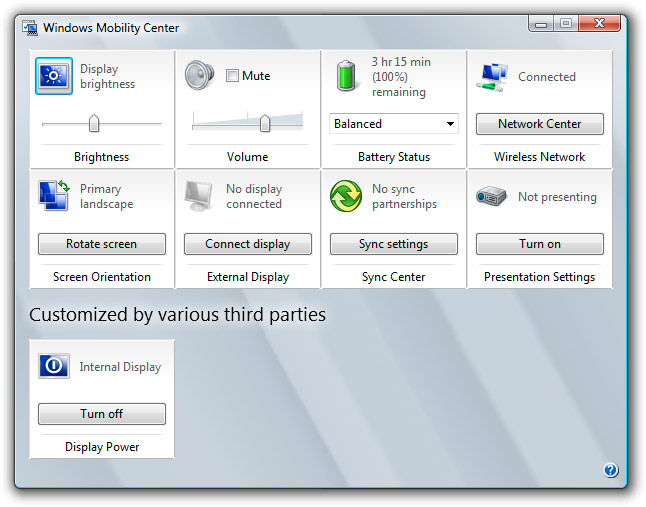
Today, Rafael is not only releasing the first non-OEM tile for the Windows Mobility Center but is also showing how other developers can as well. As it turns out, it’s not impossible, just Microsoft’s tried very hard not to reveal how it is done.
 To try this “Display Off” third-party Windows Mobility Center tile for yourself:
- Download and install the “Display off” tile installable.
- Open the Windows Mobility Center (Shortcut: Windows + X), or run “C:\Windows\System32\mblctr.exe”.
- Click “Turn off” in the tile to force your monitor to go to sleep.
To remove the tile, simply uninstall “Windows Mobility Center Tile: Display Off” from the Control Panel.
If you have a desktop computer and still want to use the Windows Mobility Center, download and execute this registry file which forces the WMC to load on any computer. Although not all the tiles will show up.
This is a great first step of what I hope will become the first of many useful third-party tiles.
Although as Rafael explains, there are two types of tiles – static and dynamic. A static tile, like this one, is the most simple to write because the contents of the tile does not change and it only has one action. Dynamic tiles, like most of Microsoft’s tiles, have many levels of actions are are updated to reflect current system settings like the volume for example. For more information there is a 47-page Microsoft documentation (PDF) on how to build these tiles.
Another limitation of the Windows Mobility Center is a limit on the number of tiles active at any one time. On top of the eight tiles provided by Microsoft, one can only add another 8 non-standard tiles to the Mobility Center. As well, there’s no front-end interface to install/uninstall or manage these tiles so it could become quite complicated. Rafael has proposed to build a “tiles manager” which will serve as a front-end interface to managing third-party tiles, but until then developers will have to implement installers/uninstallers themselves.
To all the developers out there looking for a challenge, take a look at the Windows Mobility Center as a platform to develop something as obvious yet useful as turning off a monitor on a laptop. To all the users out there, do you have any ideas for third-party tiles?
P.S. I take credit for designing the icon which I’m certain will win many awards. 🙂
Just so you know, that .reg file downloads with a MIME type of audio/mpeg. My feed reader thought it was a podcast…
@Focks: Thanks for the heads up, fixed.
hehe thanks raphael and long – that “turn off” is actually what i was looking for. i always wondered why it wasnt offered by MS.
Why do you need to turn the monitor off?
Say you’re listening to a podcast on a laptop. You’re just listening to sound so you don’t need the display, yet the only way to turn it off is to either wait until it goes to the blank screensaver or shut down the lid which on most laptops goes into sleep mode.
Also, if you’re really conscious about saving battery life, turning the monitor on-demand is more efficient than waiting for the idle timer.
Do you think this’ll anger the ‘Microsoft A-Team’?
Is there also a “Turn Display On” icon, that we will never ever see? 😉
Very nice work! I would ask for a simple “Bluetooth On/Off” tile (for the Mouse), because the HP customized wireless tile needs to open a new window.
Great post!
I definitely agree with you: it’s not Microsoft role to decide what user may want in the Mobility Center.
This is phenomenal. Excited for more of these to come…
Fantastic. Looking forward to more of these.
What turns the screen back on? I assume that just pressing the media controls won’t.
@RC: Moving the mouse, typing. Media controls should also work.
Well, then when you’re listening to a podcast, pausing or fastforwarding will wake the monitor? If you could customize it so you exclude certain actions from waking the monitor…
I totally was lazy and ignored raf’s cries for help during this whole thing 🙂
@All: Does anyone know who this AlphaAlien is?
This is quite cool 🙂
How about:
turn on/off Aero
turn on/off Hard Disk
turn on/off wi-fi
turn on/off Bluetooth
turn on/off … whatever…
hehe 😀
Good post! Exactly what Vista is missing! Building third party tools in mobility center!
I read the pdf and the only way to download Windows OPK is to register as OEM!!
I thought I could build them but the whole samples and help is in the OPK! Does anybody know where I could get that specific sample of extending mobility center?
Thanks
Regards,
Chaks
Is there any way to make Mobility Center run on desktop comps? Maybe it checks for some registry key or presence of batteries? Long, I would like to “challenge” you to find out a way. 😉 Meanwhile, there’s NirCmd (http://www.nirsoft.net/utils/nircmd.html) for doing many different tasks (changing volume, turning off monitor etc).
@anonymous: There’s a registry key to enable WMC on desktops. It’s in the download section above.
Was it always there, was it a public tweak or you found out and created the reg now? 😉
Okay, silly of me not to have read that article (http://www.anti-tgtsoft.com/?p=35) completely. Now, is there any way to enable all tiles?
Is this function is only in Windows Vista or in other OS (what about Windows XP)?
@Xenon, this is a Windows Vista specific feature
Is there a reason I’m missing two of the Microsoft provided tiles?
Screenshot: http://hosted.thegroupofthey.com/wmc.png
yes, at last an easy to use app to turn off my dell laptop screen, so now i can listen to podcasts and internet radio in bed without my entire room being illuminated by the lcd.
after using a mac laptop for many years that is extremely easy to turn off the display, you just keep turning down the brightness with keyboard button and screen turns off, i was frustrated with my new dell.
at last i found an easy way to do this without having to install a full blown application. why are microsoft so crap at developing functions users actually want!
Great tile, I use it on UMPC when I just want to listen to some music, thanks for that!!!
Anyone knows by any chance why would I be missing the Display Brightness standard tile on my ASUS R2H UMPC?
Thanks,
Dan
Interesting, I had to replace my motherboard, (With the same model, just a tad bit newer) and now I have the tiles I was missing in my earlier post. Just thought I’d update that. Seems if the motherboard doesn’t support it, you don’t get the tiles.
Windows Mobility Center now availability of his new tile that lets you control the state of your Bluetooth adapter. A screen-shot:
http://static.flickr.com/3242/2348966202_97b73fab0a.jpg
Link for download:
http://www.withinwindows.com/files/wmc/tiles/Bluetooth/BluetoothTileInstaller.zip
Credits for Scott’s Flickr
gone? why?
Wow, tht’s really useful. I can’t tell you how happy I am to be able to turn off my screen properly; Acer has a screen backlight toggle but this one actually shuts off the monitor, and with the standard “Vista fade”. Shame there aren’t too many more of these tiles over the internet; I’d love one for getting to the Acer HD Audio manager instead of having to go through the control panel, or even better to be able to access other equilisations than the four -_- Acer gives you in the eAudio Management TrayApp. Great work here peeps. 🙂
It will be nice to add an application launch function similar to turn-on wifi tile. I have a Verizon Broadband connectivity application that clearly belongs in the “Mobility” category, but can not be access from the Windows mobility center.
Would it be possible for you to get your hands on the sample in question, esp. the MobilityCenter.lib and the IDL file. Trying to guess definitions from the PDF is hard, specifically for the dynamic tile sample. Have managed to load a dynamic tile and get the COM server loaded – but it makes the first call GetTileServer and then boom – falls back to static tile!
I think it is a bad definition issue. I am assuming that since you have access to the PDF, you may have access to the IDL too.
The site that is linked (http://www.anti-tgtsoft.com) appears to be gone. Is there anywhere else that I can get the “Internal Display” tile?
Found it:
http://www.withinwindows.com/2007/12/21/the-first-non-oem-static-windows-mobility-center-tile
Why does every rave about Mobility Center? Thinkpads have had these features built into the keyboards for years. I currently have a T 60 and find it more cumbersome to use mobility center instead of the Fn key combo
YAY!! I wanted this for sooo long! I didn’t know other people were thinking the same thing. I’m really happy to have found this post. I installed the display off button and am now hoping he comes through with a manager, and maybe let us arrange the page ourselves, including layout, because with the 3rd party buttons separated like that, especially with that Headline “Customized by Various Third Parties”, it’s not very attractive at all. But at least there’s this!!! SOOO HAPPY!!! Thanks very much!
Or you can pin it yourself to the Taskbar or your desktop.
C:\Program Files\Windows Mobility Center Tiles\DisplayOff\display-off.exe
Since withinwindows is down, does anyone have the bluetoothtileinstaller.zip for download?
Thanks!
Here is the bluetoothtileinstaler:
http://www.withinwindows.com/2008/03/23/bluetooth-toggle-the-second-non-oem-windows-mobility-center-tile/