On November 8 the FCC published Microsoft’s appropriate filings for an apparent update to the Wireless Laser Mouse 6000 mouse, appropriately dubbed version 2.0. In the documents made available contains quite a few revealing photographs of the new mouse design. Notably it has undergone a significant redesign. Personally, I wouldn’t have called it version 2 if I saw these mice side by side.
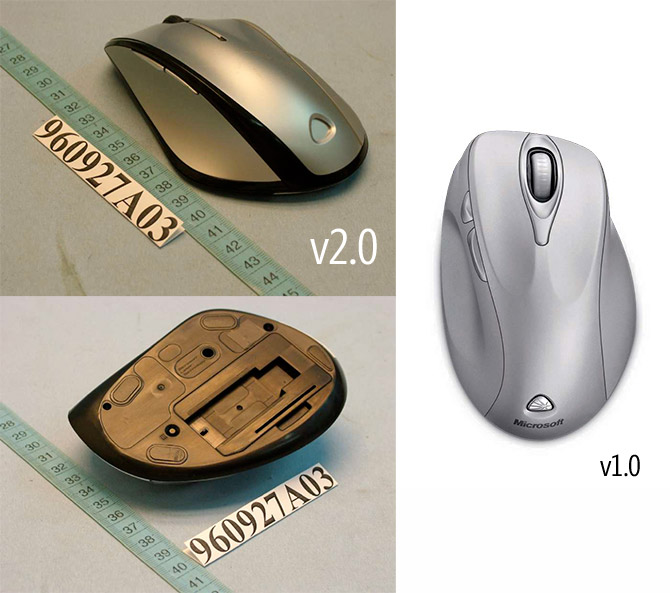
Currently, I own a Wireless Laser Mouse 6000 and use it everyday. I think it’s a great mouse. I was curious to see what’s changed.
By comparing the photos, all of the finger and thumb grooves have been removed. Instead, every surface is smoothed from end-to-end. The thumb inset appears to be much deeper, which might be good since I find it currently too shallow. The thumb buttons have also been streamlined to be thinner, which could also be good since I find myself clicking them accidentally once in a while. Lastly, the grove around the scroll wheel has also shrunk.
From what I can see, version 2 looks less comfortable. However, mice is a hard thing to judge from the outside. Even I had doubts about the mouse which I now can’t live without. Because of that, I won’t make a judgment without trying it out.
No release date has been provided.
I have a similar MS mouse that’s different than both of those. Came with a wireless desktop 2.0 set a couple years back. The thumb grove on mine is almost a combination of the two shown above. Upside down, the mouse is shaped like a kidney bean. The one of the left looks like it would slip out of your hand, but probably not a problem in practice. I like the v1.0 without a hands on.
My thumb buttons are never used because they just don’t seem easily reachable the way I hold my mouse. I have to move my thumb forward significantly to use them. So I don’t.
Also, what’s the deal with the little logo emblem at the bottom? It’s different on mine. Was it just changed, or do different mice have different emblems?
Hmm, in Poland Microsoft’s mouses are much too expensive in comparement of rest of mouses… Yes, there are Microsoft’s mouses for 100 zł (€25) but for this price you can get much better mouse.
Sorry for my english… Correct me if I made mistake
As a PC gamer I can’t use MS mice anymore. The smooth scroll wheel is fantastic for websites but useless for gaming (choosing weapons in shooting games, for example).
I’d give anything for an Intellimouse Explorer 3.0 with laser!
Once again, left handed people are shafted. But no one cares?
Good Job, you got your article on engadget, keep up the good work
Brian Damage you are in luck get the Microsoft wired laser 6000 series mouse it is the closest thing to the explorer 3.0 as it has a stepped/click scroll wheel.
I was of the same dilemma I love MS mice for desktop usage but the free scroll wheel hinders FPS games.
Hopefully one day the mice engineers at Microsoft will make a mouse with both free & click wheels with a simple button on the underside of the mouse to switch between the two.
(I know Logitech make such a mouse the MX/VX Revolution I bought it and was not a fan of how it worked with a software based switch, it was such a chore to setup for all applications with profiles and it was not comfortable to hold)
Quite ugly mouse. Those forward and backward buttons finally got slimmed to minimize unintentionally click when you hold the mouse but those really un-necessary.
I bought a v2.0 mouse and the scroll wheel will not let me scroll up and down. It let’s me scroll side to side, which is nice, and it lets me use the wheel as a button, but even thought scrolling is enable with both the Microsoft Mouse software and XP’s mouse configuration, it will not scroll. Sometimes when I try to, it behaves crazily and moves randomly up and down the page very quickly. It has been doing this right out of the box, but I can’t seem to find any instances of this happening to anyone else. Anyone here find this problem?
I have the same scroll problem with a Wireless Laser Mouse 6000 v1.0. The driver i’m useing is InteliiPoint v6.2 and the OS is XP SP2 32bit.
Adrian, I contacted Microsoft about it, and after doing all their ridiculous amount of “tests” to confirm that the problem is indeed with hardware, they sent me a whole new desktop, unopened. So, if the problem persists, I’d do that. I never could get the old mouse to function properly. Cheers.
I have one of these that I purchased as part of a wireless desktop bundle. Recently, the mouse buttons have started intermittently not functioning. It takes a dozen or more clicks to get an actual click, and then it will often stick when it does click. Makes games and photo editing a chore to say the least. Is this a widespread problem? I think I’ll contact MS about it.
Thanks!
I have the same problem any cure for it thanks
I have a wireless ms mouse that’s the 2000 series, i just noticed. i got it about three months ago at office max.
the light quit. i changed the batteries, restarted and i’m using the mouse i replaced. any insight. and thanks for this chance to save it. Harrpo
I have the same problem. Mouse and KB work intermittently. What a waste!!
I have two Microsoft Wireless Mice 6000 v1.0 orerating on the same desk about 1 metre apart.While any one of the two is moving the other does not react. Is there anything I can do toenable two operators work side by side.
Regards Clive