Like I’ve said a month ago, Windows Vista is full of little things that doesn’t write the history books of computing or utilize your $1000 GPU cards to pump-out breathtaking 3D effects, but it adds up. This is another one of those little gems, called the “Windows Mobility Center“.
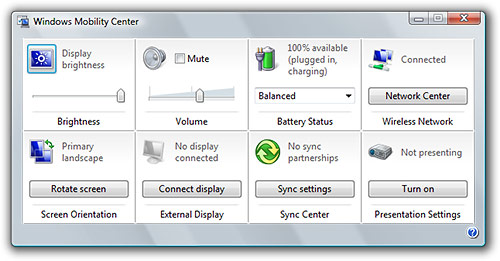
 The Windows Mobility Center is an applet – the equivalent of a fresh-born software program not bloated with splash screens, toolbars and task panes. In fact, I don’t even know why it has a help file. It’s sole purpose in life is to configure mobile PC settings – quite a crappy life really.
In the past, to change the brightness of the display, volume of the speakers or the screen rotation either meant giving your fingers a yoga workout – holding one key whilst trying to press another conveniently placed inches away from the span of your hand; or digging deep into OEM application branded like NASCAR vehicles which also comes with 50 startup processes just so you can rotate the screen on-demand. It was so outrageous that even the patent inventors described the experience as “tedious and annoying”. Right they are!
What makes “Windows Mobility Center” tick is its (over)simplification. It’s one centralized interface with one tile representing one feature. Every tile has only one icon and one control – one slider, one dropdown, one button. It just works. No learning curve, no advanced options, no “Ok” button. You just click and go.
 I keep a shortcut in my Quick Launch menu to it (drag and drop the link from the Control Panel) for quick access if I’m in tablet mode, or just Windows key + “X” when I’m in keyboard mode. It’s an applet so it opens in an instant, and once you’re done, you just close it. I’m running out of positive adjectives, it’s just brilliant!
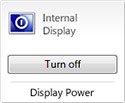 What I really want to see is developers taking advantage of this simple interface to build mini-applications with one purpose in mind. For example, a lot of the times when I listen to a podcast I want to turn off my laptop display without waiting for the screensaver or going to standby. There’s a lot of applications out there that does this, but comes with an installer taking up several MBs bloated with unnecessary functions. I’d love it if someone could build a “Turn screen off” tile for the WMC. Any takers?
If you think about this concept of aggregated control panels, it could apply to many other scenarios. There could be a “Windows Performance Center” for desktop PCs targeted at high-performance users such as gamers. Maybe there could be options to control the fan speed; switch between predefined performance modes which balances noise and performance; an option to disable system sounds and prompts; an option to quickly disable non-critical system processes to reduce load for resource-intensive applications.
Does anyone else share my passion for the Windows Mobility Center?
I love it!
Totally share your passion.
It is such a useful litlle tool, especialy when using Tablet.
I would probably share your passion if I had a mobile PC.
But this thing I really liked:
http://www.shahine.com/omar/ThinkPadT60InitialThoughts.aspx
I agree, it is absolutely excellent.
What’s not so excellent is Toshiba’s add-on for it – “Lock This Computer”.
Nobody needs yet another way to lock the computer!
But yes, the Mobility Center is really brilliant!
i love it! i still thing the interface should be all glass like the sidebar gagdet selector. Customizing my power and brightness and all of the features sure does help when ur running low on battery.
hmm Windows Live Hotmail and WIndows Live messenger are not working right now, urgently need to syncronise my PPC mail. !!
If you have a notebook, it will be usefull for sure 🙂
My old 486 has a ‘Fn’ key and faaar away, over the function keys, special functions like these. Nice to see that’s over!
The windows mobility center is wonderful! It is especially useful for presenting!
Yes, I love it too!
But it’s a shame it disappears on PC that windows consider not to be laptop (try just taking battery out of laptop while running on plug – it will say “Windows Mobility Center is available only on mobile PCs.” Even though I would appreciate quick access to volume, network center, sync and presentation mode on my desktop :(.
@Keff: Yep. I hope they expand it to many other scenarios in the next version of Windows.
I do.
Take care.
I have found a program released by “laushung” called lullabye. it puts your monitor to sleep. and doesn’t have much of a footprint. Here: http://www.deviantart.com/deviation/53039433/
Enjoy!
I have a place in my heart for Windows Mobility Center, I too hope there are more driver plugins for hardware developed for it. I am a big fan of presentation mode. Also it can be quickly launched with a quick click on the Windows start key and X (at the same time) or left-click on your (if you are running a laptop) battery/charge icon and select Windows Mobility Center. 🙂
Glad you liked the mobility center. You’d be amazed at how much effort it takes to tweak and tune the UI to bring it into such a simplified state. Unfortunately for your wish list, mobility center extensibility is exposed only to PC manufacturers. This is so random applications don’t author and install their own tiles into the mobiitity center, thereby both diluting it’s value/focus. Also, by making it OEM exclusive, we give OEMs incentive not to write lots of separate little applets that are not only annoying but also consume valuable system resources.
Hi,
I think Windows Mobility Center can be great for me! unfortunately I installed Vista on my notebook without the battery plugged in. Now i dont have the feature available. How do i install it?
Thx, Mike
Love it one of my favourite vista apps along with the problem reporting center and being able to generate a system health report, totally reliable and stable.
I was wondering if anyone else had Quick Launch menu on the top of there laptop screen as a drop down. i had this on my laptop but it got turned off somehow and im trying to get it back.
can anyone help????
Опубликовал на своем страничке вашу статью, и разместил там конечно-же обратную ссылку на вас. Но вот зашел глянуть поевился ли трекбек, а его нет… Досадно конечно, но ведь пишим мы не ради ссылок)) Но все же посмотрите все ли у вас функцианирует, ибо странно что ссылка не поевилась, или она не прошла модерацию?
Здравствуй, чесно сказать не ожидал от вас такого бреда))) Прочитал твои предыдущие записи, они были более содержательными. Прости за прямоту=)
Да будет свети. Хватит уже писать, все ведь ясно. Это не-ра-бо-та-ет. И работать не будет….
Я где-то встречал было еще больше, но и так хорошо. Кое-что даже распечатал.
У меня дизайн в гугль хроме поехал. Невозможно читать 🙁
Ну как же единственно так? Думаю, почему не расширить этот обзор.
Ну и ну, с чего это настолько особенно и однобоко? Сомневаюсь, что можно сделать, чтобы раздвинуть этот обзор.
“nircmd monitor off” does the trick very nicely. Now the plus side is that nircmd is a tool that allows a loooooot of other things, and is only a 100 ko exe file, this minus side is that it is another tool…
I don’t think it will be easy to implement something like that (monitor off IN mobility center) without having to install an exe to do it as well, but I’ll take a look at how to do it if you reply to me here (I’m notified of follow-up comments via email). I’m sure that if I install nircmd, I can be able to add numerous useful functionalities to that mobility center, all being of course 100% customizable.
Camusensei