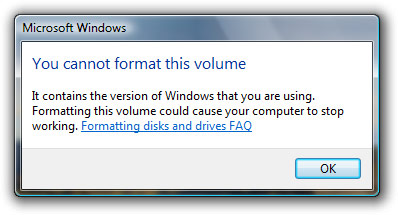
I’m not sure if the command line format tool still works or not. Not that curious to test it. 😉
Update: Thanks to Christopher “Brave” Hawkins for trying out the command line tool, which fortunately does not work.
I guess all the elite 12-year-old hackers need to find a new hacking tool. 😉
Windows 2000 and XP wouldn’t let you format C: via the GUI either.
The command prompt doesn’t work from at least XP SP2 onwards – I distinctly remember having to use the boot disc’s repair mode to format my computer.
@Graeme: Ah okay, but I’m presuming you get an error after clicking the “Format” button.
In Windows Vista, by just selecting “Format” from the right-click menu on the drive, you’re prompted with this error.
I think I should get some sought of bravery award:
C:\Windows\system32>format C:
The type of the file system is NTFS.
Enter current volume label for drive C: Prime
WARNING, ALL DATA ON NON-REMOVABLE DISK
DRIVE C: WILL BE LOST!
Proceed with Format (Y/N)? y
Formatting 150005M
System Partition is not allowed to be formatted.
PS – Same thing happens under XP
@Long: You’re right, I just tested and it does go a lot further before failing: right-click, Format, set options in the dialog, click Start, answer “Are you sure” prompt and only then does it fail. The error message is not as descriptive as that found in Vista (Windows cannot format the drive, check that no disk utilities are using it and no folder windows are displaying it), I was thinking of the “Change drive letter” dialog in disk management, which clearly says that you can’t change the drive letter of your boot or system volume.
ah, but xp doesn’t give you such a beautiful box. definitely worth upgrading for…
@Christopher Hawkins:
it’s actually very creepy how far that process got before it stopped itself.
almost wet myself reading your post!
Try this one then:
DISKPART
SELECT DISK 0
CLEAN
To guarantee that will work with the OS running either, but it’s more destructive than FORMAT.
I love how they say it “could” cause your computer to stop working. I think that is exactly how you would cause your computer to stop working.
Nah, the computer would still work fine.
About 6 weeks ago, the mainstream press (and a lot of technology blogs) had a minor stroke about Vista’s voice recognition system, and how someone could remotely format your drive by having you play a sound file that the VRS would interpret to be voice commands, even claiming that there were those who tested it and found it to be true.
Guess this kind of proves them to be liars, eh?
@Aaron: Virtual machine time
what if you get sick and tired of windows and decide to stick linux on there
What Karma said!
You can’t even by naked machines anymore, IE with no OS pre-installed.
There’s no definition of “stop working”. The computer would work absolutely fine, except you would need to take some time installing Linux.
That message was written for noobs.
comment6, buy reductil, 41908, buy betnovate, 8)), buy accutane without prescription, gnddni, buy levothyroxine, 2509, buy periactin online, ihafb,