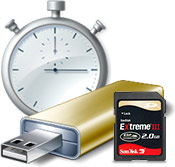
 After hearing all the rants and raves about Windows Vista’s ReadyBoost feature before and after the launch, I thought I just had to try it for myself. So over the weekend, I bought myself a top-of-the-line SanDisk Extreme III 2GB Secure Digital memory card from eBay to try it out for myself.
ReadyBoost works for all sorts of memory devices – USB, CompactFlash, Memory Stick Duo, XD, SD and anything else you can slot in your integrated card reader. I actually already own a 2GB SanDisk Cruzer Micro USB stick specially optimized for ReadyBoost which works as described, but it feels quite awkward having a USB drive sticking out of your laptop whereever you go. Especially when I just toss my laptop in my bag, I don’t want to break anything.
The benefit of a SD card or any other low-profile memory cards is that it can ‘slot’ into your card reader, and appear hidden without anything sticking out. Such a small aesthetics difference actually makes a huge impact on the experience, it feels like nothing is there. Of course, there are exceptions to this with certain laptop models where the card reader isn’t as deep as it should be, but the Toshiba Portege M400 works as planned.
After setting up Windows to use 1900MB of the available 2GB space, the activity indicator started flashing immediately. A good sign that something is working. It would continue flashing whenever I launched a program, and several times during idle, also good signs that something is happening. Just to check exactly how much is happening, I loaded up the Resource Monitor and looked for activity on the ReadyBoost cache file.
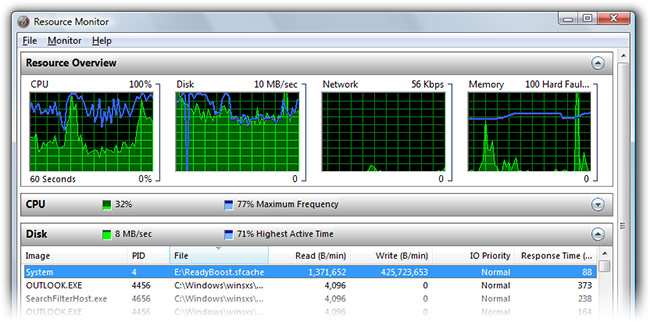
After loading up Outlook for the first time, the system was writing to the ReadyBoost cache at about 6MB/s.
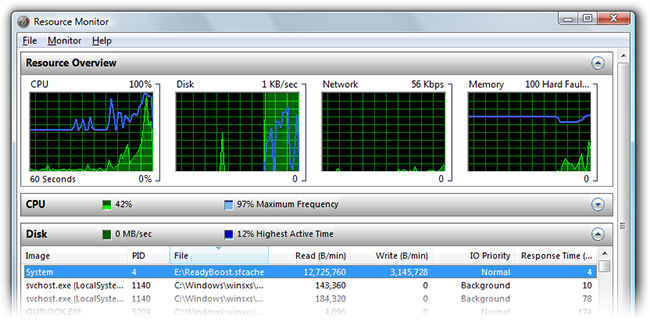
On the subsequent load of Outlook, there was little writing activity and a lot more reading at about 2MB/s.
 The immediate benefit can be seen in applications such as Outlook and Office OneNote. Previously, Outlook took at least 3 seconds to load the inbox from standby in the task-tray. With ReadyBoost, this is almost instant. The same can be said for OneNote, where it took over 5 seconds to load the application and notebook, now takes under a second for both. Most other applications like Internet Explorer and Explorer also became snappier. Resume from system standby was also quicker to load to a usable state. Even the forever-to-load Photoshop benefited marginally.
However, this did not apply to all application. ReadyBoost did not seem to have any effects on Mozilla Firefox. It still takes around 5 seconds to load, even after loading the application several times during the same minute.
Even though I’ve only been using ReadyBoost for around 12 hours, but I feel like it was a worthwhile investment. The benefits might increase over time as the cache becomes more developed and intelligent. However, what I don’t agree with is how ReadyBoost has been marketed and perceived by the public. ReadyBoost does not improve performance, it only improves responsiveness. It won’t make your system or Photoshop run any faster, but it will make things faster to load and initialize to a working-state.
If you’re on a budget, then ReadyBoost is premium accessory that is definitely not value-for-money. You’re literally paying a price to slice milliseconds off loading times. But if you’re a professional or heavy business user, then ReadyBoost might be a cheaper, easier or the only alternative to upgrading memory.
Update: There are clearly some bugs with ReadyBoost in the RTM version of Windows Vista. For example, sometimes after resume from standby, ReadyBoost fails to initialize at all even though the setting is enabled. Other times after standby, the system disables ReadyBoost because it doesn’t think the device is fast enough, and you’ll have to manually “re-test”. Hopefully these will cleared up by patches in the not too distant future.
Update 2: Reader Tom Chachamu has an excellent comparison the difference between responsiveness and system performance. ReadyBoost enhances the former.
High responsiveness: the system “feels fast” and you don’t have to wait for something to load when you’re about to go to a command. (Example of high responsiveness: when you logon, you immediately want to go to the start menu and launch something. The time from logon to launch is a busy wait for you.) – this is affected by readyboost.
High speed: the system performs computational (or I/O) tasks fast. (Example: you are ripping a massive library of CDs. It takes about 10 minutes. If it took less time, say by offloading floating point calculations to the GPU, then that would be high speed. It’s still longer than half a minute so the system is fast, but not responsive. When you’re encoding the CDs, you can do other useful activities, so it’s a non-busy wait.) – this is not affected by readyboost.
I just had a similar feeling my tests on two computers.
On my first test, on a quite recent Pentium D – no core2duo for me :'( – the “performance” gain (as you said, it’s more of a “responsivness” gain) was not really impressive, but it’s good to see OneNote starting so rapidly.
The second one, which was not really powerful enough for running Vista (a sempron based computer, 1go and an outdate gfx card), had a real boost in “usefulness”, launching any Office software (or worse : Visual studio) was really a pain before plugging the usb key . Outlook 2007 took 17s from start to ready-state and now takes only 9s with the 1Gb of Ready boost cache, Word didn’t gain so much with only a start-time reduced by 3 sec (from a total of 13).
Now, is readyboost a good alternative to upgrading this computer ? I really don’t know, but it’s clearly easier than opening the case and adding memory (okay, I know : I’m lazy)
Thanks Long, this is the first-ever intelligent test and description of ReadyBoost. Even hi-tech tech mags loke Tom’s hardware were expecting synthetic performance boost, which I frankly don’t get. Vista is snappier with RB, not miraculously faster, exactly how you put it. It helps a lot with multitasking and task-switching.
Thanks, I was looking for a real World test before jumping in and buying myself an additional card for this purpose.
I think I will give it a go with the SD slot as I’m constantly swapping out CF cards full of photos.
Out of interest what Vista rating does your laptop have? I wonder if the more powerful it is, the lower the usefullness or vice versa. My desktop reports 5.2, so we’ll see!
Hi Long, excellent article. Can you say something about the amount of memory in your Portege M400? Thanks!
I had a Pentium M 1.7Ghz laptop with a 5400RPM HDD and 1GB RAM and it was terrible under XP. That hard drive was so slow due to the massive amounts of paging when you open 5-10 “modern” programs.
I clean installed Vista, got all my drivers and popped in 1GB USB stick and Vista outperformed XP by a mile. I was floored by how much it helped this low-performance laptop.
Nice review, thanks for the information 🙂
@Long : you can’t remove the stick from the computer when putting it in a bag and use it again without losing something ? If you have to keep it connected everywhere you go .. it’s really not worthing .. that’s sure !
Wonder if anyone will consider manufacturing a USB stick that holds a DIMM module just to give boosts to these systems that are difficult to upgrade. They would be limited to the USB 2.0 interface, but it would be interesting.
-d
Hi Long,
Great article. I am trying to learn about ReadyBoost. Can you tell me if it improves the loading for Internet Explorer 7 ?
Also is it possible that the usefulness of ReadyBoost may be seen more with IO intensive apps like outlook(since outlook probably reads from the ost/pst file ?) than Firefox. Given that what it really does is acts as a cache between the harddisk and memory ? Correct me if wrong. Its more a question than a statement.
I found that game load times decreased by quite a lot…
@Graham: My system has a rating of 3.1 with Intel Core Duo 2400 and 1GB RAM.
@Joachim: Windows Vista manages memory very differently to other versions of Windows. You’d find during idle, Vista tries to hog as much memory as it can. This is an effect of SuperFetch. Basically, it is trying to cache everything in preemptive of what you might do next. As soon launch an application, then Vista will unload the cache to give as much room as the application needs.
Therefore, my memory footprint is basically 1GB out of 1GB.
@Jay: I tend to rushly close my lid and throw my laptop in my bag after lectures and meetings. Therefore, I don’t want to waste time plugging/unplugging a USB stick before/after every laptop use.
Also, the system tends to unload and reload your ReadyBoost cache after removing the memory device, so it is probably a better idea to keep it in the wholetime.
@Kandarp: It only improves the loading of IE7, and not much of actual web surfing.
It is probably true ReadyBoost holds the cache of Outlook’s PST, but it also uses the SuperFetch technology which means it also caches application executables too. I would think Firefox can benefit with a cache of its EXEs, user profile and other data-stuff.
Since Long disabled comments on the ‘Winner of Vista Ultimate Giveaway’ post…
Greetings from Canada!
I am want Vista!
Me want try difference between XP!
wow… Maybe you should put that they cannot use Babelfish to translate their posts! Or they at least have to string together a sentence that makes sense.
Sorry if thats a little racist… :/ But… yeah…
Mitch
Correction.. that would be the Win A copy of Vista Ultimate post… my bad >_
or be like me 🙂 for my desktop i just put a usb on one of my internal usb ports hehe 🙂
ya people seem to misunderstand that just bgecause 90% of your ram is used isnt a bad thing… 70% of that 90% is probably cache that will be easily dropped if a program actually needs it.
I would also get a 1 gig of ready boost 😉
in my usage, RB has been pretty good to me with general responsiveness and contrary to popular belief, it doesn’t increase the “speed” of the machine, but rather just helps with cacheing.
photoshop still takes forever to load (700+ fonts is my issue) but the filter previews do seem to pop faster; applying the filter on the other hand is not noticably faster :(.
still though, given your budget, RB maybe better than going for more ram until you can afford it. me, i just need to build a new pc!
would this work on a Sony Memory Stick Micro (M2) on a M2-to-Duo adaptor? or is that too slow a medium?
“Boost does not improve performance, it only improves responsiveness.”
Sorry, I dont understand your conclusion. Did you expect from RB that it will improve the number of calculations or to have a higher framerate when playing games? I am using it for several weeks now and I can confirm your experiences, that it helps a lot to improve the responsivness of the system.
So it helps to make the whole system perform faster. So isn’t it the same?
@joris: A lot of what was communicated by others is that ReadyBoost somehow improves performance – make your system run faster than before, which is not true. I wouldn’t say increasing FPS, but certainly hinting towards it.
I think the real use of ReadyBoost is to use your existing USB stick in something usefull when you’re not useing it in any other way. ReadyBoost is a “good” add-on feature to our USBs but it’s not the feature that we gonna buy a “new” memory stick for it because if so, save more money and buy a RAM better!
@Texnomic: Sometimes you can’t get more RAM. Such as a laptop scenario, where all RAM slots are full and it is not feasible to replace all the RAM.
“I am using it for several weeks now and I can confirm your experiences, that it helps a lot to improve the responsivness of the system.
So it helps to make the whole system perform faster. So isn’t it the same?”
High responsiveness: the system “feels fast” and you don’t have to wait for something to load when you’re about to go to a command. (Example of high responsiveness: when you logon, you immediately want to go to the start menu and launch something. The time from logon to launch is a busy wait for you.) – this is affected by readyboost.
High speed: the system performs computational (or I/O) tasks fast. (Example: you are ripping a massive library of CDs. It takes about 10 minutes. If it took less time, say by offloading floating point calculations to the GPU, then that would be high speed. It’s still longer than half a minute so the system is fast, but not responsive. When you’re encoding the CDs, you can do other useful activities, so it’s a non-busy wait.) – this is not affected by readyboost.
@Tomer Chachamu: Excellent comparison!
Thank you.This is a good idea.
“There are clearly some bugs with ReadyBoost in the RTM version of Windows Vista. For example, sometimes after resume from standby, ReadyBoost fails to initialize at all even though the setting is enabled.”
I’ve found this too. Sometimes right after resuming from suspend Vista will pop up a box with ‘unrecognized USB device’, and my ReadyBoost drive will not be available. It’s frustrating but I’m glad someone else has confirmed that this is a bug. However it kind of spoils the idea if you have to unplug and replug.
Long, Everything you said was true but at the bottom you wrote that you are unhappy with the way this was marketed and perceived by the public. I just wanted to clarify that you were talking about the way consumers are spreading the word and not Microsoft. I only say this because I have read all over the place MS saying exactly what you said and even less expectations. They say that the real performance is with 512mb of ram and that with 1gb and especially 2gb you would rarely see a difference.
On another note, I’m thinking that if SuperFetch works properly, that is where us with large ram sizes will benifit. That being said I still have 2gb of ram with a 2gb flash card out the back of my pc 🙂
I’ve been trying to determine if even a relatively small memory card (512MB old, slow memory stick duo) can help system performance on a Sony UX390N (1GB RAM, 32GB SSD disk — all flash already).
My test app was Windows Live Writer. Without the memory stick in, it loaded in about 9 seconds the first time and then 7 seconds after that. However, with the memory stick in, it still loaded at about 9 seconds the first time, but then would start to load in about 5 seconds.
This is completely non-scientific but it shows that it can help out even if the main hard disk is already rather fast — in this case, it’s fully solid state so it’s a similar form. I’m guessing that the responsiveness boost here comes from the fact that Vista can read from both at once without saturating the higher levels of bus bandwidth.
It sits flush in the machine, so there is no reason for me to not have it in (unless I find it hurts the battery life by continually moving the cache around — it used 50% processor for over a minute to load up the cache right after insert). A faster one might do even more good, too. It seems to only write at about 2-3MB/sec and doesn’t appear to read much faster than that.
Just some more data — “jeff” above had asked about Memory Sticks and this confirms they help just like everything else.
-Shane
Well, what is great is that contrary to popular belief you are able to use multiple ready boost drives- 2 8 gig flash drives, with my core 2 quad x2 8 gigs of ddr3, raids 2, vista 64 etc etc, I was able to get some needed responsiveness running xp pro in a virtual enviroment, my system has never run faster, ty for the article,
Kay