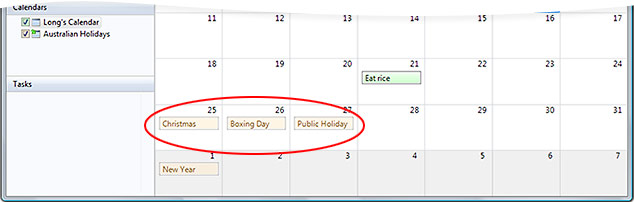
 Windows Calendar is a lightweight calendaring application newly adopted to the Windows family of bundled accessories. But it is so lightweight, it doesn’t even include public holiday dates. However thank heavens for interoperability, there’s an easy fix.
There is an extensive library of preset calendar dates on the internet, and with Windows Calendar’s subscription feature, we can simply download this data. For this example, I’m going to use Apple’s iCal library.
- Open up Apple’s library of religious and world holiday calendars.
- Click on the calendar you wish to subscribe to.
- Windows Calendar should open up and prompt you to confirm your calendar subscription. Click “Next”.
- (Wait until pigs fly)
- Name your calendar appropriately (ex. “Australian Holidays”).
- Click “OK” and you’re done.
Some sites may not automatically allow you to subscribe to their calendars. In this case, simply copy the URL for the iCal-formatted calendar, click “Subscribe” in the Windows Calendar toolbar and continue.
Subscribing to public calendars isn’t only limited to public holidays. You can keep a track of movie openings, DVD releases and even TV episodes. For example, I’m a Lost fanatic, and with this season 3 episodes calendar, I’ll never miss a cliffhanging episode again.
iCalShare offers a huge database of over 4300 subscribable calendars in 40 different topics. You’ll never miss a beat.
Thank you. Very useful indeed. Your site always contains something original.
Very interesting, and I’m glad it works for Outlook too.
I can’t keep up with all these different calendars, contacts lists etc…
I mean, you’ve got Windows contacts, Outlook contacts and Windows Live contacts. How are you meant to keep them synchronised? I use a PDA so I synch with outlook and just dont use Windows calendar.
Cheers. This works a treat!
Vista is looking so awesome. But I keep hearing all these people bag it out. =/
That’s genious.
@Matt Sharpe; Do you know how to import contacts from the contacts-folder into Outlook 2007?
This is awesome again Long! It’s so good it hurts I never used this program before, so, once again thanks!
PS
I’m going to make a laugh, Halo calender!
Thanks for the tips 🙂
hmm, this doesn’t work for me. Outlook grabs the focus and the ics file. Windows calendar has no word in this. is there a workaround?
thanks
HK
fracture copy the link to the ics… and then in the windows calender use “subscribe…” from the menu at the top
chris, thanks, that was just too easy and I should have figured this out myself.
thanks again
Check out http://www.markthisdate.com for lots of calendars to subscribe too
Cheers
Hey thanks for the great info. I was looking for just Holidays but now I have movie releases, dvd releases, my STL Cards schedule, and soon calendars for Lost 4 and the next Heroes. Thanks again man!
Hey – mid 2008 and this is still better advice than elsewhere. Thanks!
FIND DUPLICATE FILES INSTANTLY with Easy Duplicate Finder. It is the … Get Your Free Duplicate Report! … Let Easy Duplicate Finder remove the duplicates! …