I’ve been doing a lot of playing around with virtual environments lately, because booting into Windows Vista everytime I want to hear the startup sound can be pretty frustrating. Today, Parallels announced Parallels Workstation 2.2 for Windows which has increased support for Windows Vista. So far, I’ve been using Microsoft’s Virtual PC 2007 Beta but I’m not 100% happy with the performance. So I decided to give Parallels a test run after hearing all the good press on its Macintosh counterpart.
I installed a virgin copy of Windows Vista Ultimate RTM on exactly the same virtual hardware to do a direct comparison between the two products. Both products has their respective ‘additions’ package (VM Additions/Parallels Tools) installed to maximize performance.
Note: I recognize that VMware Server/Workstation supports Windows Vista as well, but the lack of Intel VT support results in really poor performance.


The results was surprising. Parallels started off faster by at most 2 seconds, but eventually Virtual PC caught up and ended up winning by 8 seconds. This has put my superstition about Virtual PC’s sluggish performance on the backburner for the while, until each product optimizes their products for Vista even further.
Unfortunately, none of the solutions (Virtual PC, Parallels, VMWare) will support hardware-graphics virtualization for quite some time, so there goes any chance of Aero Glass in a virtual environment.
My good friend Andrew Dugdell has 7 great tips on even improving Virtual PC’s performance. Well worth checking if you do a lot of work in a virtual environment.
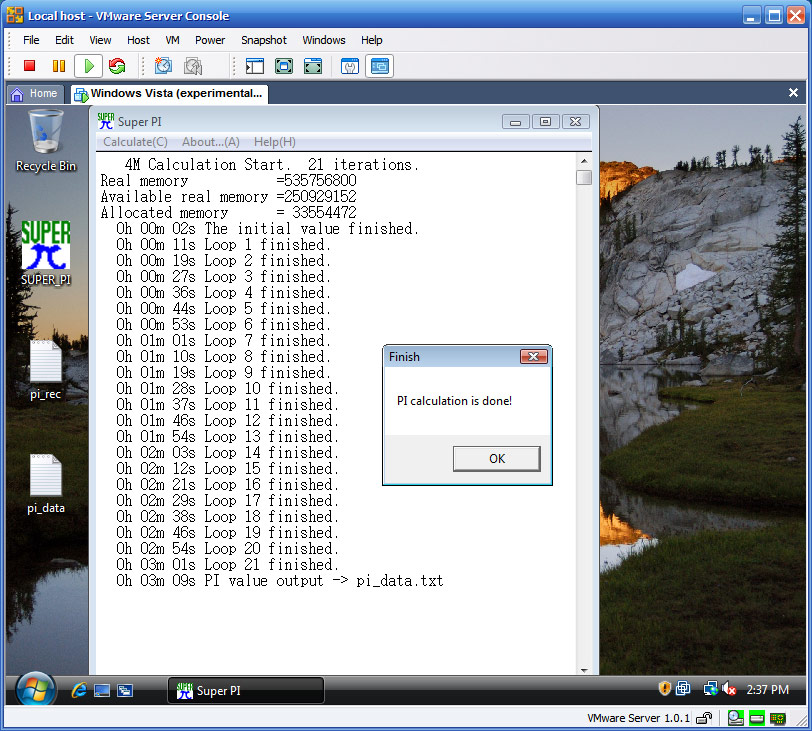 Update: Under the advice of Keith Adams (from VMware), I gave VMware Server another go. I’ve actually been a long time user of VMware Server, but ever since alternatives started supporting Intel VT, I’ve switched and found the experience much better. Perhaps it was just a psychological thing, but my new tests prove otherwise.
VMware completed the SuperPI test 6 seconds faster than Virtual PC. And with its dual-core support for guest operating systems, it runs even faster with dual-core enabled. I guess this proves Intel VT doesn’t enhance performance at all (right now), or at least VMware already runs blazingly fast. I’m switching back!
hey.. nice comparison.. but i read somewhere that there is a method to get aero effects even on VPC… ok i agree it is not purely vpc.. all one have to do is to connect to VPC using an RDP client.
Read more at
http://blandname.com/2006/11/11/aero-glass-on-a-windows-vista-virtual-machine/
Yep. You can do Aero Glass with Windows Vista as the host. But Vista in Vista kind of defeats the purpose.
This is the worst part about testing applications with Vista. We have been using VMWare each time a new OS comes out from Microsoft. Now with the Aero glass it is impossible to do testing (With applications that might be affected by Aero) without actually setting up a machine running Vista, with the latest and greatest video card. Hopefully one of the VM companies will come out with a solution soon. It sure would make development a lot easier.
Steve Wiseman
http;//www.windows-admin-tools.com
Have you actually measured the “really poor performance” caused by “lack of VT support”? I work on VMware’s VMM; we support VT, and choose not to use it where possible, because on current hardware it does not improve performance (for most workloads). See our paper in ASPLOS XII for details: http://www.vmware.com/pdf/asplos235_adams.pdf
Point taken about the lack of Aero Glass support, Steve. This has nothing to do with VT, though.
Last I read, VirtualPC 2007 running inside Windows Vista does support Aero Glass (no need for remote desktop). I know defeats the purpose for those who don’t want to actually install Windows Vista on a PC, but Steve, you don’t even need the greatest video card to support Aero Glass, Intel GMA950 supports it.
I tried Microsoft Virtual PC 2007 Beta and VMware Workstation 5.5, and the latter was much better in Vista RC:
[url=http://www.expertvista.com/software/virtualbattle.html]http://www.expertvista.com/software/virtualbattle.html[/url]
I’d be really interested in knowing what kind of results would Super PI get on the Host. I think it’s important to get a sense of what you’re losing(in terms of speed, not graphics) when virtualising Vista.
You call this a review?
No numbers, no objective thoughts, no real data, just general griping and influenced subjective writings.
Virtual PC is hardly mentioned, and all you say is that “VMware is better than Parallels & VPC.”
Where’s the benchmarks? The start-up times? The real results?
I’m afraid this simply doesn’t qualify as an actual “review” or “comparison,” just some ramblings on a topic you obviously have little experience with.
@Roger, you realize this is NOT a review and there were numbers, right?
Rog is obviously a VPC zealot. Most MS employees are 🙂
Try adding these lines to the “.VMX” file of your VMWare virtual machine. In some versions of VMWare, the first line will enable virtual 3D hardware while the second sets how much vram to report to the OS (In this case, 128mb).
mks.enable3d = TRUE
svga.vramSize = 134217728
Glass in a VM? EASY. Forget Vista, use XP. And learn about WindowBlinds!! windowblinds.net
No I’m not an employee. I am a long time user who feels sorry for the victims who are using Vista. It is DRM bloat garbage. I just use tiny firewall for security (I am US Airforce it is on all of our machines) and WINDOWBLINDS for gorgeous visuals that more than equal Vista’s finest.
Please, learn a little about what optional software is out there before you limit yourself to what is shipped with the OS. It is the same mentality of those poor Mac OSX users who don’t understand how soundly windows beats mac if you just know what software to run. Microsoft sure screwed up with Vista, bad.
I came here trying to figure which to use: VMWare (Server or Workstation), Virtual PC or Parallels. I am non the wiser.
If anyone knows of an objective comparison of current versions, I would like to hear from you.
My personal situation is:
– Core 2 Duo h/w and XP Pro host OS (either 32 or 64 bit)
– Wish to run XP guest for testing and dedicated application environment, such as web dev, audio editing, tools testing, demos etc.
– also want to run Ubuntu as guest for education
So far I found the following:
MS Virtual PC 2007 – very good Windows support, love the (unique) Differencing vd idea! Doesn’t work with Ubuntu. Uses really low memory amount! No USB.
VMWare Server – No USB.
VMWare Workstation 5.5 (free upgrade to 6) – tried v6 Beta and it crashed my system. Dearest option. Seems to have best “pedigree”.
Parallels – Reasonable price. USB 1.1
As you can see, my knowledge is very limited, which is why I am looking for some advice on which way to go.
Any input???
-paul
@Paul:
Virtual PC 2004 and 2007 host Ubuntu just fine once you get past the fact that VPC wants you to run 16-bit graphics, and Ubuntu defaults to 24-bit. Here is just one of many articles on how to get around it:
http://arcanecode.wordpress.com/2007/02/26/installing-ubuntu-610-on-virtual-pc-2007-step-by-step/
It’s a long-winded explanation, so here is my short version for those comfortable in the command-line:
* wait until the installer boots and loads garbled graphics
* press Control-Alt-F1, log in as root (with “sudo su”)
* edit your xorg.conf (pico /etc/X11/xorg.conf)
* page down to the “DefaultDepth” setting, change 24 to 16
* press Control-O to save, Control-X to quit.
* press Control-Alt-F7 tor eturn to your hosed GUI.
* press Control-Alt-Backspace to restart X Windows.
Make sure you don’t have any of those Control-Alt-keystrokes assigned to any Windows Shortcuts before trying this.
Thx Rob,
Nice short description, it is working well.
When switching from console (Ctrl-Alt-F1) and back (Ctrl-Alt-F7) the grafics are a little bit more readable!.
I’m using the default Ubuntu 6.10 iso. (not the alternative version, as described in the step-by-step article)
parlles are better than both of them
“parlles are better than both of them”
HAHAHAHAHAHA
> It is the same mentality of those poor Mac OSX users who don’t understand how soundly
> windows beats mac if you just know what software to run
Hilarious. I’d expect as much from the military. So, what piece of glorious Windows software is the final nail in Apple’s coffin?
I really wonder how many of the people here making all these comparisons have actually used these products? I make no claims to Parallels as I do not have a Mac and have only used it once.
However, I have used VM Ware and Virtual PC quite extensively, and other than the price, Virual PC has nothing going for it.
VM Ware (I am comparing VM Ware Workstation again Virtual PC) is such a nicely refined product, and Virtual PC is obviously something that Microsoft threw out there as soon as it could to try to compete in this market that VM Ware dominates.
Connectix Virtual PC was not a very good application, and it is what Virtual PC is built on. Microsoft purchased the product from Connectix back a few years ago because it realized that it wanted to get into the virtualization market, and VM Ware was the only serious player in town.
Ilook at VM Ware, and see all the options, refinements, support for many OS’s, and then I look at VPC. It is like comparing a Volkswagon to a Ferrari. Yeah, both have 4 tires, and use fuel, and go from A to Z, but thats about where the simularities stay.
VM Ware Workstation is a $300 program, VPC is free. If you are a home user, who wants to play with VM’s, and are not needing a serious VM app, then use VPC, but if you are a professional who uses this app for their business (as I do for testing many apps on many OS’s), then VM Ware is the only way to go.
“parlles are better than both of them”
lol… that one was priceless. Parallels is slower than shite.
George, we’ll forget that Volkswaggen are the parent company of Buggatti 😉
Roher Heinz said: “I’m afraid this simply doesn’t qualify as an actual “review” or “comparison,” just some ramblings on a topic you obviously have little experience with.”
Exactly! Whether it was promoted as review or not, it’s till rambling on a topic he has little clues about.
Let’s be honest, how many would be interested in me saying that I prefer VMWare (which I do) without sharing any facts.
hi,
i have a question, i got the virtual pc but the screen of the PC is quite small. There is any way i can make it bigger, cause i have a iBook G4 12 inch screen.
thanks,
JGV
vpc may be free, but the os you run it on isn’t.
Linux host + vmware server IS free…
Parallels is terribly unstable… I updated from parallels 2.5 to 3.0 in the hope of solving the problem, and it has just gotten worst… As usual, the only reason why mac zealots like parallels is the nice icon and the fancy name, and that’s probably the only good thing about it. I’m moving to wmware.
I am using VMWare 1.0.4.
I have one system here that works perfectly fine, able to detect thumb drives on both the Host (WinXP) and Guest (Ubuntu) systems.
However, on my notebook, with the Host as Windows Vista and Guest as Ubuntu, I can only see the thumb drives on my Vista. No way to see thumb drives on my Ubuntu, even when I disable the thumb drives on the Vista system.
I have been trying to get this problem solved for quite some time already.
is it the Vista problem? or will VMWare 2.0 Beta help to solve this problem
pls email me: [email protected]
if you have some suitable solution.
USE VIRTUAL SERVER 2005 R2 SP1
Hi guys I’m using this great free product on Vista as a host OS, I run several Vista Virtual Machines (Guest OS). Everything is supported, Aero and all the bells and whistles.
I have a fast machine running Vista and want to run Winxp . If I use Virtual PC to run Winxp will it run fast or slow.If I want speed will I have to do a dual-boot.
Many thanks
John
@Paul Szilard
VMWServer does have USB support. You just need to install a virtual USB controller (as simple as shutting the machine down, going into the Hardware Specs and adding it). Then you will have the option to pass through USB devices to the Virtual Machine.
We use it all the time for USB devices.
Hey, Your links to Dugie’s site is broken….. The new URL is http://blog.windowsvirtualization.com/uncategorized/virtual-machine-purity-test-can-you-get-86-or-higher
and http://blog.windowsvirtualization.com/
I have vmware workstation on top of vista running Ubuntu, windows 95 (so i can play scorched planet lol), windows xp, and the windows 7 beta. All 4 work great
I have used both VMWare and Virtual PC and i find VMWare workstation (version 6 agains vpc 2004) to be better than vpc. You have all kinds of hardware with vmware (sound, usb , NIC and the rest) with better control as you can disconnect them while the machine runs (vpc 2004 does’t support USB but 2007 does).
You can run far more guests in vmware that VPC as supported guests.
vmware let you record a movie of the display while vpc does not.
vmware allows the use of snapshots and other features that vpc doesn’t have.
you can check all these yourself and from my experince vmware workstation 6 is faster that VPC2004 (i need more testing on 2007)
the price of VMWare workstation 7 is 186 dollars (electronic download from the site)