If you were to explain to someone the features and benefits of Windows Vista, you’d probably start off with Aero, new Shell, Search, Sidebar, security, Media Center and all the other goodies listed on this wiki, but would you mention to them, “Dynamic multi-dimensional scrolling”? What the hell is that?
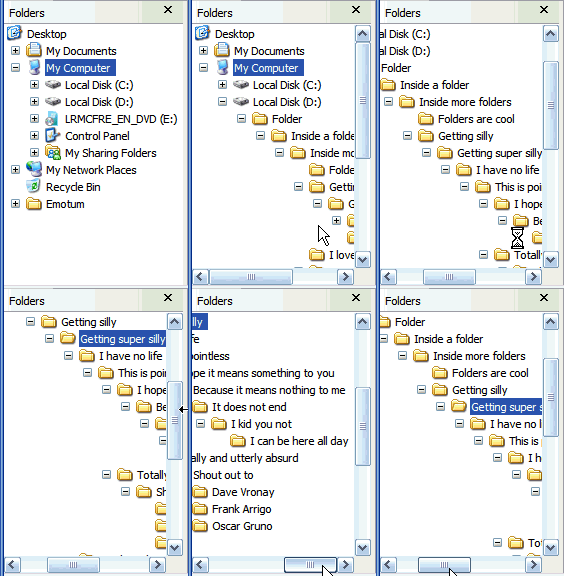
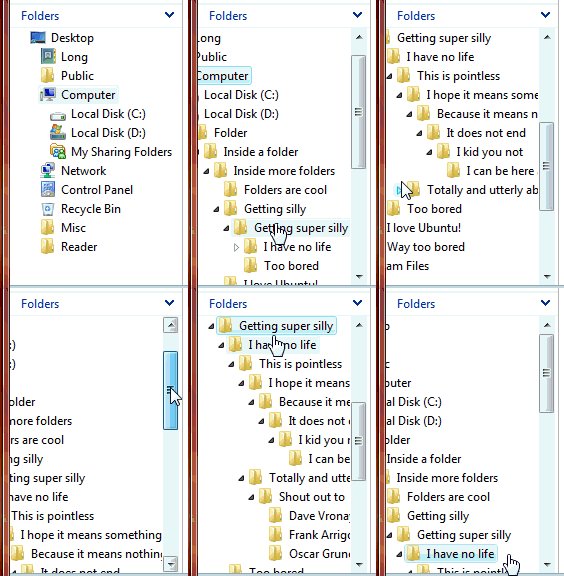
Have a look at the scrolling experience in XP (left) and Vista (right).
Excuse the quality and large file size, but I think this is the best way of showing it.
Pretty neat heh? It’s not one those things you’ll probably never notice, but once you’ve used it, you can’t go back. This ‘feature’ is currently reviewed for a patent, and as described in the application, “the automatic dynamic scrolling alleviates the effort and stress related to requiring a user to manually scroll a view in two dimensions in a tree control.” Hats off to Lyon Wong, Cornelis Van Dok , Colin Anthony and Stephan Hoefnagels.
Is it a feature? No. Is it worth mentioning? No. Is it a selling point? No.
Does it deliver a great experience? Yes.
The point I’m trying to make is, you can’t appreciate an experience until you use it. No matter how many feature lists you read, how many screenshots you see, how many screencasts you watch, you’re not going to get the full picture. Try it, experience it, then judge it.
But I’ve got to admit, the list of experience enhancing ‘features’ in Vista is not as long as the list of experience-prohibiting flaws. But maybe the next Windows will be better.
Hi Long
I’m not sure how you are scrolling?
Are you just clicking on the folder name to scroll?
I see Vista takes up less horizontal space too.
Mat
@Mat: Vertical scroll is controlled by my mousewheel. Horizontal scrolling is automatic in Vista 😉
automatic my _ _ _ it is still NOT working for me….and nothing anywhere is helpful, including this page…and the “try it and you’ll never go back” idea is just a lie…repeat a lie often enough and it becomes the ‘truth’…or not…depends on your IQ level i guess…if this were so great there would be no need for this and other webpages…and guess what…not a bit of functionallity added at all…
yeah its cool 🙂
Yeah I noticed it right from the start, nice feature. But I will never get, why MS devs spend countless hours advocating things like no “Up-level” button in Vista, instead of placing the god-damn thing into the command bar.
Such a Windows “experience” was the best in XP. sure cant say that for Vista..way too many small issues. If you really look at that Wiki, u’ll realize almost everything in Vista is being backported to XP. And the dumbed down basic apps are worthless.
IE7 and RSS platform, XMLLite, IEAK, Developer Toolbar
Windows Defender
Windows Desktop Search 2.6.5/3.0
Windows Media Player 11
Windows Media Format 11 Runtime
Windows Media Connect
Windows Driver Foundation, User Mode Driver Framework
Windows Portable Devices
Universal Audio Architecture
Windows Networking Updates (WPA2, Diagnostics, PNRP v2)
Windows Imaging Component
XPS
Windows Media Photo
Management Console 3.0
Remote Desktop Protocol Client 6.0 (Windows Vista Terminal Services Client)
.NET Framework 2.0/3.0
UI Automation
Guided Help
Windows Live Messenger
Windows Live Mail Desktop
Rights Management Client
Ink Analysis API
Services for Unix
Windows PowerShell
Virtual PC 2007
And Vista has been developed only from Aug/Sept 2004 so MS couldn’t really add any Vista-only killer feature since it was already late. I see nothing to call it NT6, no selling point. If u think about it:
Windows 95 => GUI invention, Start button, Windows concepts
Windows NT => First NT kernel, First Server OS
Windows 98/98 SE/Me => Updated Windows features for 9x line
Windows 2000 => Many many new features, complete workstation and server
Windows XP => Combined NT kernel with 9x compatibility offering the best of both worlds, many small improvements, still supporting the latest standards and features
Windows Server 2003 => Enough to warrant an upgrade over Windows 2000 Server
Windows Vista => ??
I dont mean to say nothing’s new in Vista…it’s bad…but for the time being…everything’s there in XP.
MS said DX10 will be 8 times faster but still gaming will be 15% slower than XP. And security might be a selling point for the average Joe but how are we still surviving on XPSP2 without doing much?
Then again, who am I?
(expecting strong anti-me comments below)
@anonymous:
Windows 95 is a “GUI invention”? I have to assume in 1995 you had to use the parachute to jump off the carpet.
@anonymous
Aero
Integrated Search
IIS 7 (no longer limited to 1 website)
Sidebar & Gadgets
Improved Network stack
Improved Audio stack
Come on now, you seam well read on Vista, should I need to go on? You know this…
A new Explorer experience with the breadcrumb bar (which is great)
Improved security and UAC
Improved directory structure
Improved speed and stability
Improved install and startup time
Windows Mail (great upgrade to OE, works well for newsgroups)
Windows Calendar
Windows Photogallery (very nice app)
Parental controls
Previous versions of files
Yes, many features developed will also be made available for Windows XP. Thank Microsoft for that. Probably wiser than spinning that into a slam on Vista.
I completely understand if you don’t think the above warrents an upgrade to Vista. I understand many people feel that way. But everyone is different. There are also those who find it a very nice upgrade. I think they tend to be those who use their computers a bit more and want to enjoy the experience rather than get in, get done, and get out. I also hold out a bit of hope that Vista is an enabler, allowing things like Ultimate Extras and future deliverables to continue enhancing the end user experience.
yeah i noticed the scrolling, but at first i was like “did i do that?” because at first i wasn’t sure. it was a great idea but to for m$ to highlight it would make vista look more like a trivial update that a new version of windows (which unfortunately since pdc2003 it’s kinda looking like that).
@anonymous: 15% percent slower? hasn’t this been covered already? where’s your proof? it is the same as gaming on xp once the dwm gets disabled (automatically).
and you can’t stiick Live services in there as they aren’t vista exclusives.
please don’t interpret as “anti-you”, just trying to stomp this vista gaming slower than xp junk that just seemed to run away with everyone’s imagination.
How are you capturing and making those animated gif’s? That’s cool!
Vista for some will be a non starter, but for most Vista will be well worth the wait,just like tiger in OSX, some people will shrug their shoulders and wonder what all the hoopla is about, it you have to ask, it’s not for you.
If they removed the registery as promised, i wouldent have cared, but they dident, so this is cool!
@ikyouCrow
Sorry, but unless they’ve made fantastic gains since RC2 Vista is much slower than XP for gaming. Part of this may be video drivers but I don’t think all of it is.
In particular, the 3 games I play the most are City of Heroes, World of Warcraft and source engine games (eg HL2).
Using the exact same graphics settings: source engine is minimum 15% slower, CoH is as much as 50% slower and WoW sometimes gets as much as 60% slower (using non-scientific analysis of the in-game FPS monitor). I didn’t realise this until I went back to XP after using Vista for a week, suddenly my games were fun to play again 😛
@Scott Kingery: With Camtasia Studio of course. http://www.techsmith.com/camtasia.asp
Back to the Explorer Feature …
I actually hate the “feature,” 1/2 the time.
Any chance of making it configureable so that I can still have my horizontal scroll bar ?
It is something new to get used to, and hopefully it will make me more productive but I guess it’s still taking a little while to uneducate myself of the old/bad ways of navigating through the folder pane.
Why doesn’t this apply in Regestry Editor(regedit)?
@Darren: Good question.
Prey, FarCry, Doom3 —- more than 1024*768 resolution with all eye candy turned at maximum with DX10 —will this play in windows vista by getting smooth frame rate??
I hate this feature ALL THE TIME. Very frustraiting. It does not make me productive. You still have to move your mouse to get the screen to scroll left and right. The problem is that the screen is moves when i don’t want it to move and doesn’t move when I want it to. I want to control when the screen moves. There’s way too much automated activity going on the desk top these days. Just by moving the mouse you get pop ups, screen movement, font changes. It’s like you’re navigating a mine field when you move your mouse around on the screen. Enough already. Give me back control of my desk top. I have a left and right mouse button. Let me use them when I want. Stop trying to anticipate what I want.
Man, I can’t stand this! Is it so hard to use a scrollbar? Firstly, I dont like that the list will scroll horizontally whenever I select something. it’s disorienting and not particularly helpful. One case in particular is much worse – what if you wanted to navigate to the root of a tree (vista uses this styling for all trees, not just file management) but it was not visible? no scrollbar means that you would not be able to see the root node to select it.
I totally hate this feature! It is so annoying! Most of the time, a click into the tree to access a top level item, so I have to scroll back again and again! And you can’t even turn it of! ARRGH….
dynamic multi-dimensional scrolling is a cool feature. Only a stupid user
would disable it!
RE: BillD
Jul 22nd, 2007 at 3:16 am
“dynamic multi-dimensional scrolling is a cool feature. Only a stupid user
would disable it!”
Your an idiot, ok?
I Hate this ‘feature’ it is poorly designed and scrolls at inappropriate times, taking up far more time than it could ever save. If there are folders (or any other item displayed in a tree) more than several levels deep, this will sometimes make it impossible to scroll back to the root without scrolling first to an intermediate position. This feature (out of the many vista pieces that I dislike) causes me the greatest aggravation, since it is so prevalent and SO TERRIBLE!
His was one off the firts things that i like is very usefull and look very nice .. i will never disable it..
sorry from my poor inglish (im from Brazil)..
Anyone knows a way to disable this ? I can understand people can like it, but I really hate this “feature” that annoys me everyday. Help would really be appreciated (mainly by my coworkers who would stop earing my daily complaints ^^).
I have Vista and would like to know if it’s possible to scroll in the vertical, automatically.
In XP, we could do this by “clicking” the MOUSE WHEEL.
Pls advs & tks
Its a nice feature, so nice that I’d like to send it back to MS as a gift. But only AWAY from my computer. Please take it back please please please.
I wanna get back my HScroll Bar pleaaaaaaase
So I guess nobody has figured out a way to disable this? Pity, it’s driving me ***** nuts!
BillD is an idiot. Lyon Wong, Cornelis Van Dok , Colin Anthony and Stephan Hoefnagels are evil. This feature is very very bad. Just looking at the graphic at the top of the page makes me want to punch my screen. What the graphic doesn’t show is the thin virtical lines reflecting the various folder levels. I rely on those lines for orientation when scrolling through highly populated folders. Auto scrolling takes this visual aid away.
The nice thing about the graphic above is that it clearly demonstrates how slow and cumbersum this feature really is. Its frustrating to navigate a large directory, start to focus on a file/folder name, and then your screen starts moving on you. Auto scrolling sucks. M$ should stop chasing patents and changing core features just because it looks cool.
This feature is one of the biggest showstopper in vista. PLEASE GIVE US AN OPTION TO DISABLE IT!! It plainly sucks. It just guesses on what I might want to do, but it guesses WRONG.
This “feature” makes me want to gouge out my eyes while licking cactii.
It is INFURIATING.
Has anyone found a way to disable this idiotic feature yet? I can understand the allure for those that find form and appearance much more important than function, but as someone who works with computers, this feature causes constant pain.
When I’m navigating in a tree view, I happen to know where I’m going and don’t need to Windows moving things around just because some OS programmer at M$ thinks they know what I want.
There has to be some way to turn this off. Turning off smooth scrolling at least makes Vista jump to its target location a little faster. As someone else noted, in order to hide their deficiencies, the Vista team, made everything slow animate. Again, because form and appearance are obviously more important than efficiency.
Making the pane wider is not a real suggestion. Please. I’m keeping that pane narrow because I need the space for my primary workspace.
Hopefully someone will find a registry entry somewhere or a little noticed flag to kill it.
Part of my role is usability, and you never take away user control without providing some way for them to override. Even then, if the user intentionally moved the horizontal bar, that would be an indication to an intelligent feature, to no longer adjust that tree view during the current session, because it would have obviously failed.
Thanks.
S
If this really is such a great feature*, then why wasn’t it also implemented for vertical scrolling?
– Don
* it’s not, it’s deeply awful
Huzzah!
Just had to look long enough. Since this is primarily a problem for me in Eclipse, this works for me. Hope others find it useful as well.
https://bugs.eclipse.org/bugs/show_bug.cgi?id=164437#c17
S
A thousand thanks SilverDev – this was really only a problem for me in Eclipse too. I feel like a new man 🙂
SilverDev – You are a true hero. This was driving me nuts!
Keep fighting the evil 😉
Please god! Tell me how to turn it off! It’s thoroughly messing up my games! I need to scroll up and down and I just keep getting taken to the desktop!
I also hate “dynamic scrolling”. I am not a computer geek, developer or gamer but I am a serious computer user. I don’t play games and don’t like Microsoft arrogantly deciding what is best for everybody without giving us options. Obviously this is another “love-it” of “hate-it” feature. I would like MS to give us the option to turn off “improvements” that we do not want, including start-up programs that we rarely use. These programs running in the background slow everything else.
I can’t think of anything that I really like about Vista. I joined the forum to learn why others like it and to learn if there are features that might improve my work. I purchased a new laptop and was forced to purchase vista (with 4GB RAM) to get the laptop that I wanted. Many of my existing programs would not run and there were no drivers for some of my printers. There were no drivers for 2 of my Lexmarks and my 3-year old HP; I haven’t tried to connect the laptop to my Epson Stylus Photo printer. I had to replace or upgrade perfectly good software because they did not run with vista. I believe the changes I had to make in the way I work made me less efficient. If vista is “better” the learning curve is too steep and much time is wasted. Vista is contradicts thermodynamics – it increases entropy.
I hate it. Making Dynamic Scrolling optional would have been the “Vista” thing to do.
I find that enlarging the navigation pane (tree view) eliminates Vista’s guesswork on which way to scroll. Same way in XP — by expanding your navigation pane, you do away with the need for the horizontal scroll bar.
Aside from that, Vista is the biggest pile of bloatware ever made.
Jesus. Why all the hate for this awesome feature? I think most of you are just complaining just for the sake of complaining. No way does this feature get in the way of the work flow.
meh thats not mind blowing
but I do like it. They need to make it more responsive and faster though.
this is one of the most annoying features ever pushed down our throats by microsoft. it really gets in my way when using list view in folders having a large number of files. when i select a file with a longer filename, it is really irritating to have the image run to the left.
Well, this is no longer present in Windows 7.
I sometimes miss it.
This feature is still in Windows 7 RC, or are you using a leaked copy of the final version of Windows 7?
I also wish to see it removed.
I, along with my colleagues, also find this a terribly annoying feature since we use laptops with limited screen space. And no, I’m not complaining for the sake of it, my dislike is genuine. The first thing I do when setting up any new computer is to disable slowing features like smooth scrolling, and this dynamic horizontal scrolling falls into that category.
I appreciate that some people like these features. Good for them. I’m not suggesting that MS removes dynamic scrolling, just that they provide an option to disable it. That way everyone can be happy.
Having said that. Has a solution been found yet?
Seems like the “no horizontal scroll bar” disease has infected windows 7 too, and the auto-scroll thing doesn’t work for me either.
Did these amazing programmers at Microsoft implement a keyboard interface as well as the mouse interaction ? If they did, what is it ? CTRL+/ doesn’t work like it used to. Well, like it does in windows 7 regedit.exe.
Can we have the option to go back to the old explorer tree-view behaviour ?
Any scrolling at all would be better than none, which is what Windows 7 has:
http://www.blackgate.net/blog/windows-7-missing-scrollbar-in-explorer-navigation-pane/
Yeah, well its not automatic in Windows 7 – this shit is totally stupid! Nothing moves, so you can’t see folder names.
Typically of Microsoft to fuck things up.
No scroll bars and no auto scrolling in windows 7 – quite annoying IMO
oh my oh my. Why microsoft likes to turn OFF customization?!
Why they like removing some nice features they had ?!
Why they like taking control over my PC… remind me please what PC stands for ?
I want to be able to turn horizontal scroll bar ON or OFF!!!! That’s what OS is suppose to do, to let me use my computer … and personalize … custom as in I like THE SCROLL BAR and not the magic.
…. idiots soon they’ll force us to switch to stupid Mac.
Nice demonstration. Too bad it does not work. At least not for me. Why is it that Microsoft must always change that which has worked for years. Just to annoy us, I guess. Should have gone to Apple when I had the chance. 🙁
ELEVEN YEARS of ignoring user requests…
I know that Microsoft does a ton of UI usability testing. I have no idea what demographic they chose that said this was a good feature. (Maybe the only usability testing was done by the person who screwed it up in development and it never got caught in test – so it became a ‘feature’).
To Long Zheng, and others who like this ‘feature’… If you had real jobs in the business world, you would realize that many people have to name files and folders with names long enough to mean something. We don’t all get to sit around and play on the internet all day downloading videos (with really short file names) of cats.
I have configured my explorer layout to be optimum for my uses. Many file/folder names are longer than the width of the navigation pane – and the Dynamic multi-dimensional scrolling ‘feature’ does not allow me to see their full names – because there is NO ‘MAGIC’ WAY for it to autoscroll the navigation pane back and forth for me to see what I’m looking for. This makes it impossible to use the navigation tree to differentiate between long file/folder names that begin the same.
Why does MS even allow the user to choose to keep their Explorer layout between sessions – if they are going to REQUIRE the user to destroy that layout by moving the splitter bar to be able to see their files/folders in the navigation pane?
By the way, I hate to mention this, because MS might decide that it is anathema also… but there is a horizontal scroll bar (when necessary) on the main file explorer pane. Again, what demographic was able to figure out how to use one horizontal scroll bar, but not the other, on the same application UI?
Is there some superstar at MS that has their name on this feature and so it is off limits for being fixed?
How hard would it be to put a horizontal scroll bar back on the navigator pane?
Microsoft can hire me to do it if no one at MS can figure it out.