If you don’t fancy the back story, skip directly to download.
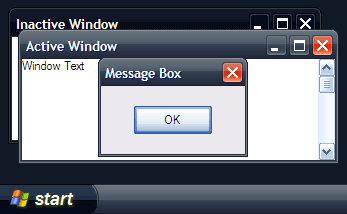 Sometime after the launch of XP, somewhere in Redmond, someone on the Microsoft design team was in the progress of developing something for Media Center. It was believed to be too powerful for public consumption and forever archived in the servers at 1 Microsoft Way. Now, a young
 hobbit man by the name of W3bbo saw light of this unheard of theme, and traveled far and wide to uncover its mysteries. One theme to find. One theme to upload. One theme to rule them all.
Devoted Channel9 member W3bbo spotted an interesting theme on one of the “people_ready” television commercials airing in the Kingdoms. After some dedicated searching, he finally uncovered this mystery Windows XP theme by Microsoft. W3bbo writes,
During Royale‘s development (the XP Media Center theme), the graphic artists also produced a black version of the skin, sans the overused “glass” effect. The result is an aesthetic black skin named “Royale Noir”, it even works with Office 2003.
Since the skin was never released (or reached final adjustments) there are a few issues with it: some of the colors don’t meet the overall “feel” (they’re too purple-ish compared to the greys of the bitmaps) and the inactive titlebars are a little too dark.
You’ll find it’s been signed by Microsoft and doesn’t require a custom UxTheme.dll in case there are any doubts as to its authenticity.
If you already have Royale installed, you’ll need to remove it as both of these skins share the same name.
This skin has not been released to anyone outside Microsoft, until now.
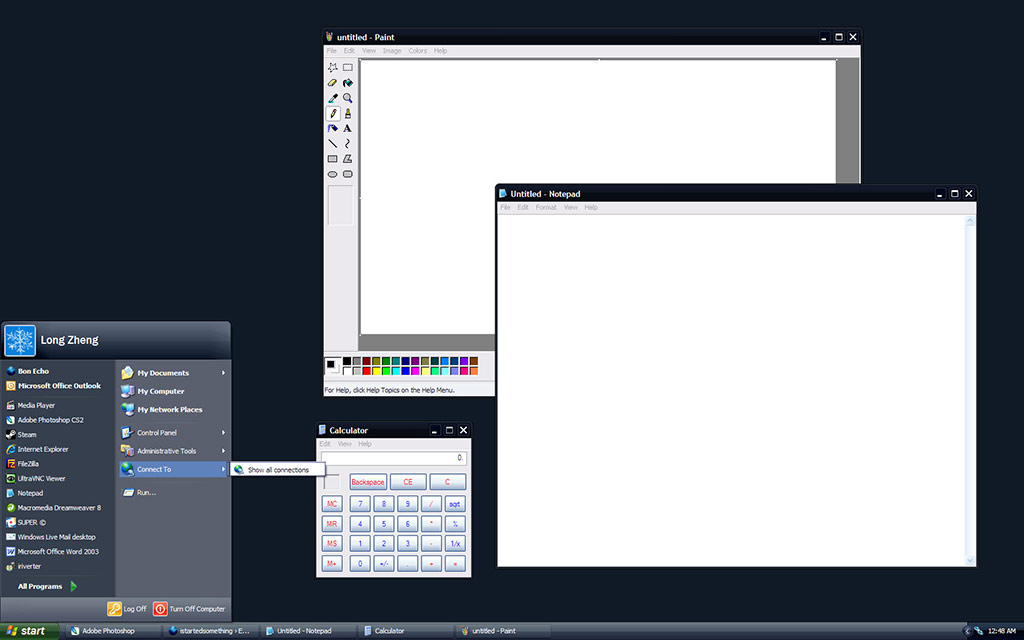
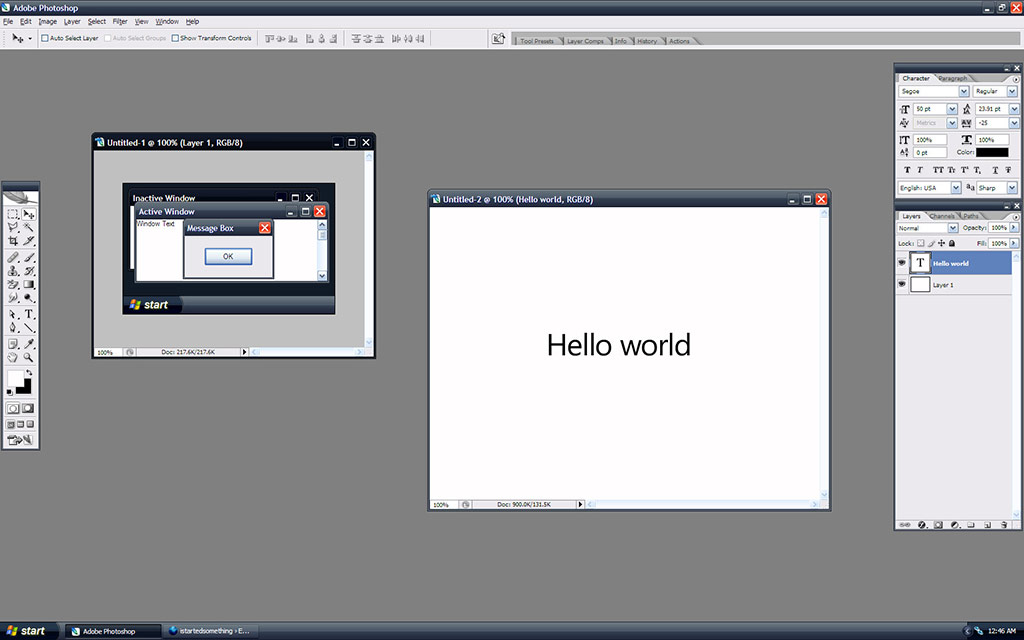
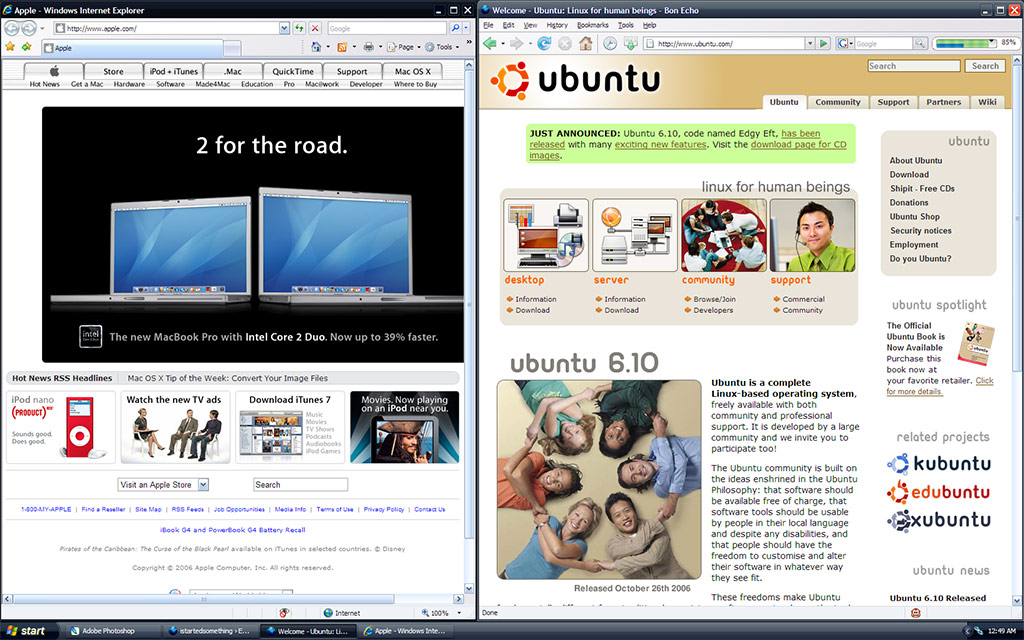
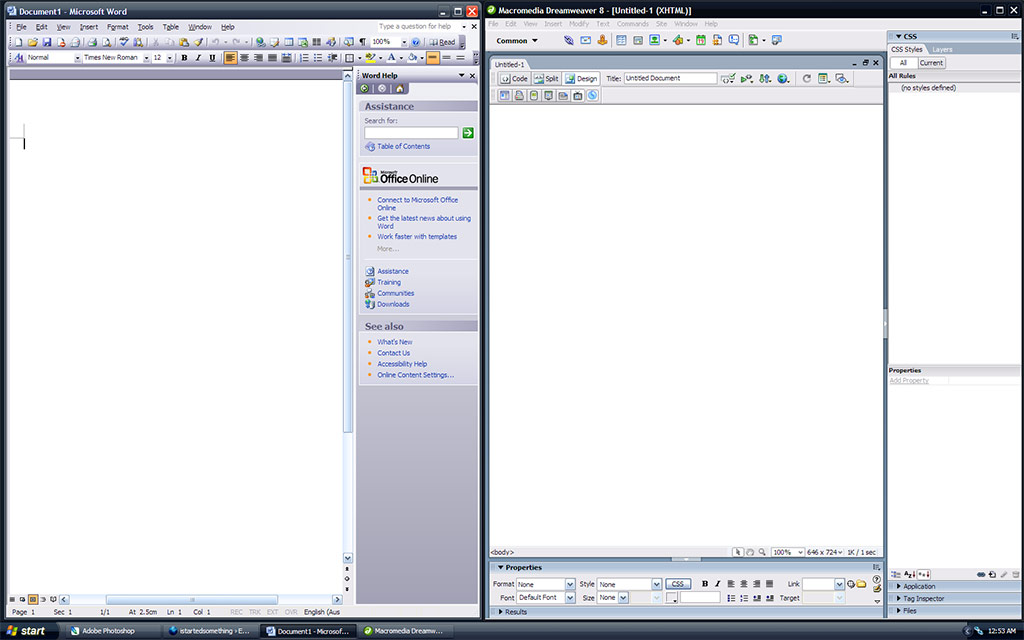
Without a doubt, XP Media Center’s Royale theme was a huge improvement over Luna. It updated the cliché beveled look-and-feel if XP to a contemporary glossy style, whilst keeping similar color schemes and layouts. In my opinion, it was the most usable non-standard XP theme available.
Royale Noir is an almost exact copy of Royale except with a dark purplish tint. If Royale was day, Royale Noir is night. No doubt about it, this is a ‘dark’ theme. If you’re the sort of person who likes bright and vivid colors, stay away from this theme.
As W3bbo pointed out, there are quite definitely issues with this theme due to its incompleteness. The most obvious being, the “Start” button’s hover and active states are unchanged from Royale, inconsistent with the purple tint surrounding. However, there is even a color scheme for Office 2003 so it will not default to the blue Luna colors.
Looking at it from the big picture, Royale Noir is a welcomed alternative to the extremely small collection of verified-by-Microsoft XP themes. However being incomplete, it is not recommended for the general consumers. Enthusiasts are welcomed to try it to stand out from the crowd, but even still, you’ll feel right at home with the familiar Luna/Royale style.
Download Royale Noir (.RAR) [232K]
Instructions to use:
- Extract files to “C:\windows\resources\themes\royale noir”
- Double click on “luna.msstyles”
- Select “Noir” from “Color Scheme”
Because this theme has been code-signed by Microsoft, No UXTheme.dll hack required.
As I emphasize again, I take no credit for this amazing find. W3bbo did an amazing job uncovering this mystery XP theme.
Thanks, Royal is good 🙂
What other signed themes are there?
ROYALE WE LUV U
Zune is one 🙂 you can find a list in wikipedia :bd
Think lot ! It’s an amazing theme !
@Rowan: Errrrr, none? 😛
hello me come phone thunkyou
Its very similar to the black theme used in the Beta 5112 build of Vista minus the transparency.
But it isveryeasy
thank, good
The Office “theme” is not really a theme, it’s just the grey look you get when you switch to Windows Classic.
true that
Long, looking at all the attention being given by you (and others) to Vista’s themes, it seems like that’s the only thing newsworthy with Vista…
I installed it on. Looks nice, but i prefer the Royale to Royale Noir, so kept it set at Royale 🙂
Thanks for this!!
Hey great theme!
I already have a similar one in Windowblinds format named “Noir” that I downloaded from Wincustomize.com
WOW thank you for this Im gonna go digg it dude… You Rock!
It’s not too different from Luna Element, which I find very usable.
I can’t get this theme to apply. I extract the files to a royale noir folder, and drag the folder to my themes folder and click on luna and nothing happens.
Nevermind. Figured it out!
Wow, this theme is cool.
Thank you for your work. m(_ _)m
can someone help me with this please. i did exactly what the instructions say (i’m not a noob at computers) and the option “Noir” is not coming up under the color scheme drop box. are there more specifics that the instructions did not go over? i would really like this cool theme, so any help would be appreciated
@coheed: Do you see the “Royale” theme at least coming up?
I also thought this did not work when I first installed it. But then I discovered the trick.
Go to the Appearance tab and you will see that you have two choices under “Color Scheme.” Select Royale Noir.
It is also possible to rename the luna.msstyles file to royale.msstyles and use the *.theme files that came with the Royale download that was on Microsoft Download Center or the ones in Media Center Edition. It is probably also possible to just save your current theme. But take care to save it in %SystemDrive%\WINDOWS\Resources\Themes.
And Long thanks for allowing us to download this. I’ve been using Royale for almost a year, but having another color scheme is great. The only down side to me is the Start Button.
great!!
I really love these two styles!!
thanks for releaseing them!!
this must be a trick to coincide with the new James Bond movie – Casino Royale
well dude it would be cool if it doesnt show the blue color also if it was all black then it would be a really nice theme now its like,, ok sowhat?
Good but windows xp has gone now.
hallo, great ! super ! gooood ! theme is Royal !
This is f-ing SWEET! I love the whole noir artistic feel, in movies, and games like Max Payne, so this just takes the cake.
Now if someone would complete it…. like that pesky start button.
Very cool. I’ve been using Royal for awhile, and this is a great change. The only bummer is that the Office 2007 beta doesn’t take advantage of it (bad programers, BAD) but other then that it’s great.
Can’t get this to work, I install properly but once I click on the Luna.msstyle, the window pops up, I can select Royale Noir, but it displays nothing and throws an error message if I try to apply it :/
very nice web i like it
Reminds me of the Vista Transformation Pack but nice.
People experiencing problems with this are likely having the extracted luna.msstyles replaced by the System File Checker. SFC replaced the file on me in less than 5 seconds.
you can still apply the theme, but you have to be quick about it and run luna.msstyles immediately after extracting it, select the changes and apply them within that 5 seconds or you have to extract the file again.
YMMV
rar file? come on!
I installed it properly, etc., and it works correctly. Every time I turn on the computer, it reverts back to Windows Classic and I have to go back and click on luna.msstyle again. Has that happened to anyone else?
i have the same problem
Yeah, me to. Does anyone know how to fix it?
I had the same problem for a while, but recently there was a System Update and now it boots up with it already loaded. I was so happy to find that out!
Great, finally a matching theme for my thinkpad!
i cant get it to work….i have the royale theme downloaded and i’ve already run it, but when i go to c:windows/resources/themes and go into royale all i see is the “windows visual style file” and the shell folder…i cant find the “luna.msstyles” file, also…since its a rar file, what do you use to open it?
any help would be appreceaited
In order to fix this, you’ll have to actually do some renaming after extracting. Extract it to “c:\windows\resources\themes\luna2” and rename “luna.msstyles” in that folder to “luna2.msstyles”
It’ll work perfectly and even show up in the display properties dialog.
Hey dude!
Visit this page and if its not your cross post, then you are being ripped off 😉
Seriously, i had read your post last night and right now I am reading this plagarised copy….
http://jeremyzz.com/2006/10/29/royale-noir-secret-xp-theme-uncovered/
He has even pointed to your url for download, but got it wrong …..
http://istartedsomething.com.nyud.net:8080/uploads/royale_noir.rar
Cheers!
Alpesh
@Alpesh: I get too much of that to care anymore. Besides, anyone visiting those sites don’t get ‘real’ information. Another reason to look for the genuine istartedsomething badge. 😉
I read on neowin forums some guys finished/fixed the Royale Noir theme a day after release, and it’s available for download. You will need to patch uxtheme.dll though because it’s edited and no longer Microsoft certified.
Check it out here:
http://forums.hardwarezone.com/showthread.php?t=1442816
For those who like the Royale Noir theme: check out the Zune Desktop Theme at http://www.zune.net/en-us/meetzune/device.htm (below, right).
this theme is really cool.. 🙂
thanks!!
Complete roxage. I like how it works even without Media Center; I’ve been jealous of that theme for a while. Freaking Luna. >_>
Or maybe I’m just a moron and could have went out and downloaded Royale somewhere anyway. In any case, thanks W3bbo! Your website is fascinating!
i must be a little slow, don’t make fun of me, but when you refer to extracting the file, is that just downloading it to the /theme folder?
i’m gonna need a lot of help, i think this theme looks tight, just need a little help getting there
@TJS: Dude, download the one posted by Christen in the link above. It’s the fixed Royale Noir theme and it’s in a self-installer format. Remember to thank the guy that made it. 🙂
I need help. Whenever I download the file, it opens in Windows Picture and Fax Viewer, and I can’t get it to extract. Can Someone help me please?
I dont like start button because dont look smooth
If you’re having trouble opening the .rar file that this comes in, you can download the free program 7zip at http://7zip.org
Once you’ve downloaded and installed 7zip, you can right click on the .rar archive and extract it, and then click on luna.msstyles in the royale_noir directory (it should be in the same folder where you just extracted the .rar file)
Finally, now that it’s installed, right click on your desktop, click properties, go to the appearance tab, and select the color scheme “Royale Noir”
If, like me, you find the titlebars a little large, you can click on advanced, select “active title bar” from the dropdown menu, and change the font size to 20.
If you’re having trouble opening the .rar file that this comes in, you can download the free program 7zip at http://7zip.org
Once you’ve downloaded and installed 7zip, you can right click on the .rar archive and extract it, and then click on luna.msstyles in the royale_noir directory (it should be in the same folder where you just extracted the .rar file)
Finally, now that it’s installed, right click on your desktop, click properties, go to the appearance tab, and select the color scheme “Royale Noir”
If, like me, you find the titlebars a little large, you can click on advanced, select “active title bar” from the dropdown menu, and change the font size to 20.
Help!
This theme looks so kick-a*s but I can’t get it to work on my system. I extract it to the folder, and then double-click as instructed. Sure enough the display properties window comes up, but when I try to select “Royale Noir” and hit “apply”, I get this typically infuriating Windows error message:
The visual styles could not be applied. The service did not respond to the start or control request in a timely fashion.
What in the name of 1’s and 0’s does THAT mean?
-Jeremy
i just wanna say thanks for whoever found this awesome batman like theme, with a few modifications of my own, i love it!!!
tune up utilities 2006 is better,more choices
I actually designed a skin quite similar to this for a program we are working on, without know about this skin. Damn you Microsoft, steal me ideas lol. Nah it wasnt really the same. Similar colour scheme was about it.
I like it though. But I may get a little sick of though after a while. Thanks for the link.
great i love it. i’ve always liked royale, but royale noir takes it
Looks and sounds like an interesting theme. Will be installing to do some comparisons.
Ha, i never even realized that the MCE my pc came with has a different look from my girl’s lappy’s regular xp. And i sometimes work on them both at the same time. I am somewhat colorblind…. Anyway, the two sure as hell look different now! Thanks, W3bbo.
Microsoft seems to have found the colour scheme appropriate for the launch of the Zune. If you go to Zune.net, you can find the new, finished Zune theme, which is exactly like Royale Noir except that the Start button is orange in the spirit of the Zune. Huzzah for official releases of alternative OS visual styles!
Nice job !
This theme is good
Amazing !
Wow, it’s the very cool!!!
Theme is so great…
Thank A lot…
İ was looking for a theme like that…
İ love Vista Themes…
Burgazko
I loved this theme, except the start button, so I moded it to use a blue button, and it never turns green, Very Nice
I dont like the start menu can you make it more better??
I get the theme to apply when i click it through the .rar folder, i also extracted the folder to the Themes, but everytime i start the computer my settings go back to windows 2000 or something like that and my desktop changes to the classic XP one, how do i get it to stay the royal noir all the time?
i always can apply the skin onto my desktop, but whenever i shut my computer off or when i log off my account, it just doesnt work…[my computer has only one account…therefore i am the admin of my computer]how do i fix that?
Excellent find
oh tnx i like it and design personal theme for it see here http://www.deviantart.com/deviation/43244013/ i hope u enjoy it
Nice one, white! Finally, the Royale Noir theme is completely finished by oddbasket! Download it now!
http://forums.hardwarezone.com/showthread.php?p=20884845#post20884845
Enjoy! 🙂
I love this!
can some1 help me download this scheme for my laptop….
Thank You
Hi & thanks
in 3rd screenshot above there is a tiny progress bar
beside searchbar in Ffox,there is an add-on named “download statusbar” that put something like this on status bar,anyone know what’s this,or how you put it there?
thanks in advance
Ha! I knew it was u LZ!
Still flying the Z-10/Mi28/Cobra’s ;)?
wonderful….i was just looking for a black theme that will suit to my winamp black skin…and seew ht i have got…just amazing buddy hats off to u..!
It’s official! The best Royale Noir and Zune theme is now on dviantART!! 😉
http://istartedsomething.com/20061029/royale-noir/
Thanks again to oddbasket for giving us this awesome theme!!
Oops! Silly me, I just pasted the URL of this page, didn’t I? LOL!!
Thumbs up fot the best Royale theme yet again! 😉
http://www.deviantart.com/deviation/44294818/
Anyone thinking that the Zune theme and this Royale Noir theme are the same must have some kind of vision impairment. There are many notable differences…mostly being the shades/hues of the theme and the orange start menu bar. Zune = gray/black ; Royale Noir = blueish/gray/black
This theme rocks though…for sure. Thanks iss!
it’s amazing
How do you extract.
there is also a great theme for opera web-browser in same colors named lix. go for it and hf
great thing this black edition
Why did you say that it’s not finished? Which parts are missing?
e una mierda
la wea mula conchetumare
Yea.. why is it unfinished? seems pretty finished to me. And best of all you can choose from the blue Royale and the new Zune theme from this Royale Noir theme. Definitely pretty awesome!
I prefer the zune theme though…
It says on this site that Royale Noir has been updated and released
http://www.winaddons.com/royal-noir-146/
Is this royale noir freeware?
@Ernie: Yes, it is freeware.
And the finished version which won Softpedia’s Pick 5/5 Award can be downloaded at:
http://www.softpedia.com/get/Desktop-Enhancements/Themes/Royale-Noir-Theme.shtml
Thanks goofy.
hey! i think it’s cool nut i can’t use it.
i tried extracting the .rar file and nothing happened.
i seem to have trouble. i activate the theme but the windows, toolbar etc turn into windows classic. help please
I really like this theme, however, i cant get it to be “permanent”. When i shut down my computer i have to MANUALLY reset to this theme… is there a way around this? I did follow the instructions correctly and I’m unsure as to why this is happening.. any one know a remedy?
I’ve tried both the Zune theme and the Royale theme, and everything seems to be fine except that when I browse/explore a data CD-R or data DVD-R, the icons for directories do not display the default/regular beige-colored windows folders, and instead have been replaced as Internet Explorer “e” icons. Does anyone else have this issue? I haven’t applied any other skins or themes to my system. It is the default Windows XP installation and all I am trying out are these 2 themes but they both seem to exhibit this same minor issue. Any help is appreciated.
this theme is so cool. man……W3bbo….YOU ROCK DUDE!!!
That is avery nice and cool theme its nice for me to use new look in my old package.
hej hej svensken här :)snart påsk.KYCKLING
I have taken an interest in this program but I dont know how to extract and carry out the nessisary steps for installing this program, someone help me. Btw Im useing this great transparency program called FocusAlpha available @ Majorgeeks.com I think it will look even cooler w/ this program. You guys should try it. ^_^ http://www.majorgeeks.com/download.php?det=5197
Ahh I’v finally figued it out and it looks exelent I had to download the 7zip program in order to make this work and simply follow the given instructions and then click on the Luna icon. Here is a picture of what everything looks after i did it and used everything in combination with FocusAlpha http://i55.photobucket.com/albums/g136/JoeV_the_1_and_only/untitled.jpg?t=1174876312
how 2 use de theme??
Its not working, when I down load it its a file thats not in a folder, and its by its self.
I sent it exactly where it said, and i tryed every other place i could possibly think of and its not showing up on color schemes.
I’ve never done this before but I am “computer savy”
NO OTHER SITES ARE ANY CLOSER TO HELPING
Is there any other program i need to have…………………………………………………………………………………………………………………………………………………………….. this shit is so fucking anoying
Thank you
I wrote a subject in a Gregarious blog. I Recommended RoyaleNoir and this URL to my iranian friend.
doxdo.net/alireza121/p932
Love it!!!!!!
itz gud ya…kep it up….:-) poda nayinte mone…maramakri…
ya props for that, and its great i uninstalled that imatition royal noir hack. Too all you people that dunno how to use the file get winrar Doh
this theme is so cool. man……W3bbo
Hey, I downloaded Royale Noir but I was not able to find the “luna.msstyles” file that you extract it from some one please help me thanks
ehh got other themes?
hey…i downloaded the royale noir theme from here…..it got installed and stuff…and looked absolutely fab…but everytime i restart my comp…a diff theme comes other than the noir…..in the sense a xp modified theme appears….what do i do…..pls help guys…
hi dudes ive just downloaded the theme but i dont know how to change the theme to royale noir how do i ????????????
i still cant download it. can someone give me a direct link of the download thing or somthing?
I have to say this is the best. You are now #1 in the cool book.
This theme is cool, it reminds me of a Stylexp theme I once used, but without needing that horrible program installed. The fact that it’s not permanent is annoying, but it’s a bit of a ‘hack’ theme anyway.
For those that are having trouble:
download WinRAR from http://www.rarlab.com and install it. This means you can open and extract the file. Extract the folder part (Shell) to c:\windows\resources\themes
and then simply double click on the luna.msstyles file from within winrar. Then go to the appearance tab of your display settings (right click on the desktop and then go properties) and select Royale, and underneath choose from either Royale Blue or Royale Noir.
where can i dowload it??
where do you download it ? i can’t find the link. 🙂
i can’t find it :S can somebody send a direct link to me or something ??
@Albin: http://istartedsomething.com/uploads/royale_noir.rar
I need help. If I save the file, its not a zipped folder and I can’t extract. It’s the unknown program icon. How do I make it a zipped folder?
THANK YOU Sam Morris!! i got it
To extract .rar files, you need a program such as WinRAR.
Don’t use WinRAR, use 7zip. 7zip is free, and seems to work better
EVERYTIME I RESTART IT DOESN’T COME BACK UP PLEEEASE HELP!!
Wow! nice. Exellent theme!!!!! I like its style .
I’ve been using window blinds and have noticed it screws up or slows the system down, this is niiice
I have the same problem as u
I’m considering downloading this theme. I just have one question. Does the theme revert after shutdown for everyone? Because if not, could somebody please try to figure out what is different for the people for whom it is permanent.
I don’t want a temporary theme.
I love it. I looked so good on laptop and now my desktop pc also looks cool. Thanks.
>
THANK YOU!!!!!!!!!!!!!!!!!!!!!
This looks great a lot easier on my eyes than that bright blue. 🙂
Cool theme, thanks.
I really like this theme but I had to change back to the Windows XP theme because my PC kept freezing and I had to restart. It’s really annoying because this theme looks so much better!
Hey, Everyone i guess this theme is good, But i have a better one you can pute any colour you want to..etc to download it just go to http://www.google.com and right Top themeXp, And select any web youll finde it and then just download Trust me its so good, Have fun.
i dont know where to put these files????
Wow! very nice team;)
i have a problem i got the theme applyed and everything but every time i turn it off or restart it switches back to the classic view can somebody help.
it patches uxtheme.dll patching uxtheme.dll is very very bad idea my computer became slow after patching i will not do it no more like this i am using royale better then that or use zune
hi, thx for the theme but how can you make it stay in the appearance tab instead of having to go to the themes folder? thanks
WOW nice just installed to my D (not system restore) drive my sys is E now lol so yeah installed to my D just incase i f**k up like i did with VTP lol :\
but nice 😉
I’ve just installed this myself, as well as everyone else in my apartment.
Very cool skin – I just hope we avoid most of the freeze/shutdown problems that others have been running into.
This will tide me over until Vista gets better…
I love this color scheme! thanks for putting it up 🙂
NICE NICE NICE!!!
love it so much!!
Great job 🙂
I dont like start button
güsel emege saygı 😀
cool,
that’s what i need
thanks
i downloaded service pack 2
especially so windows media player 11 would match my royale noir theme XD
thx dudes!
i’ve been roaming the world(Internet) for themes for a while now
and this one beats them all!
thanx 4 ur free themes
Many many thanks for sharring this with us ~
Since the “black” 1 is here, how about the “white” 1 😛 ~
IMPRESSIVE THEME, AND IMPRESSIVE JOB – WHOEVER CAME UP WITH THIS. With the zune theme, this is also my favourite theme for windows xp. KUDUS!
Wow it’s wonderful!
Thanks a lot
I don’t have the media centre edition but, I downloaded this, created a folder called Royale and renamed the msstyles file as Royale.msstyles and now I have both the noir and the original blue theme that comes with the media centre edition!
THanks great job
thanks man for that thing
WOW…. 🙂
Thank you for this Im gonna go digg it dude… You Rock!…. 🙂
oooooh, its nice, i just want it. Thanks…..
I like this theme. however, everytime i turn off my computer it gets removed and i have to download it again. what do I do to keep it there?
OK im kinda confused I downloaded the themes and applied it but everytime I reset my computer I have to re add the theme again. Its also not an option in my themes in order to apply it i have to open the themes folder in the .zip
Can anyone help my AIM: Scotapotimus
Email: [email protected]
MSN: [email protected]
thanks
~Scott
Wen i restart my computer it goes of it and i have 2 download it again 🙁 am i doing something wrong ??
this is amazing theme..thanks….ilkie it very much
Thanks for this theme, its all great except for the start button. I like it when its not highlighted, but once you scroll youre mouse over it it goes green, which makes the black other colors look lame :x. But when you click the start button it goes to dark metallic green, which is pretty cool. Thanks a lot. Osiris
marvelous, grate, extraordinary… Hats off to you dear. Thank u very much. I got the thrilling of achievement after completing the above task.
the step by step procedure is given very nicely without any confusion to followers.
thank you.
Very nice 🙂
really pleased with it. 🙂
2kool4skool, boutime, Jus bout gave up on mods 4 my desktop…Thanks4thefreshlook
JAYEMDEE
To prevent the new theme from going away when you restart, make sure you save the zip file to your hard drive instead of simply opening it. Then, after you have completed the instructions at the top of this page, AND BEFORE YOU CLICK “APPLY” OR “OK”, go to the Themes tab and click Save As. This will allow you to save this in your themes folder, and everything will stay intact next time you restart.
did the thing you told but didn’t make any difference, besides, it’s just the same problem as in my LE5 theme. got any better ideas?
I’m having a problem, after i applied the theme my desktop just shows up as a blank color and when i switch it back to my old theme, my desktop shows the pic i set for my desktop for a while but then turns back to a solid color, can someone help me! Thanks!
Great theme!
This theme is banging. I have just upgraded my packages to Office 2007 and you can choose those to show in black so was a big gutted that my desktop was still silver. That’s not a problem now!!!! Brilliant!
I just want question, where is I can free download theme for xp.I think enough that and thank for its help…..
thank u 4 this theme!!!!!!!!!!!!!!!!!
Great Theme !!!!
Thank you…
many thank goood work
extremely terrific
dude this is siiicckkk 😀
finally something better than the fuckin blue shit
I am very happy when i saw the theme.
Thanks
http://istartedsomething.com
Hello guys, wazzup?
This theme look neat ! If you wanna check out another cool theme follow these steps:
1.Go to http://www.google.com
2.Search on “Zune Theme” (without quotes)
3.And press the first 1 and download!
4.Enjoy 🙂
thanks
best theme!
its like the Royale Theme in Windows XP MCE 2005 (which i have) but in black!
THIS IS AMAZING
thanks SOSOSOS much
i hate the look of windows XP the “Luna” style
SO UGLY
but this is awesome
i looked on so many other sties, but only this one worked
:>
yea this is awsome thanx i realy like it
on it says Extract files to “C:\windows\resources\themes\royale noir” it does not work
VERY NICE THEME GG
:p
love it!! LOVE IT it’s awesome, i wa so sick of blue, green and silver
thanx for the remixed- royale link too love it
thanx
OH MY GOD!
Thank you so much, sir!
This is … so amazing! I’ve always gone with the Win98 look because I thought the other themes looked so horrid, and I didn’t want to install some shitty program to skin XP for me. I never knew this exist. Thank you, thank you!
love the black .. but for some reason when i restart my comp it goes away and bring up the classic theme… is there a reason for this?? would love suggestions!
This theme is very good thanks for it. And keep up the good work
wohoo, thx a lot, I love black, this theme is so nice & cool. Thxs^^ IOU my fren^^
Thank you Swerve – you are a legend for addressing a query everyone else either couldn’t, or just ignored. You’re clearly the only one with the skills that can pay the bills. Cheers
I didn’t like how the original Royale Noir theme download is just a zip file that when manually placed in the right folder, overwrites the normal released Royale theme. Clearly not very easy to install or use.
So I fixed the overwrite issue and made a simple installer that “normal people” can use. Enjoy 🙂
http://rapidshare.com/files/111174857/Royale_Noir_Easy_Install.zip.html
Hold on, v1.1 of the installer fixes the two things that nagged at me: Having to pick Royale Noir on the theme list manually, and worse yet then having to go to Appearances and manually pick Royale Noir for the color scheme.
Now after install, the theme list comes up with Royale Noir already selected, just hit Ok. 🙂
http://rapidshare.com/files/111181805/Royale_Noir_with_easy_installer_v1.1.zip.html
güzel tema ellerine sağlık
ama biz bu temayı nasıl indireceğiz
thanks man. its sweet!
this theme (the Royale one) matches Microsoft Office 2007 perfectly! Brill customisation! but, is there anyway you could change the heading bar for Explorer, it’s a bit too harsh
I have run this theme on all of my computers in the house and at work. All has been great until Service Pack 3 was d/lded on this computer. After that, my wonderful Royale Noir theme has gone. I select it the media centre in the themes tab, but in appearances, the selection has reverted to the two originals and only allows me to choose blue green and silver colors for buttons etc.
If anyone has a way to resolve this it would be great, as I have not varied this theme since I installed it 12 months ago.
Beware if you update with service pack 3 everyone, you’ll lose your theme.
Thanks. It’s Great.
godlike. Really impressed with it and havent had any problems with it or any programs so far. Thx.
Thank you very much……..^_*
yes i like it tnx.. 🙂
hey i download and applyed it but when i turn of the comp and restart it donest come up with it?
how can i set it so it stays up all the time even after a resart of the computer??
Cheers!!!
thnx
Hi, i think this theme is mint, is there actually other themes available to download as well?
Oo this is exactly what I was looking for. It nearly matches AeroFox, except it has a slight blue tint. Ah well, good enough for me!
Looks very nice with the FireFox 2 theme ‘Blue Moonlight Vista’.
Thanks for the theme, been using it for almost a year now.
Beautiful!
Thank you! Thank you! Thank you very much!
It’s amazing! thank you so much! 🙂
Every time I turn off my computer, and when I go on it after it turns into windows classic white skin.
How do I make it stick to the same skin.
🙂
hey this OK I guess but I found a even cooler theme, and it saves it on your Appearances.
Because this theme is annoying cuse when you restart your computer or turn of it gets rid of it so download myn.:
🙂 go.microsoft.com/fwlink/?LinkID=75078 🙂
This is freaking amazing its not much but it is so cool looking and i found this look to be the only real advantage of vista… I also feel better that apparently Microsoft authorized it
dooood very nice
this is sik styll sfe
this theme is cool, cuz i love black color!
but every time i turn off my lap top and the next day turn it back on, the theme is gone, kinda like it did not save.
what do i do to keep this theme permanent?
each time i download it and extract it it works but when i log off and when i log back on its not there
I SAW THIS THEME ON MY NEPHEW I WAS LIKE WHAT THE HELL THIS IS COOL THEN I WENT TO MY COMPUTER AND I WAS LOOKING FOR IT AND I GOT IT ITS COOL
Hey!! Everyone who has a problem about that when you restart your computer, the theme you set is gone.
As one of the guest above suggested:
To prevent the new theme from going away when you restart, make sure you save the zip file to your hard drive instead of simply opening it. Then, after you have completed the instructions at the top of this page, AND BEFORE YOU CLICK “APPLY” OR “OK”, go to the Themes tab and click Save As. This will allow you to save this in your themes folder, and everything will stay intact next time you restart.
Yeah, you just follow his suggestion. And your theme won’t be away when you restart your computer. I just miss to Save As before I click OK. However, it has been solved and I’m now enjoying my new theme very much.
Thanks
I’m using the Zune theme now. Royale Noir is schveet. 🙂
Ive been searchin for dis theme for a long time thank you very much !
Thanks Thanks Thanks IT IS REALLY GREAT & COOL
Easy to Install & Enjoy Using It
this is the best!!!!!!!!!!!!!&!!!!!!!!!!!!!!!!!!!!!!!!!!!!!!!!!!!!!
thanx dude u rule i like the roylal theme better than the royale noir also the zune theme is cooler than royale noir (p.s. im using zune theme right now)
it dosent look like a standard xp theme. the start button has a bit of a suspect edge and turns green when you hover over it.
you sure this isnt a custom one?
ya should look at this it has a buch of stuf to customize you computer http://www.crystalxp.net/galerie/en.cat.7.html
Thanks, what a fantastic look.
that was gr8, tnx
Been trying to find this for yonks, cheers
okay im confused i downloaded it and applied it but whenever i restart my computer it changed back to the classic windows style and the royal noir goes away =/
Drew, if you have service pack 3 installed, this will not work, however Royal Zune does. Also, I have found some systems that are HP Dell etc don’t all like this theme.
Dude, thank you soo much.
this looks so much better than the standard version! I love it!
OMG!! This is the best theme ever and they did not publish it??? IDIOTS!!!!!!!!!!!!!!!!
Please Help. Im having hugge dificulty in downloading Royale Noir, I managed to download just the files for Appearance but not for themes, as In my desktop doesnt change. Surely it cant be this difficult.
Long, W3bbo, thank you for this. My desktop now matches the inside of my skull. With a certain kind of love, W. Lee
will it cost money if we dowload??
hi all u people try this royale noir theme on tuneup utilities
trust me i tried no probs
Many many thanks for this theme. I really like it because it is the simplest theme and still aesthetically improved I was looking for it. Regards.
Thanks a million, looks great! No problems so far and it was easy to set up!
Thanks alot! Long Live Xp by this theme!
Thanks a million, looks great! No problems so far and it was easy to set up!
you can dowload all themes from this site for free. 🙂
go to crystalxp .net on that site they have everything from wallpapers to full themes its all free you don’t have to sing up
i love this theme, works great
start button is nt so smooth….i dint like that feature
you are very bad bad bad
oooooooooooooooooooooooops its a virus
O.O I love this theme works great
i like it
hello!, i’m from Finland..i really like this, it’s so fast to install!
CONGRAGULATIONS!!! 😀
hey pips try the win7 transpack from winX, its great
Great job man. Works perfectly !!! Tanks 🙂
Hey thx it works great but i cant get it permanent in the theme list in properties
The theme is awesome anywayz
WOW ! A 4 year post but can understand why. ITS FANTASTIC!!! Thanks for this hats off 2 u.
Oh and for any1 else who has probs keeping theme applyed when restarting.
XXXXXXXXXXXXXXXXXXXXXXXXXXXXXXXXXXXXXXXXXXXXXXXXXXXXXXXXXXXXXXXXXXX
XXXXXXXXXXXXXXXXXXXXXXXXXXXXXXXXXXXXXXXXXXXXXXXXXXXXXXXXXXXXXXXXXXX
THERE IS A LINK FOR A EASY INSTALL DOWNLOAD OF THIS!!! dated: April 28 2008 🙂
XXXXXXXXXXXXXXXXXXXXXXXXXXXXXXXXXXXXXXXXXXXXXXXXXXXXXXXXXXXXXXXXXXXX
XXXXXXXXXXXXXXXXXXXXXXXXXXXXXXXXXXXXXXXXXXXXXXXXXXXXXXXXXXXXXXXXXXXX
AND HERE IS A FIREFOX ADD-ON TO GO WITH IT https://addons.mozilla.org/en-US/firefox/addon/4908
LOOKS SOOOOOOOOOOOO GOOD TOGETHER! NOT FAR FROM PERFECT IF YA ASK ME!
or this as a add-on (not so black as other) https://addons.mozilla.org/en-US/firefox/addon/8998
Well, I looked through all the comments and did it all right. But my computer is still stuck in the Windows Classic theme. I had it on the Zune theme, but then I logged off and on, and now it’s in the Windows Classic gray theme. I also can’t do anything in the all programs area of the start menu. It’s sort of freaky.
this is mad niceeee 😀
nah its a shit sloppy MS job.. my mods to this theme are 10x better , and way way better than the crap vista aero style…. better than anyone elses mods of it aswel I might add.. good luck finding it though
Excuse me. So many of our dreams at first seem impossible, then they seem improbable, and then, when we summon the will, they soon become inevitable.
I am from Zealand and too bad know English, give please true I wrote the following sentence: “This focus, made as a warm process hair or disease, is administered on conditions that sustain more also when they are smaller.”
THX ;-), Willard.
Can you download this for windows 7?
hello! this is great. it looks great. i dont even mind the start lighting up green either.
hope there will be more color eventually. but this black will be a good change for a while.
thank you so much for this.
it is an awesome theme
Thank you very much for this kick-ass theme! It is my favorite!
Cheerz!
HI THANKS FOR THIS WEBSITES AND THEME
whatever what the heck u no wut wud be nice? if something like this would come out for win7starter. man i’ve been waiting for a release that will Actually let you change the color of the taskbar that is hack or not. i don’t care but LONG ZHENG MAKE SOMETHING THAT WILL LET U DO THIS FOR WIN7STARTER!!
check this site for free awesome alien ware themes http://www.alienware.com/community/alienguise/theme-manager.aspx
Really Thx Bro.
Thanks so much for this one! I’ve been really really bored with the regular themes and this is what just I’m looking for. Simple but nice, and best of all I didn’t need to install any third-party applications :]
Hey I saw this and i had to get it! its realy nice, but i cant find it when im looking at the appearence settings, Im wondering what i did wrong.
Ps
I did the extraction to the right place F.Y.I
I say don’t change the theme.
very nice.. no errors whatsoever.. thanks.
when i opened this in the shell theres a metalic thing how would i get that to work?
Great style ,looks cool. You have to make one for vista and seven XD!!!
Thanks fortaskbar new color!!!!!!!!!!!!!!!!!
Thanks a million. this is the best!
Thanx very very much it’s one of the greatest themes ever created by Microsoft! I like it so much!!!!!! It’s just what I’ve lookin’ 4!!!!!!!!
Thank you!
awesome skin, this is amazing, get it!
Awesome thanks for this! 😀
this theme is awsome!!!!! just downloaded it and it rocks my favorite is the black noir because the blue is a bit girly (if u know wat i mean)
I’ve seen this theme on someones computer then wanted it’s name and downloaded and said very very very Superb theme. Please send me more links like Royal downloads.
thank you dude now my new net book is alll set up 🙂
I have created an automatic installer for this awesome theme which has following features and advantages:
1. The theme didnt contain any .theme file. So a “Royal Noir.theme” has been added which makes applying theme easier.
2. This theme and default “Royale” theme share same name and everyone needs to delete “Royale” theme for installing this theme. This issue has been fixed and now it shows actual “Royale Noir” name in Desktop Properties so no need to delete anything.
3. The installer installs the theme in correct folder and also opens the theme in Desktop Properties window. So anyone can easily apply the theme by clicking on “Apply” button.
Following are the direct download links for it:
Rapidshare – http://rapidshare.com/files/390091633/Royale_Noir_Theme_for_Windows_XP.zip
Mediafire – http://www.mediafire.com/download.php?oieoz4a2xio
Original article containing the installer:
http://www.askvg.com/download-official-windows-xp-themes-no-uxtheme-patching-required/
I hope it’ll help people in enjoying this theme. 🙂
thanq so much i was looking for that from like a year thanq thanq very very much
Cool Royale Noir
I like it. Thanks 4 ur design
zune is better theme
its is to good man just awesome
Great work!
(^_^) Thanks
i like u
what bout luna element??
does ot similar?
It doesn’t stay and it’s Windows Classic in which i hate but i love the black to much
This is officially called the ZUNE theme, look it up on google and click on the first link. It is NOT called Royale Noir! Look up Zune theme for XP!
You are mistaken. The XP theme described on this site is indeed the Royale Noir theme. The above download contains the two Royale themes. Royale is a vivid blue and Royale Noir is a dark grayish blue. The Zune theme is black with an orange start button and is available as a separate download.
Rocks. Thanx
I have a HUGE problem with Royale.
Everything works fine with the upper window bar when i’m using applications like Firefox and popup windows like the one in the Control Panel that allows you to switch themes, however there’s a huge problem with my lower taskbar, with the start menu- it defaults to a grey Classic theme. Furthermore, on windows like Control Panel, the entire window is shown in Classic.
Can anyone help?
The install instructions described on this site are incorrect and will lead to the theme reverting back to classis upon reboot. Here is the correct method:
1) Download the zip file
2) Extract file to>>> C:\windows\resources\themes\Royale (important: note the R is upper-case)
3) The folder named ” luna.msstyles ” has to be renamed ” royale ” (important: note the lower-case r)
4) Delete the “read me” file
5) Go to your desktop and right-click>>>click properties>>>click appearance>>>select a theme>>>click apply>>>click ok
6) Enjoy your new theme 🙂
it’s cool but after some time the appearance settings are messed up and u can’t change from royal noir to royale. U can make it normal xp though.
max payne is my favorite game character and i love to play that game too””,
Wow! It’s fantastic
THANK YOU! i’ve been looking for hours for just this! no additional software, no useless junk clotting up my machine! THANK YOU – and EXTRA kudos to the guy that found it orginally! 😛 THANKS AGAIN
thanks a lot worked great
There is one more signed theme. Not as good. It is called zune. It makes the taskbar black with an orange start button and the writing goes smaller.
most excellent, thanks
hmm… i always used it.
it is an awesome one that let your computer to turn from an ugly them to an awesome:):):):)
liked the theme ..ver nice.. simple and soothing. brings a professional look ..
It is good one
and its great
tnx great working///
Download More Themes!!!! and Have Fun!!!!
Thanks and I’m glad this website is still here! For the past 4 years everytime my windows would crash id come back here to reinstall this theme. Thanks again mate
Thanks My Dear. I just need the theme of this kind. and i got it Yahoooooooooooo. Thanks Team Long Zheng
thanks for thie theme bro.
Thank you, thank you, thank you!
I was sooooooo tired of gray, blue, green,,,ugh! It looks so much better…yay me! and yay YOU!
Thanks, i like the origonal blue Royale but this one is a good change
yeahh, i love this peculiar theme XD
Still the best after all this years! 😀
FFFFFFFFFFFFFFFFFFFFFFFUUUUUUUUUUUUUUUUUUUUUU-
I have a huge problem, well I had the old royle noir and It wouldn’t let me change back to normal so I installed your one and it made it even worse , how do I fix it
Actually I found Out the Problem
Please let me know! I have the same problem….
i wantwin 7
What I want to see, is a Royale with cheese.
Please, does anyone know the theme for Windows XP of Benfica?
i wan new software.
royal is awsome
Thank You Very Much!
Now My Windows XP is Like Windows 7 Very Very Much. =))))))))))))))))))))))))))
Thanks!
Thanks for the best windows xp themes!!!
ottimo bellissimo!!!
thanksssssssss aloooooootttt i luv this site!!!!
Noir is the best one for me. But I think the Windows XP themes mechanisms are all missy! If you select the style to Noir or Royale, then save the theme, you cannot select it later, and if you do so, the menu element would have freaky borders. Something like the one the Classic style has. Thats not only for Noir or Royale. Even if you select the Windows XP one, and then Save As Your_Theme, then if you select Classic->OK, then Your_Theme-OK, you will see that freak menu by right clicking anywhere in desktop.
Excellent post, thanks for the nice explanation, I really like
Hey Nice one.. Thank you. 🙂 It worked well
I Loooooooooooooooooooooooooove That Trick Really….. Thank’sssssssssssssssssssssssssssssss
Thanks for the Theme, extremely impressed and happy with it, I love that slick cool black touch to it, even if it’s just a slight color change from the blue royale it’s still an amazing theme change, Great Job.
royal a best thems always for myself
Thanks for this nice topic, very useful blog if you want to learn something and find out. thanks
We are deploying this theme for all computers on our school district. We love it.
wil I pay if I download it
thx bro…working ^^….
Really nice, I love it, thanks a lot !
Yeah man!!!!! thnx good job, thnx alot again !!!!!!!!!!!
The topics are extremities, I’m somewhere else find a good theme for Windows 7 but I can not remember on which site, these are good bravo:)
thanks a lot.
THANKS A LOT :3
thanks royal
oh thanks
…
But when i restart ma pc the royal noir theme disappaears .. shud this happeen?
overall good job man thanks for the theme
Very nice theme, thanks for sharing with us. M.
多谢你的主题,很棒!
(y)(v)
It’s 2011, and I am still using Win XP. Thank you for making it look better.
Very, very nice. Thank you!
z
I have the problem that once the computer is restarted the theme changes back to windows classic and so i have to manually set it to the royale noir theme every time i log in, am i doing something wrong??
A problem with your uxtheme.dll perhaps? Has your uxtheme.dll already been patched?
It’s 2011, and I am still using Win XP. Thank you for making it look better.
سلام تم مالی نبود
from iran
Thank you for good infiltration
YOU MADE ME HAPPY!
this royel color is very very good thanxxxxxxxxxx
مشكووووور
Es un tema muy elegante para uno de los más populares sistemas operativos (Windows XP)
Es extremadamente liviano & lo mejor de todo es que no consume recuersos como la mayoría!!!
La verdad deberian hacer un tema de Windows 7 para XP así como este!
I LOVE YOU ROYAL YOU ARE THE BEST 😉
this theme black royale it is cold black style wow wowowwwwwwwww….
love the black royale. but can u tell me how u made the toolbar or make it look mor lik Windows 7?
Royale Theme is Really one of the best themes have been made for windows xp, royale noir looks amazing from the screenshots i’ll give a try now to test it
Love windows XP,easier to use and really made for professional people.
GR8 THEME …..GOOD THING IN THIS THEME IS WE CAN SLECT COOL WALLPPAERS ON THIS THEME
very nice theme 🙂
BEAST! Thanks!
transform you xp in windows 8 with this theme: http://downdl.com/2012/07/windows-8-transformation-pack-5-0-fa-xp-ul-vista-sau-windows-7-sa-arate-exact-ca-windows-8/
Hello,Is there a resolve for the problems viewing the site using internet explorer? Would love to continue using the theme but the majority of the word still sadly uses IE so it is not accessible…….
Thanks! 🙂
bro thanks now my windows looks awesome
10463-6349
Thanks! I installed this on my school computers! 🙂
this pleases me greatly.
very easy instructions to follow.
thank you kindly sir.
thanxxxxxxxxxxxxx man
Hey! I could have sworn I’ve been to this blog before but after checking through some of the post I realized it’s new to me.
Nonetheless, I’m definitely glad I found it and I’ll be bookmarking and checking back
frequently!
tahnk
very betyfull
Question: would this still work on a Windows 7?
great
easy to download nd use 🙂
pls help me it said visual style cant applied 🙁 pls help me
Windows XP is still one of the most used OS. It’s incredible for me that it can be that beautiful and, what’s more, powerful even 12 years after its birth
Thanks, long time searching some like this, and best of all, no patch needed 🙂
Ive been using Royale Noir on my xp desktop for years (since before vista was released) and havent had any trouble with it as far as visibility or anything like that. it gets along fine with me, and frankly i think it would work out just grand with any user who wants a black theme.
awsome
Awesome template i love it
share photos sexy actress and hot model visit > sharepoto.blogspot.com
sss
thanx a lot..easy n fast.
lol since 2006 people search again this thème on google
Nice theme!
Thank you so much! Nice advice! Cheers.
thanks dude!!!!!!!!!!!!!!!!!!!!!!!!!!!!!!!!!!!!!!!!!!!!!!!!!!!!
Beautiful. Long live XP.
thanks dude!!!!!!!!!!!!!!!!!!!!!!!!!!!!!!!!!!!!!!!!!!!!!!!!!!!!
Nice job! Congrats!
Hmmm…good
awsome ty you
At last I’ve found this.. I spend a lot of time searching for color schemes and finally! Wooohooo! Thank you so much
Your device is windows 7 right?? Haha sorry for this.
Hey you Hannah Pagz, what’s your device?? Windows 7 right??
Is there available any similar theme for Windows 7?
Windows XP represents 7.4% of all desktops in April 2016. So millions of people are still running Windows XP.
Password?
Found this when it was released a decade ago
I just spent the past few hours fixing my girlfriend’s computer and she’s getting this theme
Which is the password for this windows?, thank you very much
Thank you very much!