Here’s several Windows Vista screencasts focusing on various important new features: Aero Glass, file management, guided help, tablet PC functionality, sidebar, improved search indexing and Media Center. These are just a taste of some of the new features you will find in Windows Vista. These screencast was done in quite a hurry, so I apologise for the lack of depth and variety, had a bit more time so there’s a bit of variety now.
These were all recorded on the Toshiba Portege M400 tablet PC. You might notice the resolution is quite low at 1024×768, but it wouldn’t record fluidly at the native resolution of 1400×1050. Encoded to Quicktime H.264 format.
Added: Windows Sidebar and Search and Media Center videos!
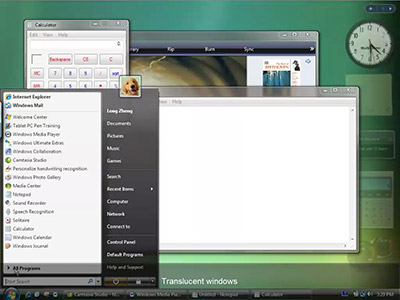
Windows Aero Glass
Click image to view video
This looks at the key aspects of Aero Glass: windows translucency – which helps reduce Windows clutter and orients attention towards application content, live previewing – ability to manage windows with the help of an actual preview of the window content, and general performance and fidelity enhancements.
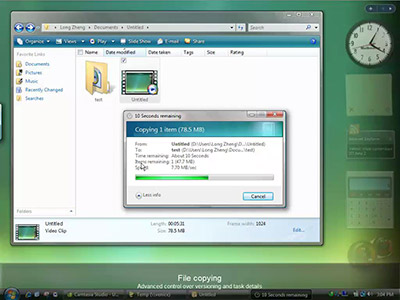
File copying
Click image to view video
Managing multiple versions of the same file is no longer guesswork, with clear indications of the differences between two file variations including a live preview, document size and attributed dates and time.
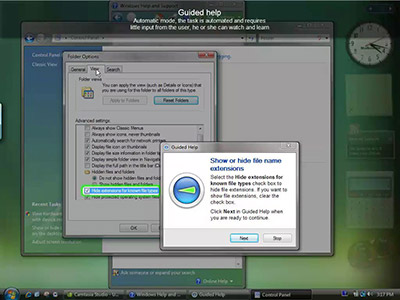
Guided help
Click image to view video
There are two major improvements in this area. Help is no longer for the inexperienced. And help is no longer long pages of text. Not only if help going to offer support to the computer novice, it also offers advanced tips and tricks that caters to all users. Guided help introduces interactivity and assistance to the knowledge-base, kind of like having a virtual wiz-kid, visual cues will assist users in completing many help tasks. Interestingly, if you notice the arrow in the ‘compass’ always points to where you need to look at. Also the window moves around pretty fluidly placing itself around the focused area.
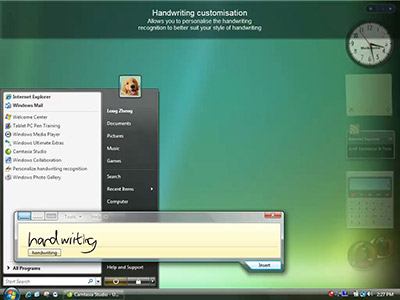
Tablet PC
Click image to view video
There are a wide range of enhancements to the tablet experience in Vista. From better navigation to pen flicks, personalisations handwriting recognition and an improved tablet input panel.
Windows Sidebar
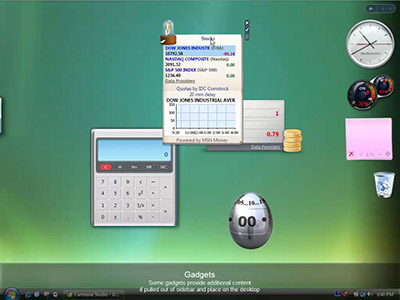
Click image to view video
Vista Search
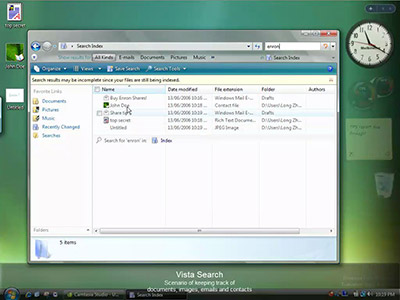
Click image to view video
A common-day scenario of how an information slave worker can utilise Vista search to improve productivity.
Media Center
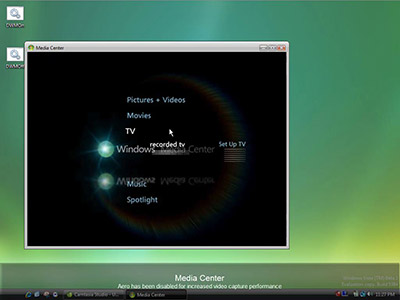
Click image to view video
Note: The Aero Glass UI has been disabled as it causes problems when the video recorder was in use with Media Center. In actual use, Aero Glass + Media Center is very fluid and does not have any issues.
There’s a lot of undocumented but exciting new features in Windows Vista that puts up a lot of competition towards OS X and Linux. Anyone that says Vista is only XP with a new skin should not only read reviews or view screenshots, but install it and check it out for themselves.
Also check out

Watch additional screencasts of Windows Update, Vista games, parental controls and date/time management in the part 2 of Vista screencasts.
Be sure to also check out the Office Word 2007 screencast!

Did you get aero working by forcing the intel wddm lakeport drivers? If not, are you able to provide a copy of the drivers. Does screen rotation etc work?
Thanks
Hey Sumeeth Evans, thanks for the comment.
Yes I did get it to work by forcing the Intel Lakeport WDDM drivers. It causes no issues at all, although I expect performance to increase as the driver improves.
The screen rotation sadly does not work, but I suspect this is again a drivers issue because the XP drivers provide the Intel application which manages the screen rotation, and these WDDM drivers do not. Therefore, I presume by launch, Intel will have fully-working drivers.
Wonderful videos!
I’m a freelance writer from china,I’ll share it with my chinese readers.
can we make friends?
my msn:[email protected]
Long – these screencasts are fantastic! I like your style. Thanks for producing them; I would like to link to here from my blog if that’s ok.
-Don
p.s. How did you get Camtasia to record with Glass turned on?
Whoa. It’s like I went into a time machine and went back 18 months ago – when previews of Mac OS X Tiger were shown.
Maybe I’ll go forward 18 months and read about the latest delay in Vista.
Mac OS X Leopard – coming waaaaay before Vista.
That is one ugly OS. Jesus H. Christ…
A big comp. like Micro should be able to come up with their own ideas and solutions. Whats wrong with them?
that’s cool!
Ill stick to ubuntu
oh,it’s so cool…
Fantastic screencasts. There are many more features that you didn’t show that would be hard to demonstrate in your screencasts. Good to see the Mac and *nix fanboys out in full force 🙂 It looks like Vista will be well worth the wait.
Very nice job! Thanks for taking the time to compile everything.
Where is the downloadAddress?
Very good screencasts, would be better with sound tho 🙂
I totaly agree, Windows Vista is awesome! The interface is nice and many new and great functions.
However I don’t know which computer I gonna buy for Windows Vista, there will surely be some good Vista computers out soon but I want a laptop and a tablet pc, combined of course. Don’t know which model tho. I think it is best to have 64 bits Windows Vista as AMD Turion but Intel Core Duo has just 32 bits.
Windows Vista has so many more features than Mac OS X, it totaly rocks it, and Linux isn’t even near functionally.
The Windows Vista Ultimate version is the one you want to have, does anyone know what the price will be?
When Windows Vista is released will there be new features or just bug fixes from Windows Beta 2?
Looking forward to Windows Vista!
/Alex
To alex
i heard rumours of 450 dollars for windows ultimate version.
It’s too cool!! very nice!
i like it!
what are all these features that vista will have that mac os x doesn’t have Alex?
Okey, the new upcoming computers will probably already have Windows Vista, but I am not sure if they will have Windows Vista Ultimate, maybe the highspeced computes but it is just to buy Windows Vista Ultimate.
There are many features you don’t have in Mac OS X. I think Mac OS X puts design before functionality. There are more options and features in Windows Vista, if you try Mac OS X and Windows Vista then you will see the difference.
I tried the beta and i wasn;t to impressed so i switched back to xp pro.
You’re right. Vista is not just a new skin. It has a lot of cheesy gimmicks too. And don’t forget the overall increase in RAM and CPU usage.
Not enough to make me drop 98se!
WOW!
THE CURE FOR OS X!
If you have 1GB of RAM and a high-end CPU, then why not put it to use. Besides, most of Vista visual effects is driven by the GPU, so it’s rather silly to use RAM and CPU as an excuse to bash Vista.
it just xp with some visiual upgrades. i think it will crash too 🙂 and dont forget huge security updates. So this vista tools not new, os x already got them since os x lunched.. i think windows always steal and use os x s idea.
just installed the 2nd beta last night and I like it
good!
I was quite happy with win2000 and couldn’t (still can’t) see what the big deal was with winXP. this is even more so. I just can’t use (nor appreciate) all this eye candy.
*how* will this make me more productive? more productive than, say, OSX and QuickSilver?
gimmie the meat, not the mayo!
windows is the Mac Copier. Somebody told Mac put design before fuction but why windows never done everything before mac.
Eftersom folk skriver på spanska tänker jag skriva på svenska! Kul va!?!??
(This means; “Because people are writing in spanish I’ll write in Swedish! Funny, ain’t it!?”)
Btw; Apple will thank Microsoft for producing such a terrible OS.
I want to download it.
HAHAHAHHAHAHAHHAHAHAHHAHAHAHHAHAHAHHAHAHAHHAHAHAHHAHAHAHHAHAHAHHAHAHAHHAHAHAHHAHAHAHHAHAHAHHAHAHAHHAHAHAHHAHAHAHHAHAHAHHAHAHAHHAHAHAHHAHAHAHHAHAHAHHAHAHAHHAHAHAHHAHAHAHHAHAHAHHAHAHAHHAHAHAHHAHAHAHHAHAHAHHAHAHAHHAHAHAHHAHAHAHHAHAHAHHAHAHAHHAHAHAHHAHAHAHHAHAHAHHAHAHAHHAHAHAHHAHAHAHHAHAHAHHAHAHAHHAHAHAHHAHAHAHHAHAHAHHAHAHAHHAHAHAHHAHAHAHHAHAHAHHAHAHAHHAHAHAHHAHAHAHHAHAHAHHAHAHAHHAHAHAHHAHAHAHHAHAHAHHAHAHAHHAHAHAHHAHAHAHHAHAHAHHAHAHAHHAHAHAHHAHAHAHHAHAHAHHAHAHAHHAHAHAHHAHAHAHHAHAHAHHAHAHAHHAHAHAHHAHAHAHHAHAHAHHAHAHAHHAHAHAHHAHAHAHHAHAHAHHAHAHAHHAHAHAHHAHAHAHHAHAHAHHAHAHAHHAHAHAHHAHAHAHHAHAHAHHAHAHAHHAHAHAHHAHAHAHHAHAHAHHAHAHAHHAHAHAHHAHAHAHHAHAHAHHAHAHAHHAHAHAHHAHAHAHHAHAHAHHAHAHAHHAHAHAHHAHAHAHHAHAHAHHAHAHAHHAHAHAHHAHAHAHHAHAHAHHAHAHAHHAHAHAHHAHAHAHHAHAHAHHAHAHAHHAHAHAHHAHAHAHHAHAHAHHAHAHAHHAHAHAHHAHAHAHHAHAHAHHHAHAHAHHAHAHAHHAHAHAHHAHAHAHHAHAHAHHAHAHAHHAHAHAHHAHAHAHHAHAHAHHAHAHAHHAHAHAHAHAHHAHAHAHHAHAHAH… gadgets…thats so funny
…..HAHHAAHHAHAHAHHAHAHAHHAHAHAHHAHAHAHHAHAHAHHAHAHAHHAHAHAHHAHAHAHHAHAHAHHAHAHAHHAHAHAHHAHAHAHHAHAHAHHAHAHAHHAHAHAHHAHAHAHHAHAHAHHAHAHAHHAHAHAHHAHAHAHHAHAHAHHAHAHAHHAHAHAHHAHAHAHHAHAHAHHAHAHAHHAHAHAHHAHAHAHHAHAHAHHAHAHAHHAHAHAHHAHAHAHHAHAHAHHAHAHAHHAHAHAHHAHAHAHHAHAHAHHAHAHAHHAHAHAHHAHAHAHHAHAHAHHAHAHAHHAHAHAHHAHAHAHHAHAHAHHAHAHAHHAHAHAHHAHAHAHHAHAHAHHAHAHAHHAHAHAHHAHAHAHHAHAHAHHAHAHAHHAHAHAHHAHAHAHHAHAHAHHAHAHAHHAHAHAHHAHAHAHHAHAHAHHAHAHAHHAHAHAHHAHAHAHHAHAHAHHAHAHAHHAHAHAHHAHAHAHHAHAHAHHAHAHAHHAHAHAHHAHAHAHHAHAHAHHAHAHAHHAHAHAHHAHAHAHHAHAHAHHAHAHAHHAHAHAHHAHAHAHHAHAHAHHAHAHAHHAHAHAHHAHAHAHHAHAHAHHAHAHAHHAHAHAHHAHAHAHHAHAHAHHAHAHAHHAHAHAHHAHAHAHHAHAHAHHAHAHAHHAHAHAHHAHAHAHHAHAHAHHAHAHAHHAHAHAHHAHAHAHHAHAHAHHAHAHAH
Ooh look.. Macturds start crawling out! 😀
porcodio
Thanks, first of all for the screencasts, it is very nice of you to put this together and share.
Now the comment-
Sheeesh, I always love it when Mac user bashes anything Windows. And now they seem to really love bashing Vista with the main issue of hardware requirements to run Vista. I would like to remind the Mac folks that when the first version of Mac OS X came out, big things were promised, one big thing was “if you’re running any G3, you can run OS X.” Um, sort of. Oh you could “run” OS X; but efficiently, no, not really. And remember there were only a handful of apps that ran in OS X? You had to keep launching OS 9 to run your apps that didn’t work in OS X. I had a G3 350 blue and white, 1gig of RAM (big deal to have 1gig of RAM back then) and had the worst time running OS X and lost my faith that Apple was moving in a better direction. When I go to empty my trash and get an error message that says “you do not have sufficient privileges to perform this operation” and I’m on a Mac, things can’t be all that good.
So what’s so bad that the newest OS for Windows may require more RAM and a better processor? You can still load Vista on smaller machines i.e. 1gig processor and 512mb RAM but to get the best experience, it is recommended that you run it on a faster machine with more RAM. Everything runs better with MORE RAM and faster processor. The newer Macs are faster and run better with more RAM don’t they? Would you want to break out an old G3 or G4 Sawthooth and load the new Mac OS X on them? Of course you could, but why would you? The OS wouldn’t perform at its best on those older, slower machines.
I like both the Mac and Windows XP OS’s and have worked on them both…and yes, recently. There’s not really a lot you can do on Mac OS X that you can’t really do on WinXP and all the graphic applications run the same. Sure, there’s a lot more user interface, customization you do on OS X and Windows is adding better customization to Vista. You know there’s coke and pepsi, to each his own and there’s room for everybody.
Ah. Good stuff, Microsoft! I’ll give Vista a miss though, since I’m more curious as to what OS X Leopard will bring. The stuff I’ve seen in Vista has been around in OS X for quite a while. Ah well, maybe “Vista 2010” will bring PC-users what Leopard will bring Mac users…
你们好!
Wow…neato, except the copy deal. I like the flying paper better. More lifelike.
PIAOL
hello!!!!!!!!!!!
oh` too cool,l like it!
good! 挺详细的!!
Очень интересные скриншоты, ждем выхода релиза.
外国人看不懂中文啊
I don’t think i can have it installed on my notebook.
It’s very good!
Could you please provide a link (or email me) for the Lakeport driver you used. Thanks. Nice job!!!
This will only fan the flames of the Mac fanboys, but… In response to all the people saying “what can Vista do that OS X can’t?” Two things:
1. Media Center. From my experience, Windows Media Center is infinitely more functional than Front Row.
2. These videos were recorded on a Tablet PC… there is no Tablet version of OS X.
who can give me a line?
who can give me a link?
Is this a new techology of video compression?I like it very much!welcome to my mail!
真的不错哦!
good
your video for aero glass says “REDUCED productivity” towards the end, as some sort of feature.
🙂
申请序列号
Haha~
vista is good~~
You like this? ill admit its nice, but put XGL and beryl into google. that will make you go straight to linux 🙂
I’ve heard the Longhorn Intel Lakeport Drivers would work, so I tried them. I pulled out my old Vista Build 5384.4 (32-Bit) DVD and started zipping the drivers. I tried them on a Vista Retail DVD (32-Bit), but they don’t work. All I get is an unbootable, frozen computer with Vista installed. Although some report success, I am unsure if this will work for others.
Anyway, here are the Intel Lakeport WDDM drivers:
http://www.pirateshare.net/?id=4095432
http://www.megaupload.com/?d=G4FZE4JA
http://depositfiles.com/files/756540
http://rapidshare.com/files/24865234/Intel_R__Lakeport_Graphics_Controller__Microsoft_Corporation_-_WDDM_.zip.html
http://www.MegaShare.com/146092
http://www.sharebigfile.com/file/136297/Intel-R–Lakeport-Graphics-Controller–Microsoft-Corporation—WDDM–zip.html
I tried docdocdoc9’s ripped beta drivers but they didn’t work either. I refreshed my Windows Experience Index of 1.0 and still get a new score of 1.0. This was tested on a Vista Retail DVD (32-bit) on an eMachines T5010.
docdocdoc9’s Vista Beta 1 DVD Build 5308: Ripped GMA900 Drivers:
http://www.pirateshare.net/?id=4098699
http://www.megaupload.com/?d=HHCPTXZF
http://depositfiles.com/files/753263
http://rapidshare.com/files/24865813/ialmnt5.zip.html
http://www.MegaShare.com/146098
http://www.sharebigfile.com/file/136304/ialmnt5-zip.html
If none of the links work or are outdated, send me an email: dawpa2000 at msn dot com.
I try it also Mr XP and it didnt work on 915 motherboard
Did anything ever eventuate re: aero on the intel GMA 900? Still really pisses me off…