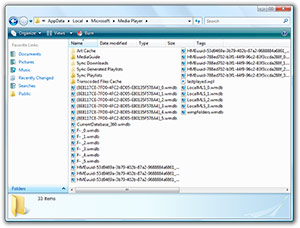
 I was having problems with the library of my Windows Media Player 11 BETA. So I searched a way to rebuild/remove the cache of the library data that WMP uses. All of the solutions pointed to non-existing files, which meant Windows Media Player 11 uses a different folder/system than version 10. I kept hunting for it, and then found this.
In the folder “C:\Documents and Settings\**username**\Local Settings\Application Data\Microsoft\Media Player\”, several files named after “CurrentDatabase_***.wmdb” & “LocalMLS_*.wmdb” are the cache files for the WMP 11 library.
If you want to fix any library related issues, or just want WMP 11 to reindex your media, simply delete all of these files.
Thanks for the solution, it really works (naturally!)
Been looking for this for ages, and finally found it. Thanks!
Fengwei
Long Zheng, Thanks very much for the fix. I thought WMP11 was a goner….
Thanks, extremely handy.
This seems to be a common problem. Why does it happen so often?
Any idea how to do this in Vista? I’m not finding any wmdb files even with advanced search ‘include non-indexed, hidden, etc’ turned on.
Those instructions work on Vista. Try manually navigating to the specified directory rather than searching. I guarentee you it’s there…
Well,
the files are NOT there but I can see them they are there with search – advanced – Search W. Media Lybrary Files option.I have set the option to reveal hidden files to me of cource, but it is still unsean..however just to notice.
Anddd..how about telling me how I coul possibly see the cache files form the clips i watch from internet, where do they go?Where is theyr folder?
For vista…
1. Start –> Search
2. Go to advanced search and check “Include non-indexed, hidden, and system files (might be slow)”
3. In the “name” blank, type in Appdata
4. Click Appdata –> Local –> Microsoft –> Media Player
5. Delete currentdatabase and localmls files.
Your library should work after this.
I had to go through the process 3 times in order for it to work. But, hours later, it now seems to be recognizing and finding my music files. Thank you.
Thank you very much Kenny. This is excactly the hand holding I needed. You ended my hour long search with this last one. I needed excact directions!!! YOU ROCK KENNY!!!!
I have tried the above and it has not fixed my system. any other ideas? I am unable to view my media library in WMP but it is in music match, real player my philips and netgear media servers(I want to use WMP to replace both of these). So far I have uninstalled every media player and media server I have ever tried so WMP was the only media related software on the PC, the above fix then reinstalled the software I mentioned above so I could actually use my stuff.
I am running XP and do not seem to have a good roll back point.
This is pretty simple to do. You’re going to have to rebuild your library though. It’s a corruption of some sort in your media files folder.
Follow this path:
%USERPROFILE%\Local Settings\Application Data\Microsoft\Media Player\ ”
Copy and paste into the address bar if you like, you’ll be inside the folder you need to find. ‘Media Player’ Delete it, and replace it with the another folder with the same name.
This should fix the problem.
For those of you out there using media sharing, you may need to follow another step here, as there’s a file you can’t delete while media sharing is running.
Goto Start menu -> Run: Type in “services.msc” without quotes.
Find the service called “Windows Media Player Network Sharing Serivce”, Right-Click on it so it says ‘Stopped’. Now go back to the Media Player folder and delete it.
Now go back to WMP, and you should be able to put your music and video files back in. Unless you’ve got playlist files elsewhere, you’ll probably have to remake them from scratch, but at least WMP will work again.
Brandon you are THE MAN! Now can you please help me setup my phone so WMP can recognize it to I can sync my music. Its an LG Choclate Touch. All I want to do is setup playlist and synch it. It does not show up in the detected devices. However I see it an an external drive letter in explorer.
That’s what did it for me! Thanks a whole lot!!!!!
Still helping people (me) in 2014!
Thanks.
Gregory.
Thank you Long Zheng.
You’ve cleared the cache of Microsofts
latest piece of spyware.
WMP 11 Not only collects a record of all your
MP3’s like previous versions, it wants to know whats in your Video Folder,
Your Picture Folder, the ‘My Documents’ Folder (ROOT FOLDER), the ‘All Users’
versions of your video, music, picture ….
AND THATS JUST THE OPENLY DONE RETRIEVAL.
OUTLOOK (When Used by noobs) is what updates Microsoft’s Database in
the background.
For those who don’t know the following – Your Christmas has come early:
http://www.fuckmicrosoft.com/content/ms-hidden-files.shtml
For those who DO KNOW – You didn’t know before being told. (Remember that).
None of those folders are actually hidden from explorer. You definitely don’t need DOS knowledge to find them, unless you just like typing \tempor~1 insteady of \termporary internet files or something.
WOW, fuck microsoft indeed.
Thanks for the help Brandon. I did what you suggested and now I am rebuilding my library from scratch. I was very confused as my library was just gone from one day to the next, even though the mp3 files were there and nothing had changed, WMP11 fucked up, first I noticed there was something weird as I couldnt change some track names… but then after a reboot, my library was gone forever and nothing I could do brought it back. But deleting that Media Player folder and creating a blank new one finally helped… I’ll just have to work on some details of my library to get it back in the same shape as before… better than nothing!
go to http://zachd.com/pss/pss.html#medialibrary
for WMP 11 if you get a message that the file is in use. it tells you to end the task for networking(sharing) music on your network. it is wmpnetwk.exe which is “Window Media Player Network Sharing Service”. then you can delete the file if you do it before the system starts that service back up again automatically.
I’ve having a similar problem but this time I cannot find alum art, do media sharing or even add files to my library. Now I’m getting a problem where after doing what Brandon said I still cannot delete the Media Player folder as a file called CurrentDatabase_360.wmdb is still running by a program… Oh never mind my Sidebar was using it.
Wow that worked! Now just to do a few tests and fix everything up but it does look very promising! Thanks so much I thought I’d never be able to fix it. =D
Yay it did work! One thing I must know (and forgot to say in my last post) was what exactly causes this problem? What happened to me was I just copied a song off my brother’s computer then played it in WMP11 and my library was gone. What can I do to avoid this happening again?
Thanks for all your help.
I’m having the same problem as Peter, I can’t delete the CurrentDatabase_360.wmdb file. I don’t understand what he meant by his Sidebar using it, though, how do I close that so I can delete the file?
I agree with earlier posters, I lost all my nedia files in WMP 11 for no apparent reason. Finally deleted the folder and that solved it. Thanks a million.
Well, i to have installed WMP11 and cannot find my library. I have run through the solutions on the MS site and have removed the previous folder. All without luck. MS should really do more to resolve this issue. If anyone can give me a clear idiot guide i would appreciate it. cheers
Shivers: Task manager, under processes, stop wmpnetwork. Something along those lines.
Deleted the bloody media player file and it worked like a charm thanks guys!
I have my music stored in a folder C:\TEMP_MUSIC and Window XP Media Player 11 seems unhappy. I was able to delete teh wmdb files and the folder. That did seem to work in that I was prompted to create a library, but when I manually added the folder above and ran the search, it found like 8 songs when I know there are over 1000 there.
Any ideas? Or is this just a microsoft “feature”?
You may also need to stop related wm* processes and then delete CurrentDatabase_360.wmdb.
I do not yet know if other .wmdb files need to be removed.
I am doing this because I have a WorldBook network drive which I access either by \\name, or by mounted drive: in any case, WMP duplicates the contents, even if I use the drive’s IP address. Very frustrating that this software is both ubiquotious, slow, and “last-generation” in its view of how a media centre PC is used.
Thanks this worked
This morning Windows Media Player froze so I stopped the active process with Task Manager instead of closing the non responsive application, which Windows still hasn’t made any faster so if you do this you have to wait 20 minutes for Windows to close the d**n program. Stopping the process works in just a second. Anyways so I go to open the program again and my whole Libary has gone – no music, pics etc. So I go to add the files again, and select the folders to monitor, then click Ok, but then it doesn’t search for any files. So i did your trick and it works again. Thanks a lot.
After deleting the databases and attempting to fix my library I found a fairly simple fix, I downloaded WINAMP.
Long Zheng, thank you very much, this solved my library problem, thx.
If you still have trouble deleteing CurrentDatabase_360.wmdb file after stoping the the Windows Media Player Network Sharing Serivce then you may need to set the service to diasabled then log back in to windows. This worked for me.
THANK YOU!
I have had a 0-byte ‘Unknown” file sitting in my library that I could not delete or modify.
Getting rid of these files solved that problem.
Thanks again!
Thanks! Very useful. Just one problem. When the library is rebuilt, my music files (mp3 and wma) come back with their correct genre. However, my video files (mostly avi) lose their genre. Is this a problem with the avi format? Which format should I convert to in order to keep the genre? Thanks!
Thank you i have time look for a solution a this problem. very good you blog. XD
Thank you guys so much!
Like Mike, I had one of those “Unknown” phantom-albums floating around my library that I just couldn’t get rid of. The first time it didn’t work, but I tried it again it worked like a charm! I think it might have worked the second time because I disabled the wmpnetwk.exe both before and after deleting the AppData files.
Either way, you guys rock!
thanks to kenny! worked fine! vista sp1 🙂
thank you soooo much brandon i swear i will love you forever for helping solv a week long problem for me!!! love you millions thank you thank you!!!!!
It took me ages to find this solution – Brandon you are a genius. Thanks for helping solve tis problem! Yeahhh!
Thanks everyone!
Especially Chris who held the final piece of the jigsaw!
Works Perfectly!!!
Exact location for vista for those who are confused.
C:\Users\**ProfileName**\AppData\Local\Microsoft\Media Player
The last time I had a problem wth a 0byte file that I could not delete, I carried out the procedure above. This time I cannot delete the CurrentDatabase_360 file. While windows media player is working fine in all other respects to have a file of 0kb Unknown artist/unknown album etc really bugs me. I use another media player in preference (Jetaudio) but it still annoys me that it is something that I dn’t seem to be able to fix. It is a serious design flaw in the program if you cannot reset or uninstall/reinstall it.
Anybody got any further ideas?
Sorry mrnice,
I should have read everything more carefully! I skipped through things – disabling Windows Media Player Network Sharing Serivce meant that I could delete the CurrentDatabase_360.wmdb. Thank you very much!
Fantastic, Just what I needed, Thanks! : )
This is a recurring issue that happens consistently even since Media Player 9 (Maybe before then too, but I never used a version prior to the bundled one with XP)
What happens, is that seemingly at random, extra and non-standard characters are added to various tag fields. Typically, the artist, album artist or composer fields. I’ve yet to encounter the effect happening to othejr fields such as the song / album title, so there is certainly some reason why it is only certain tags are affected.
From what I can tell, there is no criteria that is unique to the “afffected” files, whther these are my own creations and encodings, or whether they are from CD’s that I have converted etc. It is possible to edit the tags, but sooner or later, (at random) they are prone to the addition of these strange characters yet again.
Whilst it’s not necessarily a destructive bug, and the standard entries are preserved (the extra characters are merely concatenated to the end) it is extremely unsightly and thwarts any purpose of ordering or sorting since fields with the extra characters are of course, different to the ones without.
I’ve looked all over the web, but I can find no other mention of this peculiar issue. Can anyone shed any light onto what’s happening or, even, how to prevent/fix it?
What may be relevant, is that many of these files have long filenames, though with XP SP3 and NTFS drives that shouldn’t really be a problem, should it?
PJ, that’s a problem I’ve run across recently as well. It never happened to me before the last time I redid my library, which was just a few weeks ago. I don’t know of any way to fix it, but I sure hope someone here does.
Hey Shivers, Well, I’m glad I’m not the only one. It”s been a long-term problem for me, and Ive reinstalled windows and all sorts, to no avail, but was suprised to find very little mention of it elsewhere. In the meantime, though (Since my earlier post above) I’ve found one other person (back in 2009) who had the same issue with Windows 7 and WMP12. I left a message on “Microsoft Connect”, but really don’t have much faith in a solution. If I do get any answers, I’ll post back here 🙂
OMG!!!!
I have been searching for months trying to figure out why my media sharing wasn’t working. I decided to give up and fix my problem with my media player library instead. I never thought that this would fix that problem too!!
Thank you!
In my Windows 7 installation, Windows 7 keeps those files locked to…prevent deletion.
For some reason, it is made incredibly hard to get rid of missing music files in Windows Media Player. I moved my large collection to another location. Now I can’t play a single file. Although the files are no longer there MS seems determined to keep them in the database for your viewing and listening pleasure.
Whenever I use MS microsoft software it just reminds that I should be using something else.
Thanks for that!!!
The picture playlists just would not work and not being able to update the file names was frustrating (only more so…)
Why the hell haven MS got a simple Refresh button in such an advanced product.
Crazy.
BUT – the fix is in and it works.
Thx again.
Yeah, thanks! Looked everywhere, tried to delete the media player folder, tried to uninstall for then reinstall, like other sites said, but youre trick did the magic!
Thanks!!
Cheers dude ya a hero, many thanks
Mam problem z odtwarzaniem muzuki i filmu na medya player proszę o pomoc.
Long Zheng and Brandon both of you are the best, thank you very much
Ingenious!!! Thanks this helped get all my videos on External USB drive to show up again in my Media Player Library. Hopefully it will stay after reboot, as for some reason they would not show up even though the folder location was still being listed as already added.
Also, it is strange that the folder and videos would not show up in Media Player but would in Media Center. I could just use the Media Center but the thing is I just hate it for some reason. I prefer to just use the Player.
Anyways thinks for this. I hope it is a permanent fix.
WMP blows. I want it GONE entirely.
So I guess it’s back to UBUNTU for the true DRM free life. I do not trust Microsoft in the least and do not want them cataloging my media at all. I know where my songs are.